.PWI files are files created by the notes application in windows mobile cellphones.
You can open them on a desktop PC by using MS word. I tried word 2010 only though so i'm not sure if older versions would work.
First, prepare word 2010. Open it. Go to file > options > advanced. Now scroll the right pane down to the bottom and check confirm file format conversion on open.
Now open the .pwi file with ms word 2010. In the convert file dialog box, choose Recover text from every file.
Its not perfect, there may be a few stray formatting marks like line breaks but at least the text is there.
Wednesday, March 28, 2012


Saturday, March 17, 2012
paypal on cellphones

source
This is a card swiping accessory that attaches to an iphone which enables a seller to accept credit card payment. This one is for paypal but there are other similat companies that provide the same thing. This has been my dream for a long time, for ANY business in the philippines to be able to accept credit cards, including theoretically a fishball street vendor, all you need is a net connection.
But my dream has a part 2. Part 1 actually has been possible for some time, just use a card swiper with a battery and the guts of a cellphone inside.

But this violates part 2 of my dream, affordability. Because afaik such card swipers have expensive monthly fees. So its no good for a seller unless credit cards are used frequently.
Part of making it cheaper is for the chinese to copy it (even though the paypal one above will be heavily subsidized) since it increases competition and user base and gives us many feature choices.

source
the end
Thursday, February 23, 2012
cdrking earbud review


Model SE-107 e cdrking earbuds
I was in the market for cheap backup headphones for my laptop. So I looked around. These seemed OK. I chose them since at 180 pesos, they were at the higher end of the low quality earbud price range and I was hoping that the quality would be better. I also chose these for the symmetrical cords. I don't like asymmetrical.
I've only had them for one day and I know that they are cheap. So I didn't have my hopes up and my rating is skewed to the fact that its cheap.
Build quality - its OK. Cord and the rubber at the tip is less flimsy than some of the 100 peso counterfeit sony or beats by dr dre headphones. Cord length is ok but on the short side. I'd give it a 3/5.
Accessories - no pouch. No tip protector. With 2 extra rubbers of different sizes. I'll give it a 3/5.
Sound quality - muddy, bias towards base. I prefer crisp tones. Markedly worse than my Altec Lansings. 2/5
Verdict - I wouldn't buy these again. I should have saved 500 pesos for some Sony earbuds. Lets round off the final score to 2/5.
Update: forgot to say that the comfort and fit of the rubber is quite good. Added the Altec Lansing part.
Thursday, February 16, 2012
altec lansing ahs 515 cord repair
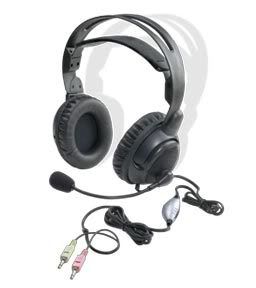
My headphone has been repaired before in this previous blog post. Now the wire insulation is fraying right after the volume control.
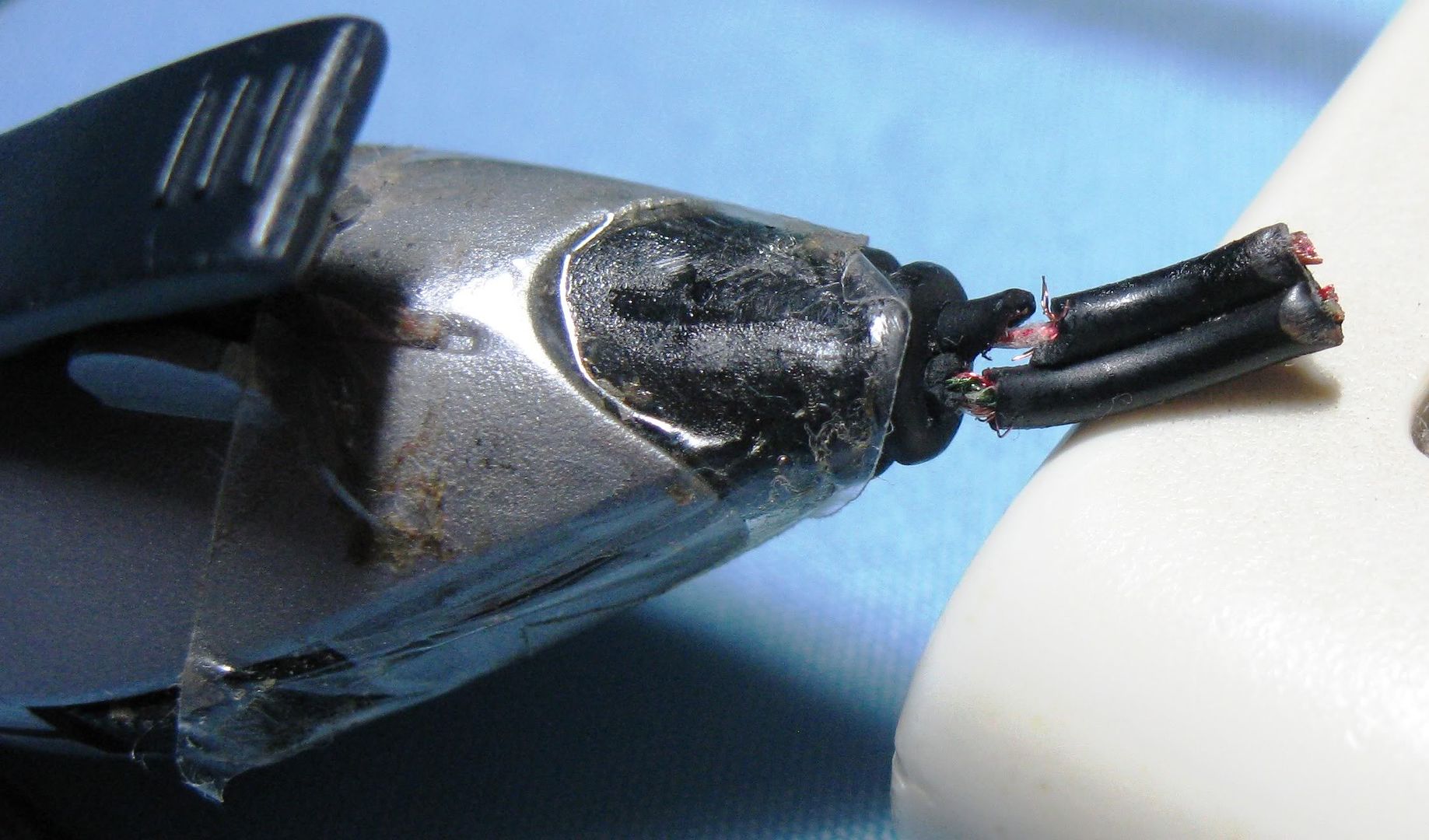
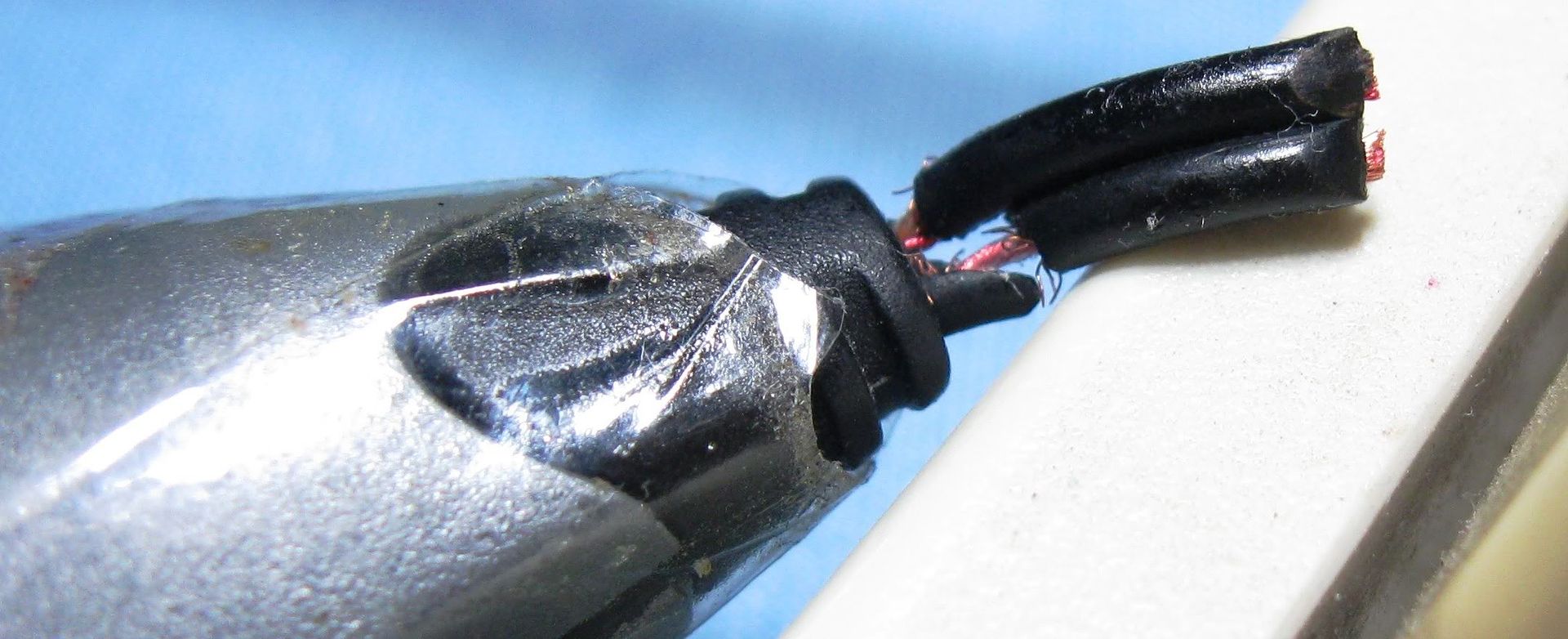
Since the volume control is useless anyway, I opted to cut it out and re attach the wire. Step 1 is to knot the wires together, remove the insulation, and splay out the wires.
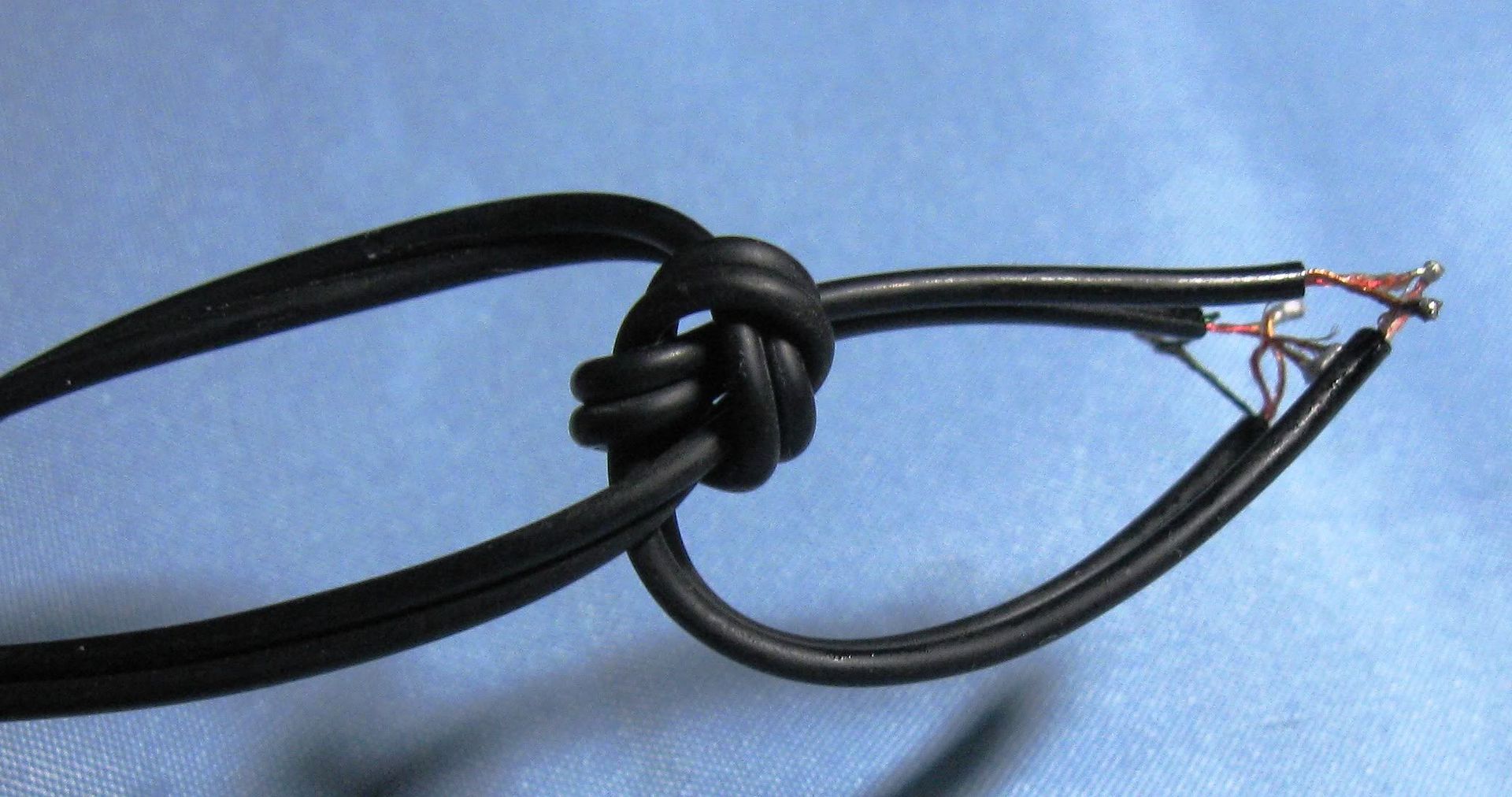
Next step is to Identify which wire goes to which. Fortunately, the mic cable only has 2 wires and the while speaker cable has 3 so there's no mixing them up. And the wires are color coded with what looks like varnish. It also serves as insulation.
It was a simple matter to tin the ends of the wires and solder them together. After this, I checked the headset on my PC. I used the audio driver's settings to check if both left and right channels were working.
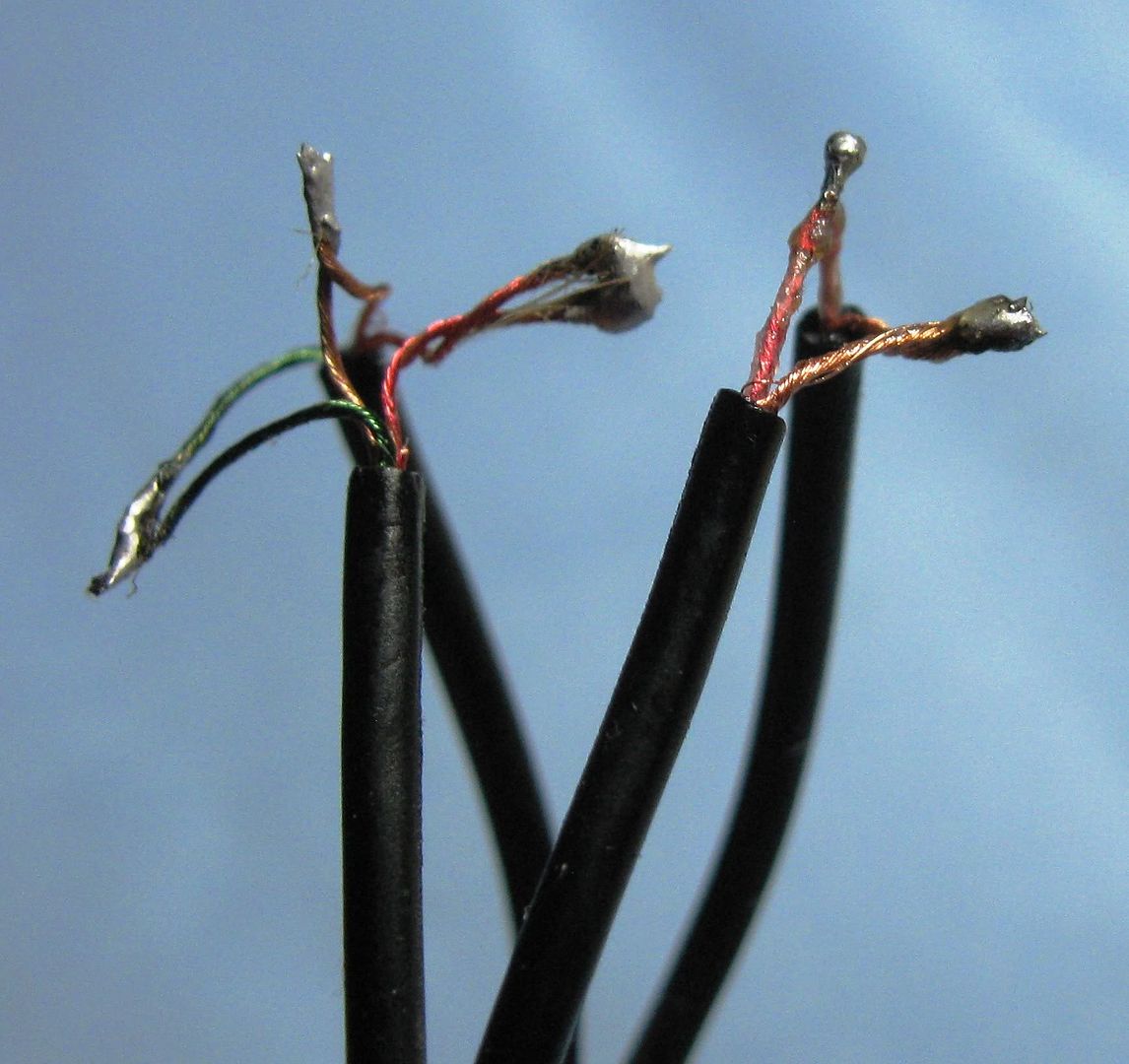
Next, carefully cover the blobs of solder with electrical tape. I ended up using 3 layers in total.

OK that's it. Instead of buying a new pair of headphones, I just repaired mine. Saved me some money.
the end
Lenovo Ideapad z470 Review - Part 4: hard drive benchmarks
< Back to part 3: 3d benchmarks
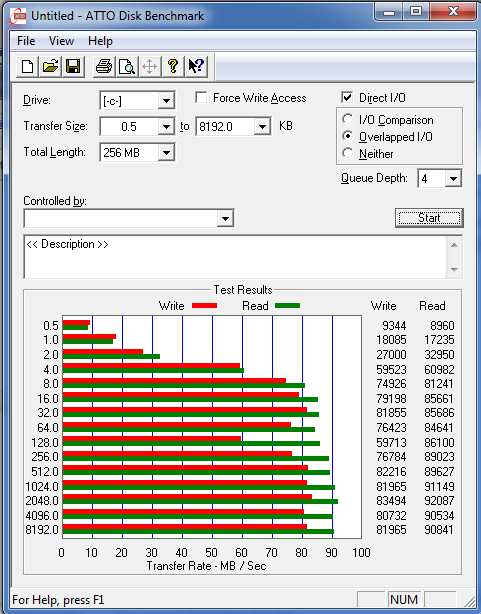
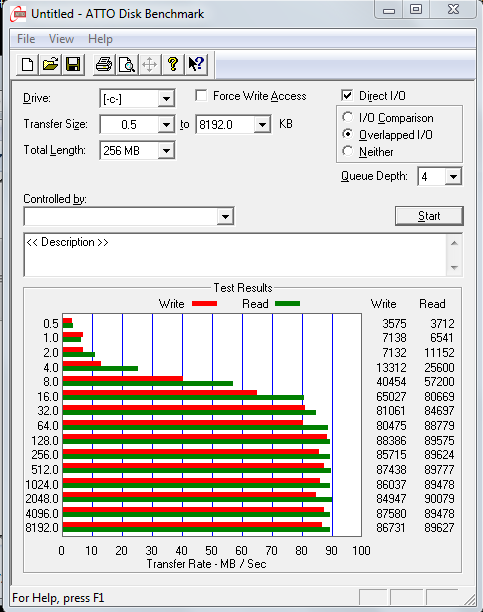
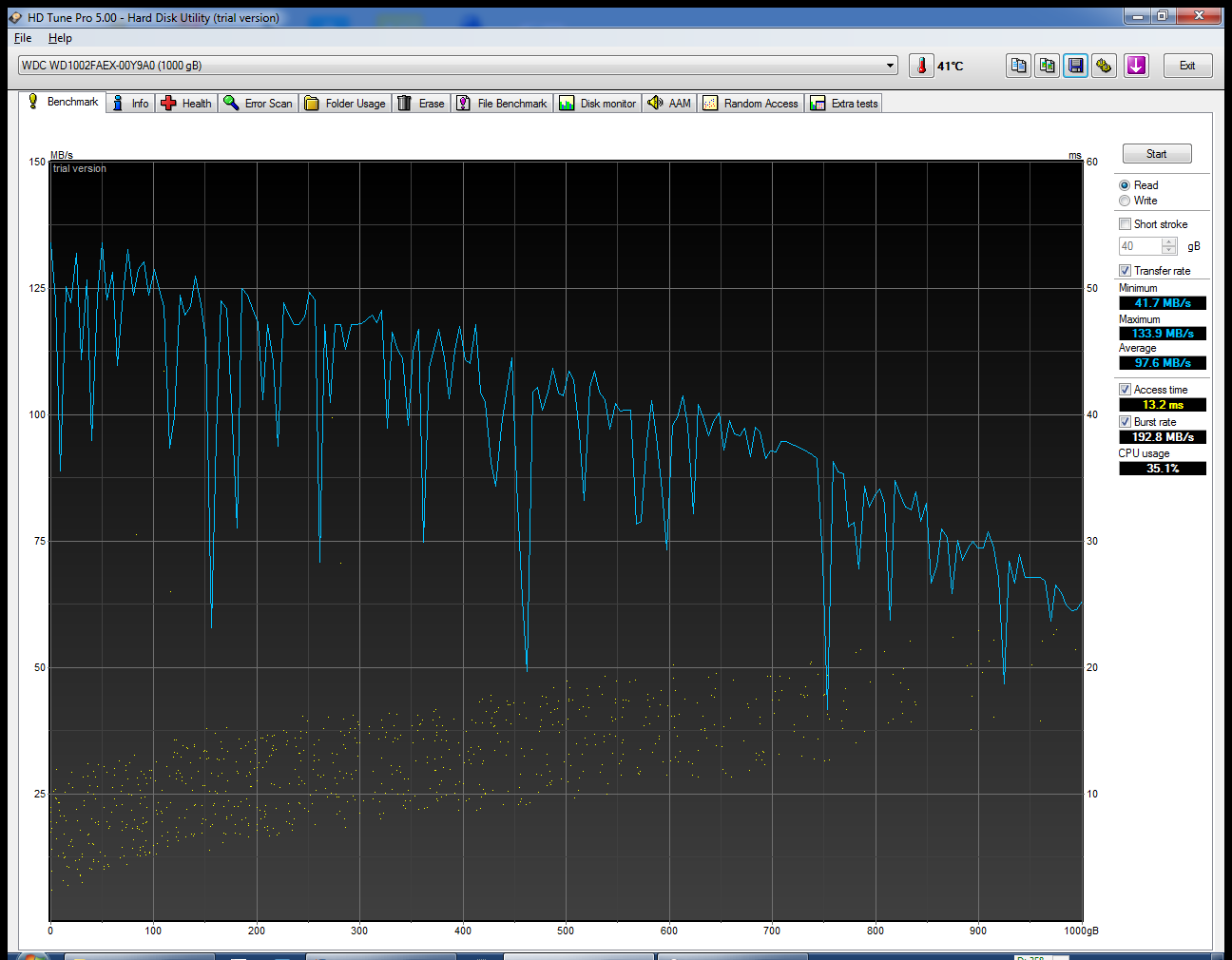
OK welcome to part 3 of my review. Hard drive benchmarks. I'm limiting it to synthetic benchmarks. We are comparing my desktop's hard drive, a WDC black 1 terabyte model WDC WD1002FAEX-00Y9A0 with the laptop's 750 gig WDC drive model WDC WD7500BPVT-24HXZT1.
For all the results, the first result or picture will be the desktop's hard drive, followed by the laptop.
1. Passmark performance test 7 build 1025 (Disk test only, copied from part 2 of the review)

2. Atto disk benchmark v 2.46


3. Crystal disk mark 64 bit v 3.0.1

-----------------------------------------------------------------------
CrystalDiskMark 3.0.1 x64 (C) 2007-2010 hiyohiyo
Crystal Dew World : http://crystalmark.info/
-----------------------------------------------------------------------
* MB/s = 1,000,000 byte/s [SATA/300 = 300,000,000 byte/s]
desktop
laptop


Well pretty much all the tests show the desktop's HD to be faster, but they are quite close. Perfectly acceptable performance for a 2.5 vs 3.5 hard drive.
OK that's it. I'm planning a part 5: wifi file transfer benchmarks
the end
OK welcome to part 3 of my review. Hard drive benchmarks. I'm limiting it to synthetic benchmarks. We are comparing my desktop's hard drive, a WDC black 1 terabyte model WDC WD1002FAEX-00Y9A0 with the laptop's 750 gig WDC drive model WDC WD7500BPVT-24HXZT1.
For all the results, the first result or picture will be the desktop's hard drive, followed by the laptop.
1. Passmark performance test 7 build 1025 (Disk test only, copied from part 2 of the review)

- desktop: disk = 735.6
- laptop : disk = 623.5
2. Atto disk benchmark v 2.46

3. Crystal disk mark 64 bit v 3.0.1

-----------------------------------------------------------------------
CrystalDiskMark 3.0.1 x64 (C) 2007-2010 hiyohiyo
Crystal Dew World : http://crystalmark.info/
-----------------------------------------------------------------------
* MB/s = 1,000,000 byte/s [SATA/300 = 300,000,000 byte/s]
desktop
Sequential Read : 85.584 MB/s
Sequential Write : 83.812 MB/s
Random Read 512KB : 34.964 MB/s
Random Write 512KB : 53.631 MB/s
Random Read 4KB (QD=1) : 0.438 MB/s [ 106.8 IOPS]
Random Write 4KB (QD=1) : 1.056 MB/s [ 257.9 IOPS]
Random Read 4KB (QD=32) : 0.647 MB/s [ 158.0 IOPS]
Random Write 4KB (QD=32) : 0.892 MB/s [ 217.8 IOPS]
Test : 1000 MB [C: 80.6% (430.3/533.7 GB)] (x5)
laptop
Sequential Read : 85.577 MB/s4. HDTune pro v5 trial
Sequential Write : 83.692 MB/s
Random Read 512KB : 26.986 MB/s
Random Write 512KB : 33.727 MB/s
Random Read 4KB (QD=1) : 0.307 MB/s [ 75.0 IOPS]
Random Write 4KB (QD=1) : 0.608 MB/s [ 148.5 IOPS]
Random Read 4KB (QD=32) : 0.655 MB/s [ 159.9 IOPS]
Random Write 4KB (QD=32) : 0.644 MB/s [ 157.3 IOPS]
Test : 1000 MB [C: 76.3% (186.3/244.0 GB)] (x5)

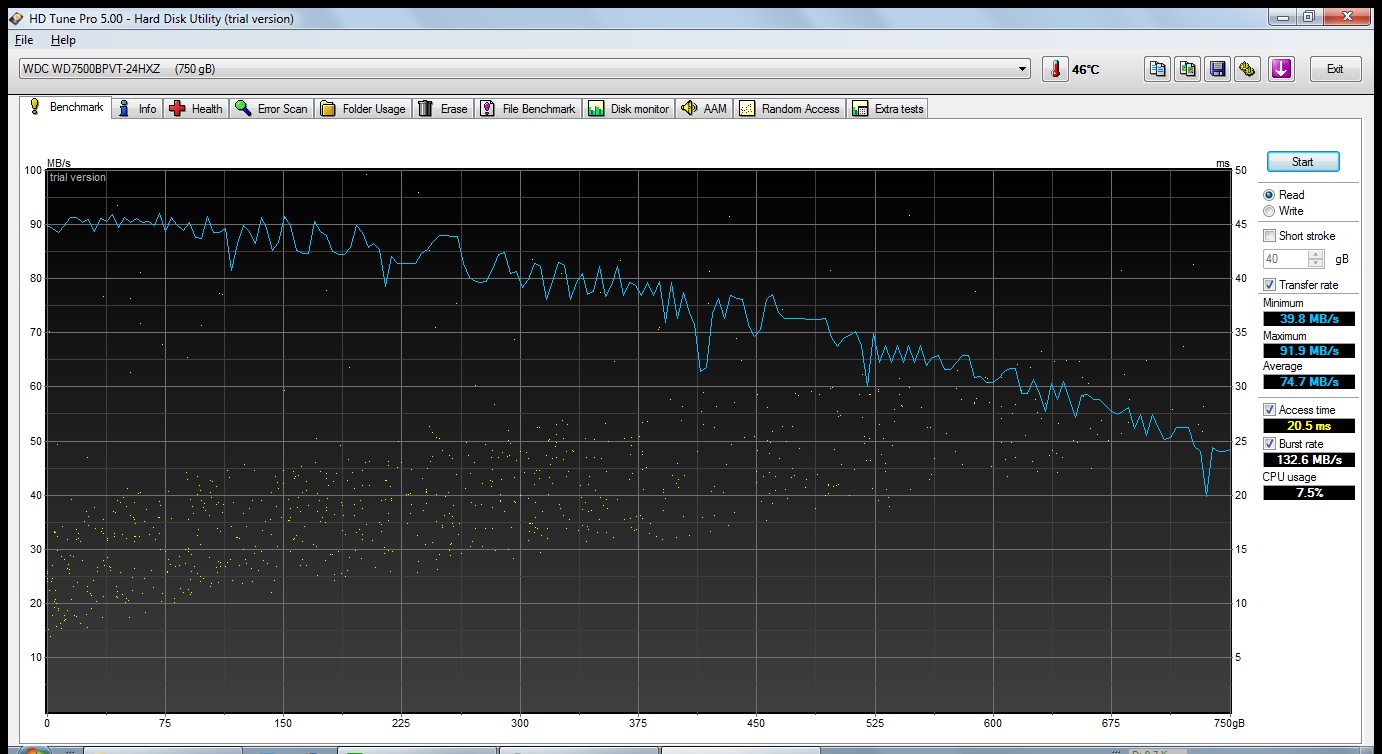
Well pretty much all the tests show the desktop's HD to be faster, but they are quite close. Perfectly acceptable performance for a 2.5 vs 3.5 hard drive.
OK that's it. I'm planning a part 5: wifi file transfer benchmarks
the end
Wednesday, February 8, 2012
lenovo z470 magnetized spots
 | |
| magnetized spots |
In response to a comment made in my lenovo z470 review, there was a coment about magnetized spots. Using a paperclip I have confirmed that yes there are magnetized spots. I could find 3, all shown as red on the pic above.
Without opening my laptop I really can't tell why there are magenets there. Its far away from the speakers and there are no obvious motors there. Any fan should have shielded magnets.
This probably poses no hazard since magnetic media like floppy discs and cassette tapes are rare these days.
Thursday, January 26, 2012
smart bro share it with smart bro prepaid sim

Remember the smart bro share it? If you don't remember, well, the share it modem is essentially a myfi device which has no battery and is powered by a 220v adaptor. It's a combo 3.5g modem and wifi router. It has a sim card slot and it gets 3.5g signal from the smart cellsite and Pc's can connect to it via LAN cable or wifi (I thing its wifi-G but not sure).

There are some drawbacks compared to smart's current myfi device (see pic above).
- Larger
- Needs a 220v mains power supply
- Only uses one frequency, 850mhz while other more advanced devices can use HSPA+/HSPA/UMTS 2100/1900/900/850 MHz. This is a theoretical limitation since some areas may have congestion. Smart uses 850 and 2100mhz so if the 850mhz band is congested the smart bro modem-router cannot switch to the uncongested 2100mhz band
This is region locked. However I don't know if the lock is done via the sim card that comes with the device or the device itself.Busted! The device works in my province and metro manila.- Being an old model (up to 3.5g only) which is incompatible with HSPA+ (sometimes known as 3.75g), the max speed is only probably 2-3 mbps
- Has a connection for an external antenna
- Being physically larger than a usb plugit, the internal antenna is much better. During tests, I could get a 5 bar signal versus a 2 bar signal with my smart bro power plugit (zte mf190).
- Has a LAN port
I used to have one, and the speeds were variable. 500kbps-1400kbps depending on the local congestion level. I had it cut and it was gathering dust in my closet. The original sim doesn't work anymore, so I tried to use it with my smart bro power plugit prepaid sim and, guess what, it worked! Speeds were modest since my area was congested. I was getting around 500-700 kbps but around 1 am on the days when there is no congestion, I was bursting to 1.8 mbps. So in my area its quite rare to get over 1.5 mbps. I tested using a combination of direct downloads, torrents and Steam.
So if you need wifi sharing and can't afford a myfi device, then reusing this is an option.
Subscribe to:
Posts (Atom)
projectwonderful adszz
