Showing posts with label internet. Show all posts

Monday, October 8, 2012

smart bro prepaid always on - is it really faster?

Hi, Long time no post. Sorry but being busy in real life and having nothing unique to post sometimes happens. Anyway, lets talk about smart bro prepaid, specifically smart bro power plugit and the Always on plan which is supposed to be faster.


Go to the smart bro power plugit page. You'll see that both for the prepaid and postpaid, it says:
Speeds of up to 7.2 Mbps*
 Notice that there is an "*". That means there's fine print. Now scroll down to the "*". It says
*Upgrade to Always On to experience speeds up to 7.2 Mbps.

The smart bro starter plugit page has something similar but in this case, its only up to  3.6 mbps and they make no mention of pre or postpaid.

 Ohhhhkay, lets upgrade to the Always on plan and see what happens. As a background, using  the normal 10 peso per 30 min or the 50 peso/24 hour prepaid plans I get the same speed. Its variable maybe 300-800 kbps DL and 500-600kbps UL, well below the claimed 2mbps. Testing is actual downloading and with speedtest.net. I live in Pampanga so I though maybe its slow in the provinces. Since then I've tested it in other places like Quezon City, Cubao and Mandaluyong with similar results of 300-600 kbps DL, 500-600kbps UL. Signal strength doesn't seem to be a factor since Cubao and mandaluyong had a slightly higher 4-5 bars versus 2-3 bars in the other places but the speeds were slightly slower even with the better signal.


Go to the smart bro Always on page. You'll see several plans. I tested the ALWAYS ON 10 plan which costs 10 pesos and give me 5 megabytes. Mega not Gigabytes.

So here's how it went. First I disabled images from firefox to maximize the time and number of webpages that would fit the cap. I then ran a bandwidth monitoring program. Specifically I used Netpersec. I reset the counter on Netpersec so that it would start at zero, counting how many bytes were uploaded and downloaded. Then I plugged in the power plugit. The software dialer automatically loaded and once it started to dial I canceled it. I went to the text messaging tab and sent the appropriate text to smart. I then received a reply stating that the always on plan was active. I started a speedtest.net test. My result was around 350kbps DL and 300kbps UL. Sorry, forgot to link the result picture since images were off. Looking at Netpersec, I downloaded a bit over 1 megabyte.

I continued to surf on smart bro's webpge and opened blogger to start this post. I received a text later on stating that 4 out of 5 megabytes of my allowance was used up. Looking at netpersec's total, I show 3.6 megabytes downloaded and 0.8 megabytes uploaded for a total of 4.4 mb. Pretty accurate IMHO if we allow for the fact that the text message probably took a few seconds to arrive and I took a few seconds to check the text and netpersec. Later on I received a text message stating that the 5 gigs were up and I'm reverting to the usual 10 pesos per 30 min. Looking at the smart bro dialer, it has a timer showing how long the current dial up session is active. I used up 5mb in around 8 minutes.

CONCLUSION

Is always on faster in my location (pampanga) compared to the usual smart bro prepaid? No.

ANALYSIS

So, does this mean that the claim is false? Unfortunately there is still room to doubt my results.  Since I only tried one power plugit unit in one location at one time, its not impossible that there may be other explanations such as:
* I was unlucky because I got a defective power plugit
* I was unlucky because smart's network was slow then

And my favorite possibility
* there is no difference in my test because smart's network is so congested in my area that any difference would be swamped by the congestion. Analogous to trying out the speed of a normal car and a multi million peso sports car on roads with traffic, you'll get similar lap times.

RECOMMENDATIONS



Yep, more tests. At the very least I should try areas that are non congested. Maybe if I go to a major metroplitan area, I'll look for areas where the regular smart bro prepaid can go a full 2 mbps. If it goes at 2mbps I assume its not congested. After that, I need confirmation from other testers.


the end

Thursday, January 26, 2012

smart bro share it with smart bro prepaid sim


Remember the smart bro share it? If you don't remember, well, the share it modem is essentially a myfi device which has no battery and is powered by a 220v adaptor. It's a combo 3.5g modem and wifi router. It has a sim card slot and it gets 3.5g signal from the smart cellsite and Pc's can connect to it via LAN cable  or wifi (I thing its wifi-G but not sure).


There are some drawbacks compared to smart's current myfi device (see pic above).
  • Larger
  • Needs a 220v mains power supply
  • Only uses one frequency, 850mhz while other more advanced devices can use HSPA+/HSPA/UMTS 2100/1900/900/850 MHz. This is a theoretical limitation since some areas may have congestion. Smart uses 850 and 2100mhz so if the 850mhz band is congested the smart bro modem-router cannot switch to the uncongested 2100mhz band
  • This is region locked. However I don't know if the lock is done via the sim card that comes with the device or the device itself. Busted! The device works in my province and metro manila.
  • Being an old model (up to 3.5g only) which is incompatible with HSPA+ (sometimes known as 3.75g), the max speed is only probably 2-3 mbps
Advantages:
  • Has a connection for an external antenna
  • Being physically larger than a usb plugit, the internal antenna is much better. During tests, I could get a 5 bar signal versus a 2 bar signal with my smart bro power plugit (zte mf190).
  • Has a LAN port

I used to have one, and the speeds were variable. 500kbps-1400kbps depending on the local congestion level. I had it cut and it was gathering dust in my closet. The original sim doesn't work anymore, so I tried to use it with my smart bro power plugit prepaid sim and, guess what, it worked! Speeds were modest since my area was congested. I was getting around 500-700 kbps but around 1 am on the days when there is no congestion, I was bursting to 1.8 mbps. So in my area its quite rare to get over 1.5 mbps. I tested using a combination of direct downloads, torrents and Steam.

So if you need wifi sharing and can't afford a myfi device, then reusing this is an option.

Thursday, November 24, 2011

smart bro power plugit types

Smart bro power plugit guide.

You've probably heard of smart bro's power plugit.

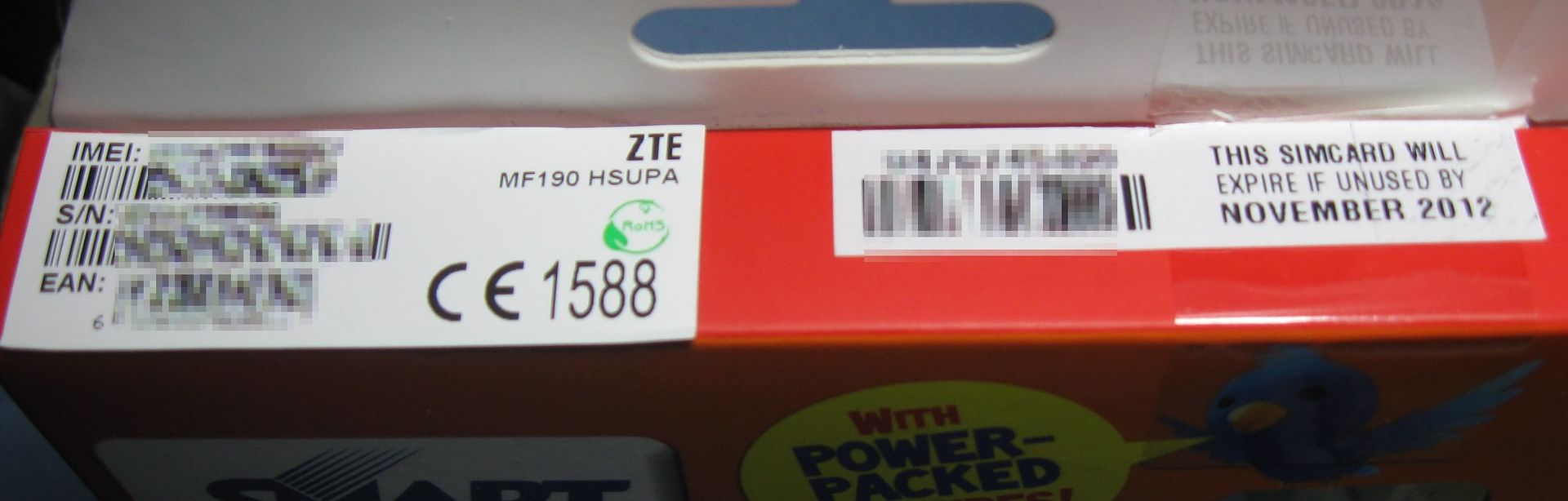
 Well, did you know there are at least 2 kinds of power plugit? The 2 modems are almost indistinguishable but the box has some changes. For simplicity's sake, I'll call them "new" and "old". Here's a picture of the new one.


And here's a pic of the old one.


From the front the distinguishing feature of the box is the sticker in the middle. In the old one, its square and white. And it says Php 1245 and 120 hours valid for 5 days. The new one has a round blue and yellow sticker that says Php 1245 and 240 hours valid for 10 days.

So now you know one advantage of the new one, you get more free surfing hours when you buy the new one.

Now lets look at the top of the box. Unfortunately, I dont have a shot of the old box.


With the old box you would have had a big green holographic sticker sealing the top flap of the box. Here you only have a small clear sticker sealing the box. It covers the right half of the right sticker, above the text November 2012. The sticker on the left is the important one. It gives the manufacturer or brand of the modem, ZTE. IT also gives the model, MF 190.

Here's a shot of the back of the new modem. Again you see the ZTE and MF 190 text. Again, the new and old modem are very similar visually so you would need to look for the model number. The old modem is model MF 180.


The software dashboard of both new and old are almost identical and to most users both are pretty much identical. However, there is one important difference.

ZTE MF180 USB Modem Details:

Transmission Rate: 3.6 Mbps
Color: White/Black
3G Frequency Band: HSDPA/UMTS 2100MHz
2G Frequency Band: GSM/GPRS/EDGE 850/900/1800/1900MHz

ZTE MF190 USB Modem Details:

UMTS/HSDPA/WCDMA 2100MHz
GSM/GPRS/EDGE 850/900/1800/1900MHz
Support HSDPA up to 7.2Mbps, HSUPA up to 2Mbps


The 190 is theoretically faster. However, actual speeds are still governed by the speed of your internet plan and by the congestion of your local smart bro network. So It might not matter. But still, one can hope that smart will upgrade its network so one could fully utilize the new modem's higher speed.

Aside from that, AFAIK there are no other significant differences between the new and old modem.

the end

Tuesday, November 22, 2011

Smart Bro - Per minute charging

Smart bro prepaid internet normally costs 10 pesos per half hour. But if you dont plan on using the entire half hour slot you can change to per minute charging. It costs exactly the same.

There are 3 packages:
  • PhP 60 = 3 hours, valid for 2 days
  • PHP 100 = 5 yours, valid for 4 days
  • PHP 150 = 7.5 hours, valid for 7 days
To register, Text MINUTE AMOUNT to 2200. You use the software dashboard to text.

the end

Thursday, November 17, 2011

Wednesday, November 16, 2011

american censorship day


Today, Congress holds hearings on the first American Internet censorship system.

This bill can pass. If it does the Internet and free speech will never be the same.

Join all of us to stop this bill.

Website Blocking

The government can order service providers to block websites for infringing links posted by any users.

Risk of Jail for Ordinary Users

It becomes a felony with a potential 5 year sentence to stream a copyrighted work that would cost more than $2,500 to license, even if you are a totally noncommercial user, e.g. singing a pop song on Facebook.

Chaos for the Internet

Thousands of sites that are legal under the DMCA would face new legal threats. People trying to keep the internet more secure wouldn't be able to rely on the integrity of the DNS system.
How you can help
If this law passes, sites like Twitter, YouTube and Tumblr could be shut down for letting users post freely. Join the protest to stop it. 

Tuesday, September 27, 2011

maryfi - turn your wifi equipped laptop into a hotspot

Maryfi or mary-fi is a freeware app that turns your wifi equipped laptop into a wifi hotspot. Win 7 only AFAIK.


I've tested it using a usb 3g modem (sun bro). Works great and not that difficult to configure. The program has a small PDF file with step by step instructions. It also supposedly works if your laptop's internet is coming in via LAN cable.

But an interesting claim is that even if your laptop's source of internet is wifi, you can in turn re-broadcast the internet, turning your laptop into a repeater. So if laptop A is in range of the wifi router but another laptop B is out of range, but in range of laptop A, with mary-fi laptop A can repeat the wifi signal to laptop B. Pretty cool trick. Unfortunately I haven't tried it yet so I cant confirm because I need to borrow another laptop to do that.

As of now, the website of mary fi is down. This is what I can see

Forbidden

You don't have permission to access / on this server.
Additionally, a 403 Forbidden error was encountered while trying to use an ErrorDocument to handle the request.


Fortunately, I have mirror links to the file, that is an alternate download link.Filename is  Maryfi-EN.exe (2.07 MB)

LINK


the end

Wednesday, April 28, 2010

Unlock Huawei Modem Dongle E160//E176/E1550/E220/E230 and more for FREE

Found this free tool to unlock the usb dongles of major ISP's

Havent tried it yet though
in reference to:
"Unlock Huawei Modem Dongle E160//E176/E1550/E220/E230 and more for FREE"
- Unlock Huawei Modem Dongle E160//E176/E1550/E220/E230 and more for FREE | Online Bits and Pieces (view on Google Sidewiki)

Sunday, March 28, 2010

BBC: the virtual revolution caused by the internet


An excellent series of BBC TV reports about the impact of the internet. I like the part about the generation gap caused by growing up with the net, how it makes you think differently. After all the arguments I have with my stuck in the 60's parents, I believe it.

NOTE: not all episodes are here

Part One: The Great Levelling

In the first in this four-part series, Aleks charts the extraordinary rise of blogs, Wikipedia and YouTube.
She also traces an ongoing clash between the freedom the technology offers us, and our innate human desire to control and profit.


Part Two: Enemy Of The State

Aleks charts how the Web is forging a new brand of politics, both in democracies and authoritarian regimes.
With contributions from Al Gore, Martha Lane Fox, Stephen Fry and Bill Gates, the programme explores how interactive, unmediated sites like Twitter and YouTube have encouraged direct action and politicised young people in unprecedented numbers.
Yet, at the same time, the Web's openness enables hardline states to spy and censor, and extremists to threaten with networks of hate and crippling cyber attacks.


Part Three: The Cost Of Free


Aleks gives the lowdown on how, for better and for worse, commerce has colonised the web - and reveals how web users are paying for what appear to be 'free' sites and services in hidden ways.
Joined by some of the most influential business leaders of today's web - including Jeff Bezos (CEO of Amazon), Eric Schmidt (CEO of Google), Chad Hurley (CEO of YouTube) and Bill Gates, the programme traces how business - with varying degrees of success - has attempted to make money on the web.
She tells the inside story of the gold rush years of the dotcom bubble, and reveals how retailers such as Amazon learned the lessons.
The programme also charts how, out of the ashes, Google forged the business model that has come to dominate today's web, offering a plethora of highly attractive, overtly free web services - including search, maps and video - that are in fact funded through a sophisticated and highly lucrative advertising system which trades on what we users look for.


in reference to: BBC World Service - Programmes - The Virtual Revolution: How and when to listen (view on Google Sidewiki)

Sunday, January 17, 2010

hard captchas


have you noticed recently that some captchas are getting pretty hard to read? (of course it depends on where you surf to)

super deformed is my description.

at this rate, archaeologists and linguists are the only ones who can read it

Saturday, December 5, 2009

smart bro plug it 3g internet - new plan


 There has been a claim in tipid PC (see here page 80) that the previous smart bro plug it plan 799 and plan 1500 have joined. That gives us a unlimited 3g internet for 999 pesos a month. Not bad!

As usual, the webpage of smart bro does not reflect this.

Previously there  were several plans for smart bro.

1. Plan 999 or canopy. This is IMHO the worst of the plans. It has a bad reputation in tipid pc. 999 pesos a month, unlimited, 384-512 kbps dpending on the location but there are reports of a speed upgrade to 1 mbps. This is locked to your cellsite.

All other plans aside from canopy use 3g or 3.5g/hspda frequencies. Up to 2mbps. They use usb dongles that function as 3g modems (see the pic above), except for share it. Also AFAIK except for share it which is locked to 3.5g, the others can use 3.5g, 3g and even GPRS if there is no 3g signal.

2. Prepaid. PHP 10 for 30 min. There are various discounts available. I've tested it in my house, actual speeds are 1.3 mbps, pretty ok to me.

3. Plan 799. 799 pesos a month for 80 hrs a month, in excess, same cost as prepaid.

4. Share it. Unlimited. Instead of a usb 3g modem, it comes with a wifi router where you stick the sim card. This is what I use now. Actual speeds are unstable, depending on the location and time. At home I can expect > 1.3 mbps. This is locked to your province, unlike the other 3g plans that are nationwide.

5. Plan 1500. Same as plan 799 except its unlimited


Again, this is unverified information !! OK verified !!!

Friday, December 4, 2009

PLDT readies 'broadband over power lines'

This will be good for people who have no other way to connect to the net or for areas with substandard net access.

But the product better be competitive, with a good price/speed/reliability ratio. Otherwise, other ISP's like the fast growing 3g and 3.5g ISP's will leave it in the dust. I would suggest a price of 1000 pesos a month for 1-2 mbps or 750 pesos a month for 512 kbps.

The article says : " virtually all of Meralco’s 24 million customers concentrated in Metro Manila". So does this mean only in Metro Manila? Hopefully this will expand to become nationwide.

The ISP market in Metro manila is becoming saturated with lots of companies fighting over subscribers. Better target areas with poor/no sun/smart 3g coverage first.


"MANILA, Philippines -- Philippine Long Distance Telephone Co. (PLDT) said it will be ready to launch, in six to 12 months, its landmark “broadband over power lines (BPL)” service, seen as a new technology that will fast-forward the growth of Internet use in the country.

The BPL technology is a by-product of the PLDT group’s acquisition of a controlling stake in Manila Electric Co. (Meralco), the country’s largest power distributors.

The new technology, as its name suggests, will allow PLDT to efficiently bring broadband services to virtually all of Meralco’s 24 million customers concentrated in Metro Manila and nearby areas at a minimal cost."

in reference to:

- PLDT readies ‘broadband over power lines’ - INQUIRER.net, Philippine News for Filipinos (view on Google Sidewiki)

projectwonderful adszz

Nuffnag Adzz

Slashdot It

Followers