Hi, This is my blog. I'll blog about tech and medical tech news, most often from my own personal perspective or personal experience as a Filipino. Most of the time I'll be concentrating on tech stuff.
Showing posts with label review. Show all posts
Friday, June 15, 2012
Alpha Protocol review: interface and performance
Alpha Protocol NON-Review
I'll be concentrating on the user interface and the performance. I know that this is slightly unfair and biased since I concentrate on only one aspect, BUT other people/websites have reviewed this game before so go to them if you want a balanced and thorough review. So be warned, this is not a real review. Its more of a rant about the performance and interface flaws. The graphics and story and gameplay are OK though.
Okay. I have a decent system, 4 gigs ram, geforce 560ti, core 2 duo e8200, maybe a little light on the CPU but its ok. I tried all the video options on and also tried the game with them all off. As with most console ports, the video options are a bit limited. I'm using the version I bought on Steam.
I see that this game suffers from consolitis and lacks polish. The loading times are too long, even for something as simple as loading a checkpoint then dying then reloading the last checkpoint. Loading time is also too long for such simple stuff as opening the map or opening one of the menus such as weapons or gadgets. When loading a save or loading a new level at least there's a spinning AP logo on the screen but otherwise, the game looks like its frozen.
Then there are lots of pauses. Example, you are running forwards then make a 90 degree turn to your left to a stair or ramp, after turning a few degrees there is a split second pause then you find yourself turned 270 degrees so you have the stairs behind you and you're face into the wall or sometimes its 180 degrees and you're going back the way you came. The scrolling is horrible in menus. The mouse wheel works but if you have say 2 windows like in the email window, scrolling the mouse wheel only scrolls the list of emails on the left while the message on the right window cannot be controlled by the mouse wheel. You can always click on the scroll up and down buttons but they are soo small. Plus there are pauses scrolling to an email or a weapon that's on the next page of a list.
The menus like the PDA and the weapon menus don't recognize the ESC key. So for example if you are in the map to go back to the game you have to mouse click on the "back" button then press TAB. For the weapon/skill/gadgets menu you can only jump from say the weapon to the skill menu only by mouse clicking on a small left-right arrow. You can't use the keyboard shortcut keys. And for exiting those menus going back to the game you can't press ESC, you gotta press the key assigned to it. Clunky and difficult if you're stressed out fighting in game.
Very Very poor interface design. A shame since the RPG system, the story and the combat is OK. Like mass effect your choices and actions determine how the story branches. I blame this on consolitis.
Oh and there are checkpoints, I hate checkpoints. I want save slots.
Overall I would give this game 5/10. For the gameplay, maybe 7/10. For the interface and performance 2/10 each.
the end
Thursday, February 23, 2012
cdrking earbud review
Model SE-107 e cdrking earbuds
I was in the market for cheap backup headphones for my laptop. So I looked around. These seemed OK. I chose them since at 180 pesos, they were at the higher end of the low quality earbud price range and I was hoping that the quality would be better. I also chose these for the symmetrical cords. I don't like asymmetrical.
I've only had them for one day and I know that they are cheap. So I didn't have my hopes up and my rating is skewed to the fact that its cheap.
Build quality - its OK. Cord and the rubber at the tip is less flimsy than some of the 100 peso counterfeit sony or beats by dr dre headphones. Cord length is ok but on the short side. I'd give it a 3/5.
Accessories - no pouch. No tip protector. With 2 extra rubbers of different sizes. I'll give it a 3/5.
Sound quality - muddy, bias towards base. I prefer crisp tones. Markedly worse than my Altec Lansings. 2/5
Verdict - I wouldn't buy these again. I should have saved 500 pesos for some Sony earbuds. Lets round off the final score to 2/5.
Update: forgot to say that the comfort and fit of the rubber is quite good. Added the Altec Lansing part.
Thursday, February 16, 2012
Lenovo Ideapad z470 Review - Part 4: hard drive benchmarks
< Back to part 3: 3d benchmarks
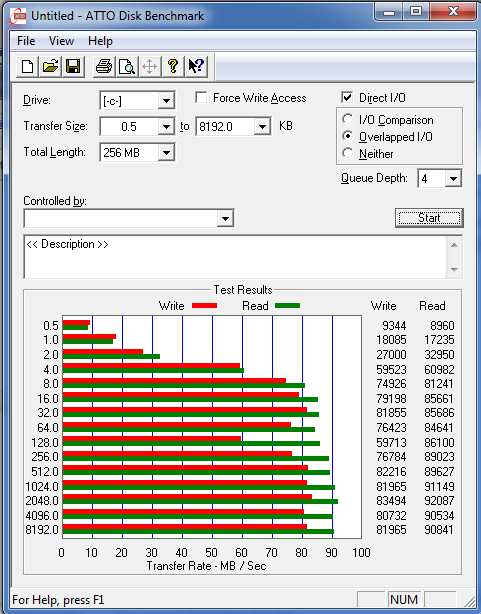
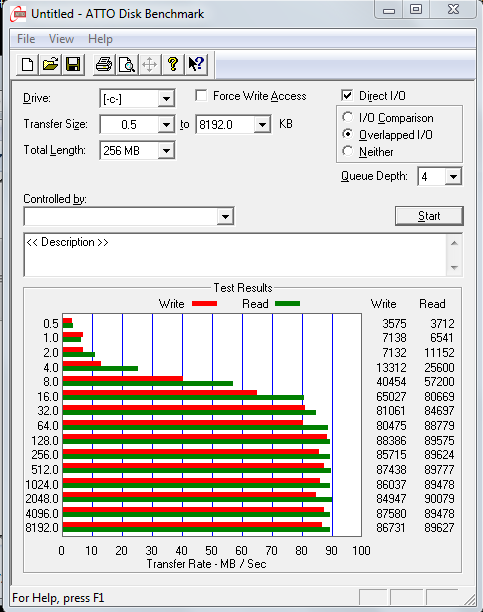
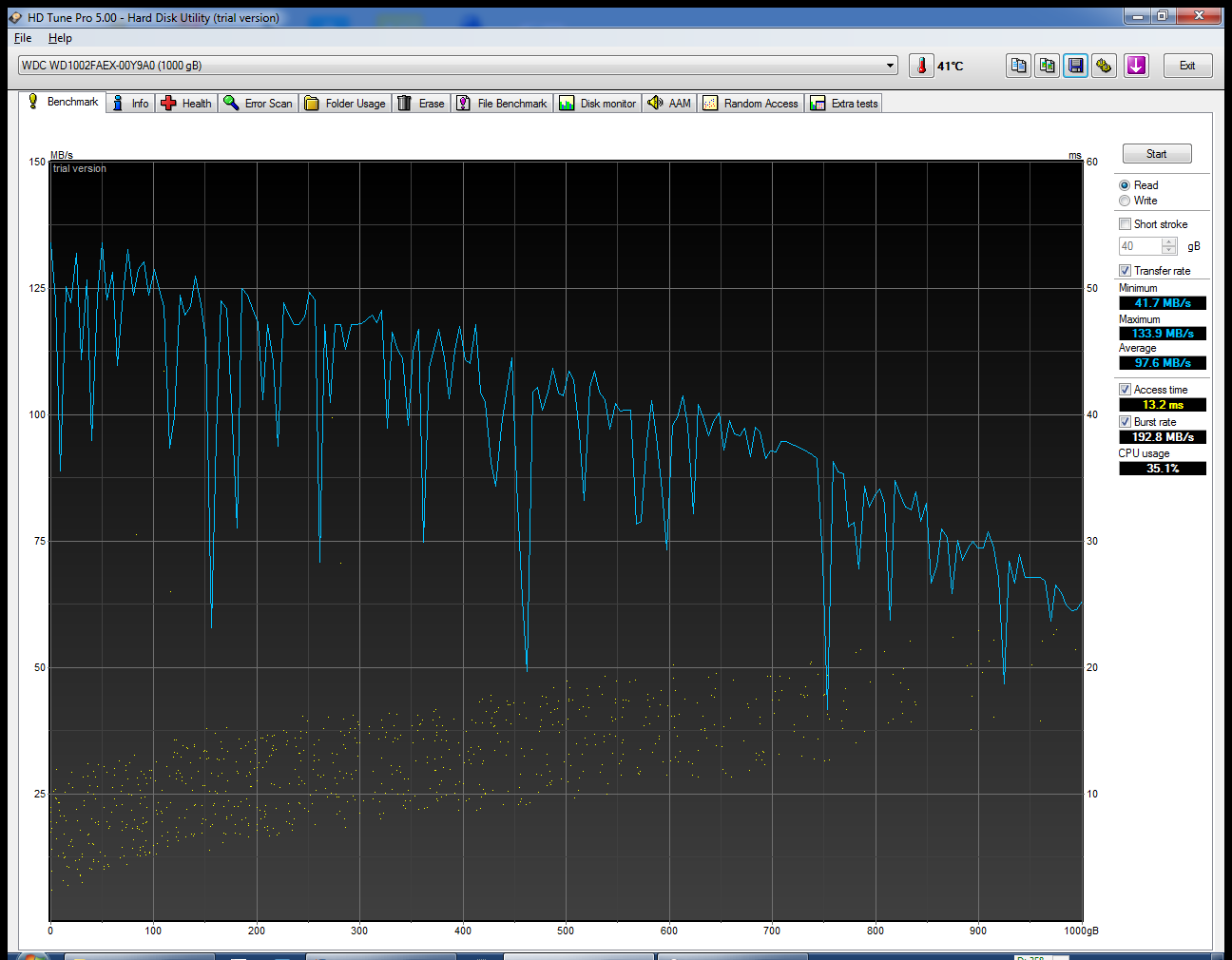
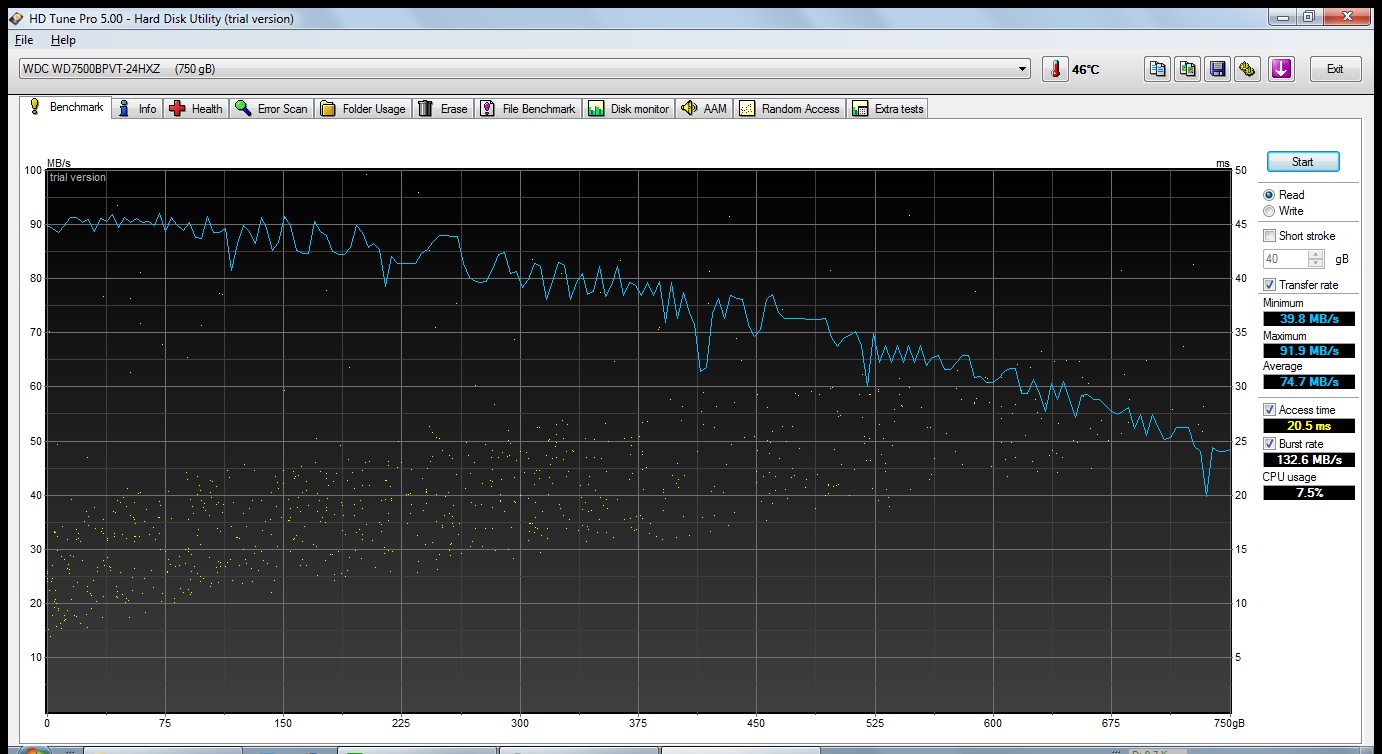
OK welcome to part 3 of my review. Hard drive benchmarks. I'm limiting it to synthetic benchmarks. We are comparing my desktop's hard drive, a WDC black 1 terabyte model WDC WD1002FAEX-00Y9A0 with the laptop's 750 gig WDC drive model WDC WD7500BPVT-24HXZT1.
For all the results, the first result or picture will be the desktop's hard drive, followed by the laptop.
1. Passmark performance test 7 build 1025 (Disk test only, copied from part 2 of the review)
2. Atto disk benchmark v 2.46
3. Crystal disk mark 64 bit v 3.0.1
-----------------------------------------------------------------------
CrystalDiskMark 3.0.1 x64 (C) 2007-2010 hiyohiyo
Crystal Dew World : http://crystalmark.info/
-----------------------------------------------------------------------
* MB/s = 1,000,000 byte/s [SATA/300 = 300,000,000 byte/s]
desktop
laptop
Well pretty much all the tests show the desktop's HD to be faster, but they are quite close. Perfectly acceptable performance for a 2.5 vs 3.5 hard drive.
OK that's it. I'm planning a part 5: wifi file transfer benchmarks
the end
OK welcome to part 3 of my review. Hard drive benchmarks. I'm limiting it to synthetic benchmarks. We are comparing my desktop's hard drive, a WDC black 1 terabyte model WDC WD1002FAEX-00Y9A0 with the laptop's 750 gig WDC drive model WDC WD7500BPVT-24HXZT1.
For all the results, the first result or picture will be the desktop's hard drive, followed by the laptop.
1. Passmark performance test 7 build 1025 (Disk test only, copied from part 2 of the review)
- desktop: disk = 735.6
- laptop : disk = 623.5
2. Atto disk benchmark v 2.46
3. Crystal disk mark 64 bit v 3.0.1
-----------------------------------------------------------------------
CrystalDiskMark 3.0.1 x64 (C) 2007-2010 hiyohiyo
Crystal Dew World : http://crystalmark.info/
-----------------------------------------------------------------------
* MB/s = 1,000,000 byte/s [SATA/300 = 300,000,000 byte/s]
desktop
Sequential Read : 85.584 MB/s
Sequential Write : 83.812 MB/s
Random Read 512KB : 34.964 MB/s
Random Write 512KB : 53.631 MB/s
Random Read 4KB (QD=1) : 0.438 MB/s [ 106.8 IOPS]
Random Write 4KB (QD=1) : 1.056 MB/s [ 257.9 IOPS]
Random Read 4KB (QD=32) : 0.647 MB/s [ 158.0 IOPS]
Random Write 4KB (QD=32) : 0.892 MB/s [ 217.8 IOPS]
Test : 1000 MB [C: 80.6% (430.3/533.7 GB)] (x5)
laptop
Sequential Read : 85.577 MB/s4. HDTune pro v5 trial
Sequential Write : 83.692 MB/s
Random Read 512KB : 26.986 MB/s
Random Write 512KB : 33.727 MB/s
Random Read 4KB (QD=1) : 0.307 MB/s [ 75.0 IOPS]
Random Write 4KB (QD=1) : 0.608 MB/s [ 148.5 IOPS]
Random Read 4KB (QD=32) : 0.655 MB/s [ 159.9 IOPS]
Random Write 4KB (QD=32) : 0.644 MB/s [ 157.3 IOPS]
Test : 1000 MB [C: 76.3% (186.3/244.0 GB)] (x5)
Well pretty much all the tests show the desktop's HD to be faster, but they are quite close. Perfectly acceptable performance for a 2.5 vs 3.5 hard drive.
OK that's it. I'm planning a part 5: wifi file transfer benchmarks
the end
Thursday, December 1, 2011
lenovo ideapad z470 review - part 3: 3D benchmarks
Back to part 2: CPU benchmarks
OK Welcome to part 3 of my informal review., 3D benchmarks. Again, all resolutions will be the native resolution. 1280x1024 for the desktop and 1366x768 for the laptop, unless it is unsupported. In that case I'll go down to 720p or 1280x720.
3dmark 2011, basic edition, "P" presets (1280x720)
desktop: P 1071
laptop: P 3358
Batman arkham asylum, steam. very high detail level, physx normal
desktop :
min = 22, max= 97, ave = 72
laptop run :
min = 22, max = 61, ave = 43
lets lower the phsx from normal to off
desktop: min = 41, max = 231, ave = 127
laptop: min = 21, max = 95, ave = 69
Devil may cry 4 benchmark. Desktop @ 1280x1024, laptop @ 1280x720. All settings at super high, AA off. The scores are FPS for scenes 1 through 4
desktop: 198, 182, 221, 133. Rank S
laptop: 85, 58, 109, 60. Rank A
Jianxia 3 benchmark. MSAA 4x, realtime shadow very high, post effect on. physx on
desktop: ave = 62, min = 6, max = 107
laptop: ave = 27, min = 7, max = 43
JX3 benchmark. physx off
desktop: ave = 36, min = 4, max = 109
laptop: ave = 19, min = 1, max = 39
JX3 benchmark. cuda accelerated animation bench. cuda on
desktop: ave = 32, min = 29, max = 34
laptop: ave = 13, min = 13, max = 16
JX3 benchmark. cuda accelerated animation bench. cuda off
desktop: ave = 12, min = 11, max = 20
laptop: ave = 11, min = 9, max = 17
Cinebench 64 bit 11.5 openGL test
desktop: 31.94fps
laptop: 21.41
Mafia 2, steam. AA off, shadow quality high, ambient occlusion on, anisotropic filtering 1x, geometry detail high, physx medium
desktop: 20.9, rank D
laptop: 20.7, rank D
with phsyx off
desktop: 44.7, rank C
laptop: 30.8, rank D
Just cause 2 steam, dark tower test. texture detail high, shadows high, AA off, anisotropic filtering 16x, water detail very high, objects detail very high, decals on, soft particles on, high res shadows on, SSAO high, point light specular on
desktop: 38.02fps
laptop: 24.28
Unigene heaven basic edition, dx 11. shaders high, tesselation normal, asnisotropy 4, AA off
desktop: 1432
laptop: 375
Lost planet 2 benchmark dx 11 test A. AA none, motion blur on, shadow detail high, texture detail high, rendering level high, DX 11 features high
desktop: 54.7 fps
laptop: 16.7 fps
Lost planet 2 benchmark dx 11 test B. AA none, motion blur on, shadow detail
high, texture detail high, rendering level high, DX 11 features high
desktop: 30.3 fps
laptop: 10.3 fps
So, except for one test, Mafia 2 physx on, the desktop pretty much wins. This is expected as games lean heavily on the GPU, and my desktop has a better GPU which wins over the faster CPU of the laptop. But this is not unexpected as this is not a real hardcore gaming laptop. But its quite capable nonetheless. I've played batman AA on it with physx off and the settings down one click and its very playable.
OK thats part 3. Next is part 4, hard drive benchmarks
the end
OK Welcome to part 3 of my informal review., 3D benchmarks. Again, all resolutions will be the native resolution. 1280x1024 for the desktop and 1366x768 for the laptop, unless it is unsupported. In that case I'll go down to 720p or 1280x720.
3dmark 2011, basic edition, "P" presets (1280x720)
desktop: P 1071
laptop: P 3358
Batman arkham asylum, steam. very high detail level, physx normal
desktop :
min = 22, max= 97, ave = 72
laptop run :
min = 22, max = 61, ave = 43
lets lower the phsx from normal to off
desktop: min = 41, max = 231, ave = 127
laptop: min = 21, max = 95, ave = 69
Devil may cry 4 benchmark. Desktop @ 1280x1024, laptop @ 1280x720. All settings at super high, AA off. The scores are FPS for scenes 1 through 4
desktop: 198, 182, 221, 133. Rank S
laptop: 85, 58, 109, 60. Rank A
desktop: ave = 62, min = 6, max = 107
laptop: ave = 27, min = 7, max = 43
JX3 benchmark. physx off
desktop: ave = 36, min = 4, max = 109
laptop: ave = 19, min = 1, max = 39
JX3 benchmark. cuda accelerated animation bench. cuda on
desktop: ave = 32, min = 29, max = 34
laptop: ave = 13, min = 13, max = 16
JX3 benchmark. cuda accelerated animation bench. cuda off
desktop: ave = 12, min = 11, max = 20
laptop: ave = 11, min = 9, max = 17
Cinebench 64 bit 11.5 openGL test
desktop: 31.94fps
laptop: 21.41
Mafia 2, steam. AA off, shadow quality high, ambient occlusion on, anisotropic filtering 1x, geometry detail high, physx medium
desktop: 20.9, rank D
laptop: 20.7, rank D
with phsyx off
desktop: 44.7, rank C
laptop: 30.8, rank D
Just cause 2 steam, dark tower test. texture detail high, shadows high, AA off, anisotropic filtering 16x, water detail very high, objects detail very high, decals on, soft particles on, high res shadows on, SSAO high, point light specular on
desktop: 38.02fps
laptop: 24.28
Unigene heaven basic edition, dx 11. shaders high, tesselation normal, asnisotropy 4, AA off
desktop: 1432
laptop: 375
Lost planet 2 benchmark dx 11 test A. AA none, motion blur on, shadow detail high, texture detail high, rendering level high, DX 11 features high
desktop: 54.7 fps
laptop: 16.7 fps
Lost planet 2 benchmark dx 11 test B. AA none, motion blur on, shadow detail
high, texture detail high, rendering level high, DX 11 features high
desktop: 30.3 fps
laptop: 10.3 fps
So, except for one test, Mafia 2 physx on, the desktop pretty much wins. This is expected as games lean heavily on the GPU, and my desktop has a better GPU which wins over the faster CPU of the laptop. But this is not unexpected as this is not a real hardcore gaming laptop. But its quite capable nonetheless. I've played batman AA on it with physx off and the settings down one click and its very playable.
OK thats part 3. Next is part 4, hard drive benchmarks
the end
Wednesday, November 23, 2011
lenovo ideapad z470 review - part 2: CPU benchmarks
OK welcome to part 2 of my review. I'll do several synthetic and real world benchmarks comparing my new laptop to my 2 year old desktop pc.
My new laptop's specs are listed in part 1 of the review.
I will have nvidia optimus on, using the NVIDIA GPU for 3d and cuda. At all times I will be using the laptop's own monitor at its native resolution, 1366 x 768. The laptop will be connected by wifi to the router and the desktop will use the LAN and the DSL modem will be on but no programs will be downloading. The laptop will first use balanced and high performance power settings. If no difference is found, I'll use balanced.
Both laptop and desktop will use the usual startup programs that I commonly use. Athough they dont use the same startup programs, I wanted this test to be like the way I use a PC, so I will accept the slight loss in accuracy due to not being able to control this factor. Plus the effect should be small anyway.
Oh and I updated my geforce drivers from 267.x to 285.x
My old desktop's specs are as follows:
Lets start with pcmark 7 v104 trial, all default settings. Since this is a trial version, you really cant change many settings. I'll try both high performance and balanced settings.
Ok thats significant. Lets go ahead to the 3d benchmarks and try a 3d benchmark first. unigene heaven 2.1 dx11 all default settings to see if we need to change the laptop's power profile.
Hmm. I guess that the GPU is bottlenecking the test so even if the balanced plan lowers the CPU speed a bit, it wont matter. OK, so from now on we stay with the high performance plan.
Lets try more CPU benchies
winrar 64bit v 3.93 trial
Passmark performance test 7 build 1025
coresmark 2010
So in summary, the core i3 is the faster CPU. Lets try video transcoding. All tests will be converting a 128 mb 640x480 mpeg-2 movie to iphone format, H 2.64
Badaboom TRIAL v2.0.0.128
Freemake v2403, convert to iphone 4. CUDA hardware acceleration set to auto detect
Arcsoft media converter 7.1.0.98 trial
Its puzzling that the CUDA actually DECELLERATED the conversion on the laptop and the desktop. Must be something wrong with the coding. Tried it again with the same results. Also take note that quicksync does give a small improvement.
Movavi video converter 11.0.1 trial
Interesting. the faster GPU can compensate. Lets try that again with CUDA off
Wondershare video converter ultimate 5.6.1, convert to H.264 iphone 3 format
CUDA on
Results pretty much mirror the pure CPU tests. The core i3 is faster. But if we put CUDA in the picture, results are dependent on how each video transcoding program uses CUDA. Some use it so well that the desktop's faster GPU compensates for the slower CPU, some dont. Special mention to media converter since CUDA decellerated conversion and quicksync only made a small difference. I'm kinda disappointed to tell the truth. I was expecting a bigger speed increase going from c2d to core i3 second gen.
OK thats it. Watch out for more parts to this review in the future. I plan 3d benchmarks, hard drive benchmarks and network benchmarks.
NEXT to Part 3, 3D benchmarks.
UPDATE: Added pictures and links to the software makers
the end
My new laptop's specs are listed in part 1 of the review.
I will have nvidia optimus on, using the NVIDIA GPU for 3d and cuda. At all times I will be using the laptop's own monitor at its native resolution, 1366 x 768. The laptop will be connected by wifi to the router and the desktop will use the LAN and the DSL modem will be on but no programs will be downloading. The laptop will first use balanced and high performance power settings. If no difference is found, I'll use balanced.
Both laptop and desktop will use the usual startup programs that I commonly use. Athough they dont use the same startup programs, I wanted this test to be like the way I use a PC, so I will accept the slight loss in accuracy due to not being able to control this factor. Plus the effect should be small anyway.
Oh and I updated my geforce drivers from 267.x to 285.x
My old desktop's specs are as follows:
- win 7 64 bit
- 1280x1024 LCD monitor
- Intel c2d e8200 @ 2.66 mhz
- inno 3d geforce 560ti
- 4 gigs ddr2 ram
- 1 terabyte WDC black hard drive
Lets start with pcmark 7 v104 trial, all default settings. Since this is a trial version, you really cant change many settings. I'll try both high performance and balanced settings.
- laptop balanced : 1157 pcmarks
- laptop high performance : 1770 pcmarks
- desktop : 2215 pcmarks
Ok thats significant. Lets go ahead to the 3d benchmarks and try a 3d benchmark first. unigene heaven 2.1 dx11 all default settings to see if we need to change the laptop's power profile.
- desktop : ave FPS = 54.9, score = 1383
- laptop high performance : ave FPS = 13.8, score = 399
- laptop balanced : ave FPS = 13.8 , score = 349
Hmm. I guess that the GPU is bottlenecking the test so even if the balanced plan lowers the CPU speed a bit, it wont matter. OK, so from now on we stay with the high performance plan.
Lets try more CPU benchies
winrar 64bit v 3.93 trial
- laptop: 1885 KB/s
- desktop: 1289 KB/s
Passmark performance test 7 build 1025
- desktop: 1262.8, cpumark = 2203.7, 3d = 2469.6, disk = 735.6
- laptop : 1152.7, cpumark = 2943.2, 3d = 555.2, disk = 623.5
- desktop: 1.37
- laptop: 2.03
coresmark 2010
- desktop: 567.15447 secs, worldwide rank #3425
- laptop: 251.67977 secs, worldwide rank #2705
So in summary, the core i3 is the faster CPU. Lets try video transcoding. All tests will be converting a 128 mb 640x480 mpeg-2 movie to iphone format, H 2.64
Badaboom TRIAL v2.0.0.128
- desktop: 245 fps, 0:32
- desktop no CUDA: 96 fps, 1:22
- laptop: 83 fps, 1:33
- laptop no CUDA: 129 fps, 1:01
Freemake v2403, convert to iphone 4. CUDA hardware acceleration set to auto detect
- desktop: 1:19
- laptop: 0:59
Arcsoft media converter 7.1.0.98 trial
- desktop CUDA: 2:24
- desktop CPU only : 1:23
- laptop CUDA: 2:41
- laptop CPU only: 0:41
- laptop quicksync: 0:36
Its puzzling that the CUDA actually DECELLERATED the conversion on the laptop and the desktop. Must be something wrong with the coding. Tried it again with the same results. Also take note that quicksync does give a small improvement.
Movavi video converter 11.0.1 trial
- desktop: 43
- laptop: 50
Interesting. the faster GPU can compensate. Lets try that again with CUDA off
- desktop: 1:46
- laptop: 1:40
Wondershare video converter ultimate 5.6.1, convert to H.264 iphone 3 format
CUDA on
- desktop: 1:03
- laptop: 0:51
- desktop: 3:09
- laptop: 2:15
- desktop: 110 fps, 1:17, 1:43 including burning ISO (0:26 for the burning only)
- laptop: 140 fps, 0:58, 1:24 including burning ISO (0:26 for the burning only)
Results pretty much mirror the pure CPU tests. The core i3 is faster. But if we put CUDA in the picture, results are dependent on how each video transcoding program uses CUDA. Some use it so well that the desktop's faster GPU compensates for the slower CPU, some dont. Special mention to media converter since CUDA decellerated conversion and quicksync only made a small difference. I'm kinda disappointed to tell the truth. I was expecting a bigger speed increase going from c2d to core i3 second gen.
OK thats it. Watch out for more parts to this review in the future. I plan 3d benchmarks, hard drive benchmarks and network benchmarks.
NEXT to Part 3, 3D benchmarks.
UPDATE: Added pictures and links to the software makers
the end
Tuesday, November 22, 2011
sidewinder gaming mouse - crazy sale
DISCLAIMER: I am in no way connected to microsoft or any other company or any store. I just found this sale in my local SM so I'm blogging about it.
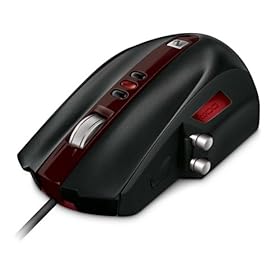
This is the sidewinder gaming mouse, by microsoft.
According to wikipedia, its a 2007 vintage design.
I've seen this mouse before and according to my notes (I was shopping around for a mouse at the time so I made notes of the prices and models of mice available in my local SM mall using the notes app of my smartphone) this mouse cost PHP 3790 several months ago. Now, I saw this in another shop in my local SM mall. I'm not really in the market for a wired mouse for my desktop. I was just browsing for wireless mice for my new laptop in case the old one dies.
Then I saw this mouse in one shop. Around 5 pieces left. There was a small sticker that says 4500 pesos. I'm thinking, ok thats a bit high but still within the possible price range. Then I read the sign stuck on the box. It says it was on sale. But when I read the price, I thought NO WAY!!, A ZERO IS MISSING!! But I did confirm it from the saleslady, yes the price is correct. php 349.00. Three hundred and fourty nine pesos. Thats a 77.x% discount!!
I agonized over whether to buy it or not and I decided to just blog about it and do more research. It turns out that there are some disadvantages. This is an old model. The MS website doesn't show it, instead showing the sidewinder X3, its descendant with a cheaper price and what seem to be less features and buttons. There are some negative reviews out there on the net which criticize the buttons and the overall ergonomics. So I'm a bit glad I didnt buy it.
But if you're in the market for a gaming mouse, you might want to try to consider this. But dont blame me if its not perfect for you.
Oh yes, I forgot. The name of the shop is silicon valley . Its a well known shop in the philippines with several branches.
UPDATE: I've gotten a lot of queries as to which SM branch I am talking about. Well, look again. The first sentence of this post has a link to the facbook account of the branch in question. And if you can't see it due to the popup, well, the popup has a close button.
the end
This is the sidewinder gaming mouse, by microsoft.
According to wikipedia, its a 2007 vintage design.
I've seen this mouse before and according to my notes (I was shopping around for a mouse at the time so I made notes of the prices and models of mice available in my local SM mall using the notes app of my smartphone) this mouse cost PHP 3790 several months ago. Now, I saw this in another shop in my local SM mall. I'm not really in the market for a wired mouse for my desktop. I was just browsing for wireless mice for my new laptop in case the old one dies.
Then I saw this mouse in one shop. Around 5 pieces left. There was a small sticker that says 4500 pesos. I'm thinking, ok thats a bit high but still within the possible price range. Then I read the sign stuck on the box. It says it was on sale. But when I read the price, I thought NO WAY!!, A ZERO IS MISSING!! But I did confirm it from the saleslady, yes the price is correct. php 349.00. Three hundred and fourty nine pesos. Thats a 77.x% discount!!
I agonized over whether to buy it or not and I decided to just blog about it and do more research. It turns out that there are some disadvantages. This is an old model. The MS website doesn't show it, instead showing the sidewinder X3, its descendant with a cheaper price and what seem to be less features and buttons. There are some negative reviews out there on the net which criticize the buttons and the overall ergonomics. So I'm a bit glad I didnt buy it.
But if you're in the market for a gaming mouse, you might want to try to consider this. But dont blame me if its not perfect for you.
Oh yes, I forgot. The name of the shop is silicon valley
UPDATE: I've gotten a lot of queries as to which SM branch I am talking about. Well, look again. The first sentence of this post has a link to the facbook account of the branch in question. And if you can't see it due to the popup, well, the popup has a close button.
the end
Saturday, November 12, 2011
lenovo ideapad z470 review - part 1
Hi. This is going to be a rather quick informal review of my new Lenovo z470 laptop. I'll divide it into at least 2 parts since it might be a long document. Again, this is informal so dont expect too detailed discussions as I will tend to concentrate on points that I deem important.
Part 1.a : Introduction and Outside appearance
Ok I bought this in the lenovo store in SM city, san Fernando Pampanga. I have a 7 year old IBM laptop and the backlight is starting to fail. I already had it fixed once but it cuts out from time to time so I guess its time to replace it. Cash, it cost me Php 32,500 pesos.
Freebies are a keyboard protector, a shoulder bag, windows home premium, Open office 3, 4 gig ram and a package. The package either consists of a rather low quality wired mouse and headset (intex brand) or a 4 gig flash drive/sd card. Various brands of flash drives are available but the SD card (micro sd plus adaptor) is transcend brand. Unfortunately its only SDHC class 2. But I aded 200 pesos to upgrade the 4 gig sd card into an 8 gig one. You can also pay more to get other versions of win7 OS.
Specs are quite OK.
My personal requirements for a laptop were not high. Pretty much for surfing and office work and maybe for downloading overnight. Any decent CPU and GPU would do. However I insisted on a large HD, a large screen and 4 gigs ram for snappy performance. But since on this laptopo, the CPU is pretty OK and it has CUDA as well as Intel Quick Sync, I might use it for video transcoding. For games, I have an old desktop with a core 2 duo and a geforce 560ti.
I chose lenovo because it has a good reputation and I used to have an IBM. Plus, they opened a store in my local SM which gave good prices and freebees.
As for initial impressions, I'm pleased. The back of the lid is glossy but that makes it into a fingerprint magnet. Screen is clear and nice. No dead pixels.


Keyboard has some space in between the keys. Typing is more better comfortable than some netbooks I tried since the keys have some space. Being Lenovo I would expect no less since they have a rep for good laptop keyboards. Sorry but I cant be more specific than that. It just feels OK typing and thats. My previous laptop was an old IBM thinkpad R51E.
Caps lock tends to get hit accidentally because of the tight spacing between it and the A key but I just set windows to beep whenever I press it. The home and pgup keys are close to the backspace and enter keys respectively so they sometimes get hit.
UPDATE: Another problem is that the DEL key is very small plus the DEL and BACKSPACE and HOME keys are very very close to one another. The problem with this is you might hit the HOME key by mistake and if you did not notice, you would start typing with the cursor moved to the start of the line.

I never liked touchpads and this touchpad is no different. The pencil eraser like TrackPoint on my old IBM is much better. But I have to make do. I eventually turned off the function that interprets a tap on the touchpad as a left mouse click to reduce errors. I havent fully explored the multitouch but so far, 2 fingertips going closer or farther from each other seems to just increase or decrease font size in firefox. I just re-use my old beat up logitech mouse. Its much more responsive than the trackpad.
The increase from 2 to 4 USB ports is welcome. Although they are only usb 2.0, thats an acceptable trade off for the price. The right rear usb port does sometimes interfere with the power cord.

And while on the subject of the power cord, I have found out that the position of the power outlet plus the L-shape of the power cord's end makes the cord more prone to fouling when picking up the laptop and repositioning it. My old laptop had a straight plug and the power port was on the back, out of the way.
Haven't tested the optical drive yet for burning but the ergonomics of the eject button is bad. Its hidden from view if you are above the laptop and it barely sticks out so it is difficult to feel with your fingers. To top it off, its a bit difficult to push. I can imagine sticking a piece of rubber on the button in the future.

The exhaust is on the left side. A quick test shows that the exhaust can get a bit uncomfortable specially if the laptop is working. Heat will eventually conduct through the plastic bottom and sometimes it might be too hot for your lap. However as long as you keep the intake ports clear and you do not load the laptop like running a CPU or GPU intensive app, the temp at the bottom of the laptop is acceptable.
Using the software PCwizard and Coretemp, and GPU-z, I measured the temps. Energy management mode was set to "balanced" and thermal management was set to "efficient thermal dissipation". All temps in degrees C. The laptop is placed on my table to ensure more or less OK airflow under the laptop
The bezel surrounding the screen sticks out a fraction of a millimeter on the right side of the screen so you can use your fingernail to raise it a bit. But this is only a small problem. This is the only thing I can see that reflects bad build quality, aside from the fingerprint magnet. No obvious scratches or poor workmanship. Then again, I'm no expert with regards to build quality, so don't take my word for it.
Part 1.b. Accompanying software, drivers and related features
Lenovo has several drivers and software that make things easier. I'll go through some of them
Battery life is claimed to be 2-3 hours but I havent tried it yet. An interesting note is that the battery software can be told to optimize the charging profile for either battery life or battery health. If you choose battery life, then the battery will charge up to ~100%. If you choose health, the batt will only charge up to ~50%. This will decrease battery life to 1 hour using balanced or 1.5 hours using the power saver setting but since the battery is not stressed out, it will last longer before needing replacement. This setting is recommended if you mostly use the laptop while plugged in.
I did use the built in software to recalibrate the battery lifespan value, but I did not do any battery life benchmarks, so the above values are approximate.
On theleft right front is a selector switch. Basically wifi on or off, although I'm not sure if bluetooth is included. On the right left front is the Optimus on/off switch.
Optimus technology essentially means that the laptop has a power thrifty Intel video card and another discrete Nvidia video card. If optimus is off, only the intel video card is active. If optimus is on, the laptop by default uses the intel vid card but switches to the nvidia when CUDA is needed or you run gpu accelerated stuff like games. I'll try this out in part 2 with benchmarks.
Microsoft security essentials antivirus is included.
CPU temp at idle is a little high at ~ 65 deg C at idle while GPU temp is ok at 55 deg C. At load using MSI Kombustor 2.0.0, I get CPU and GPU temps of 70+ deg C.
Lenovo has something called onekey theatre. A button on the upper right controls it. Basically the settings are always off, always on and automatic or intelligent. Intelligent means the software decides when to turn it on or off. While off, the colors look a bit muted and light. while on the color and detail pops out.
I'm not gonna review the speakers. They are loud enough and quality is OK. I'm not that picky.
So to end part 1, I can say that the quality and value for money is quite good. I say 4/5 stars. But again, this is not a formal review and my requirements are not that high.
A future blog post will be part 2 of this review, benchmarks. So stay tuned!
update: Part 2 is online!
The end.
Part 1.a : Introduction and Outside appearance
Ok I bought this in the lenovo store in SM city, san Fernando Pampanga. I have a 7 year old IBM laptop and the backlight is starting to fail. I already had it fixed once but it cuts out from time to time so I guess its time to replace it. Cash, it cost me Php 32,500 pesos.
Freebies are a keyboard protector, a shoulder bag, windows home premium, Open office 3, 4 gig ram and a package. The package either consists of a rather low quality wired mouse and headset (intex brand) or a 4 gig flash drive/sd card. Various brands of flash drives are available but the SD card (micro sd plus adaptor) is transcend brand. Unfortunately its only SDHC class 2. But I aded 200 pesos to upgrade the 4 gig sd card into an 8 gig one. You can also pay more to get other versions of win7 OS.
Specs are quite OK.
- Intel core i3 2330M @ 2.2 ghz
- 4 gigs PC3-10700 DDR3 ram. Curiously, the first stick is Transcend brand and the second is Nanya brand. Oh well, as long as it works and it does run in dual channel mode
- 2 gig geforce 540m + built in Intel graphics, switchable, using optimus technology.
- 750 gig western digital SATA hard drive
- dual layer DVD reader/writer
- 14 inch screen 1366 x 768. Actual size 31 cm width, 27.7cm height, 35.7cm diagonal
- multitouch (I think) touch pad
- 4-in-one card reader
- bluetooth
- wifi-N
My personal requirements for a laptop were not high. Pretty much for surfing and office work and maybe for downloading overnight. Any decent CPU and GPU would do. However I insisted on a large HD, a large screen and 4 gigs ram for snappy performance. But since on this laptopo, the CPU is pretty OK and it has CUDA as well as Intel Quick Sync, I might use it for video transcoding. For games, I have an old desktop with a core 2 duo and a geforce 560ti.
I chose lenovo because it has a good reputation and I used to have an IBM. Plus, they opened a store in my local SM which gave good prices and freebees.
As for initial impressions, I'm pleased. The back of the lid is glossy but that makes it into a fingerprint magnet. Screen is clear and nice. No dead pixels.
Keyboard has some space in between the keys. Typing is more better comfortable than some netbooks I tried since the keys have some space. Being Lenovo I would expect no less since they have a rep for good laptop keyboards. Sorry but I cant be more specific than that. It just feels OK typing and thats. My previous laptop was an old IBM thinkpad R51E.
Caps lock tends to get hit accidentally because of the tight spacing between it and the A key but I just set windows to beep whenever I press it. The home and pgup keys are close to the backspace and enter keys respectively so they sometimes get hit.
UPDATE: Another problem is that the DEL key is very small plus the DEL and BACKSPACE and HOME keys are very very close to one another. The problem with this is you might hit the HOME key by mistake and if you did not notice, you would start typing with the cursor moved to the start of the line.
I never liked touchpads and this touchpad is no different. The pencil eraser like TrackPoint on my old IBM is much better. But I have to make do. I eventually turned off the function that interprets a tap on the touchpad as a left mouse click to reduce errors. I havent fully explored the multitouch but so far, 2 fingertips going closer or farther from each other seems to just increase or decrease font size in firefox. I just re-use my old beat up logitech mouse. Its much more responsive than the trackpad.
The increase from 2 to 4 USB ports is welcome. Although they are only usb 2.0, thats an acceptable trade off for the price. The right rear usb port does sometimes interfere with the power cord.
And while on the subject of the power cord, I have found out that the position of the power outlet plus the L-shape of the power cord's end makes the cord more prone to fouling when picking up the laptop and repositioning it. My old laptop had a straight plug and the power port was on the back, out of the way.
Haven't tested the optical drive yet for burning but the ergonomics of the eject button is bad. Its hidden from view if you are above the laptop and it barely sticks out so it is difficult to feel with your fingers. To top it off, its a bit difficult to push. I can imagine sticking a piece of rubber on the button in the future.
The exhaust is on the left side. A quick test shows that the exhaust can get a bit uncomfortable specially if the laptop is working. Heat will eventually conduct through the plastic bottom and sometimes it might be too hot for your lap. However as long as you keep the intake ports clear and you do not load the laptop like running a CPU or GPU intensive app, the temp at the bottom of the laptop is acceptable.
Using the software PCwizard and Coretemp, and GPU-z, I measured the temps. Energy management mode was set to "balanced" and thermal management was set to "efficient thermal dissipation". All temps in degrees C. The laptop is placed on my table to ensure more or less OK airflow under the laptop
- Room temp = 28
- idle = CPU 51, GPU 43
- Load using MSI Kombustor GPU burn in = CPU 73, GPU 77
- Transcoding a DVD (files on the HD) to ipod, using Badaboom TRIAL v2.0.0.128 = CPU = 71, GPU = 67 (only around 60-70% load)
The bezel surrounding the screen sticks out a fraction of a millimeter on the right side of the screen so you can use your fingernail to raise it a bit. But this is only a small problem. This is the only thing I can see that reflects bad build quality, aside from the fingerprint magnet. No obvious scratches or poor workmanship. Then again, I'm no expert with regards to build quality, so don't take my word for it.
Part 1.b. Accompanying software, drivers and related features
Lenovo has several drivers and software that make things easier. I'll go through some of them
Battery life is claimed to be 2-3 hours but I havent tried it yet. An interesting note is that the battery software can be told to optimize the charging profile for either battery life or battery health. If you choose battery life, then the battery will charge up to ~100%. If you choose health, the batt will only charge up to ~50%. This will decrease battery life to 1 hour using balanced or 1.5 hours using the power saver setting but since the battery is not stressed out, it will last longer before needing replacement. This setting is recommended if you mostly use the laptop while plugged in.
I did use the built in software to recalibrate the battery lifespan value, but I did not do any battery life benchmarks, so the above values are approximate.
On the
Optimus technology essentially means that the laptop has a power thrifty Intel video card and another discrete Nvidia video card. If optimus is off, only the intel video card is active. If optimus is on, the laptop by default uses the intel vid card but switches to the nvidia when CUDA is needed or you run gpu accelerated stuff like games. I'll try this out in part 2 with benchmarks.
Microsoft security essentials antivirus is included.
Lenovo has something called onekey theatre. A button on the upper right controls it. Basically the settings are always off, always on and automatic or intelligent. Intelligent means the software decides when to turn it on or off. While off, the colors look a bit muted and light. while on the color and detail pops out.
I'm not gonna review the speakers. They are loud enough and quality is OK. I'm not that picky.
So to end part 1, I can say that the quality and value for money is quite good. I say 4/5 stars. But again, this is not a formal review and my requirements are not that high.
A future blog post will be part 2 of this review, benchmarks. So stay tuned!
update: Part 2 is online!
The end.
Wednesday, July 13, 2011
Mass effect 2 PC review, the flaws
Hi. This is my review of mass effect 2 for the PC. First of all, I want to say that this is quite a good game. However its not perfect. There are traces of consolitis (it has a console heritage), a few bugs and other design choices that did not sit well with me. So I'll concentrate on the flaws mostly. Lots of other reviews have praised this game (which it deserves) so to be different and avoid repetition, lets concentrate on the flaws.
Update: I should have also mentioned that I'm concentrating on the technical side so I wont cover the story, character development, etc.
I bought mass effect 2 (digital deluxe edition) from gamersgate at a good discount. I downloaded this game in bits and pieces over several months. A lot of the gamefiles are RAR files. This is actually a good choice since I can easily manipulate and peek into the install files. When I tried to install the game, the installation proceeded then unexpectedly stopped. I googled the error and found no help except to redownload the install files. I tried again and this time I watched the installer. There is a small status bar which shows which file is being processed. I found the file where it stopped. It was one of the RAR files. A big one, 2 gigs. I opened it in winrar and tested it and found an error. OK, no choice I need to re-download. Most likely before when I was downloading, the PC either hung, the net connection dropped or the power went out or something.
OK, I deleted the file and started the gamersgate download. I was dismayed when the progress bar of the download went all the way back to 20%. Thats ludicrous. The 2 gig file only comprises around 16% of the 12 gig download size. It should only go back to 84%. In the first case, it looks like gamersgate's download manager has no option to verify or test file integrity like most torrent clients and Steam and does not have the capability to download only one file. If one file is missing, a group of files are downloaded. OK, I re downloaded. Again there was a problem. This time I tested all the RAR files and found 2 files with errors, both greater than 1 gig, which failed testing. This time I did something different. I observed the subdirectory where the files are being downloaded and I noticed that the file I deleted first becomes a zero sized file then becomes larger and larger as the download progresses. After it is finished, the download manager then deletes another file and repeats the process. I now had a plan.
OK, this is how I avoided a lengthy re-download. First, I deleted the 2 files with errors then I copied the rest of the perfectly good files. I then started the download. The progress bar goes back to 20% and I wait till the 2 files are finished downloading. After the 2 files are finished, the download manager then deletes a third perfectly good file and starts downloading. I stop the download at this time. I copy over the backup of the third file. OK, now I have all the necessary files. I start the install process and it works.
Whew, thats a lot of work. OK to the game itself. Let me list down some of the flaws. alot of them are related to consolitis.
If you import an old mass effect 1 save, the choices you made carry over. If you do not have an old ME1 save, the game makes some default choices for you which is a bit annoying for me since the default choice is not a 100% paragon choice and I prefer paragon. But its an understandable compromise. There is a DLC, mass effect 2 genesis which allows you to make these choices, but its not free.
The intro movies cannot be skipped. This also applies to some FMV cutscenes specially the ones at the start of the game. The movies are BIK or Bink movies so you can get a BIK movie viewer and watch them and decide which you dont want then rename the files. Or you can google "mass effect 2 no intro" and download a mod which does it automatically
Loading takes too many steps. First you have to double click on the icon on the desktop, which brings up the menu.
Then after the intro movies, you get a "press any key to continue page". At least it isnt "press start" to continue which would have been insulting to PC users.
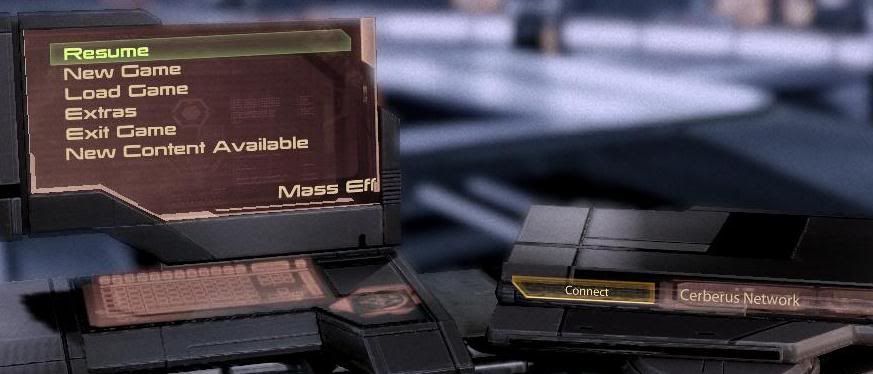
Next yo get to the main menu. But there's a little annoyance. Look at the pic below.
Initially the screen on the Left is blank, then 1-2 seconds later, the menu items Resume, new game, load game, extras and exit game appear. But if you try to click on them nothing happens. A few seconds later the new content available menu option appears and a few secodns later on the DVD like device on the right, a connect to cerebrus network button appears. Its kinda annoying that you have to wait for all of these to finish before any of the menu options work.
In the graphical options, the choices are pretty limited, also the fault of consolitis.
Saving a game is pretty fast but level loads and loading a game are slow. This is most pronouced when riding the elevator on the normandy. Fortunately, the normandy elevator bug is mostly fixed with the 1.02 patch but loads still take a fair amount of time.
A really big bug is that the spoken dialog and sound is sometimes delayed in some cutscenes. I've googled about this bug and it seems there is no fix out yet. I did try updating my pc's audio drivers but it did nothing.
Finally, I have an issue with the heavy weapons. Most other weapons come in different versions which are well balanced and different advantages and disadvantages like balancing rate of fire with accuracy and damage per shot. But for heavy weapons, the mechanics of some of the weapons suck. Firing should be simple, click left button and boom. With some of them, click the left button and nothing happens. You got to HOLD the left button, wait for it to charge up and then release. Good luck if you get hit by enemy fire while waiting for the weapon to charge up.
Ammo for heavy weapons is also scarce. This can translate to only 1 or 2 shots for the nuke.
Level design is slightly linear for missions. Although outside of missions you can go pretty much anywhere.
The run and take cover button is the same, the space bar. Guess what happens if you are standing with cover in fornt of you and an enemy firing at your back. You press space bar and try to run but instead you crouch in front of the barrier, still taking fire.
Ok thats it. Let me repeat, this is a great game but it isnt perfect. I'm just focusing on the flaws.
The end
update: OK a couple of people in the comments were asking (not politely) why I needed to describe my troubles downloading the game. Well, the problems showed up a flaw in gamersgate's download manager, the inability to download only one file. I'm sure I won't be the only person in the world who would experience problems like this. I'm merely sharing my workaround which avoided wasting bandwidth re downloading several gigs worth of perfectly good files. Don't you think thats knowledge worth sharing? Not everybody has a fast net connection and some people have download caps.
update: some people have suggested that this is not a review. That suggestion has merit. Maybe I should call it a "list of bugs" or something. Anyway, in the end, its possible that someone may learn from the mistakes and bugs I've pointed out here.
Friday, November 19, 2010
seagate momentus XT review
I. INTRODUCTION
The seagate momentus XT is a hybrid hard drive. I needed more disk space and I was torn between buying a SSD or a hybrid. A 80 gig SSD costs around PHP 9000+ in the philippines and this 500 gig momentus XT only costs PHP 6150 - PHP 6500. I bought it for PHP 6150 at the store in gilmore called PC-Options.Sorry but they dont have a website. This is their website. I decided against a normal hard drive since I wanted to see if I could reduce loading time in games. This, aside from the lack of space was my primary objective.
Since an SSD is pricey and I needed the space, I opted for the hybrid hard drive. Right then I knew this was a gamble since I'm betting on the cache making a big difference. And I know that the 2.5 inch form factor, even at 7200rpm, might make uncached reads and writes slower.
PC-options is a no frills store with a reputation for long lines, low prices, a top secret price list, and a large and up to date selection of items. By up to date I mean if something new is released, you can find it there sooner than some stores. I'm a frequent shopper there. By top secret I mean top secret. They dont give away copies and you are prohibited from taking a picture of the list with a cellphone camera. Its printed on paper taped to the counter right in front of the employees. You could use a spycam though.
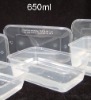
The momentusXT that I bought happened to be the only one thay had. It was on display. Living up to its low cost and no frills reputation, the drive came in a sealed antistatic bag which they opened in front of me to put the warranty sticker. They then wrapped it in bubble wrap and placed it in a plastic food box. Hey, helps keep costs down and it works, so I have no problem. The food box looks like this.
I asked them if they would order any replacement inventory and they couldnt say. Oh well.
Okay, physically its just a normal 2.5 inch SATA drive. In SATA, 2.5 and 3.5 inch formats use the same power and data cables so I can use it in my desktop. BTW, my desktop is a core 2 duo with 4 gigs of ddr2 ram. It has 2 seagate drives, a 320 gig seagate sata ST332062AS primary hard drive and a 80 gig ide drive, ST380011A, attached via an ide to sata converter.I'm using windows 7 64 bit.
Before plugging in the momentusXT, I ran a few real world tests on my PC. Several passes of booting and shutting down and loading times for the game Borderlands, steam version. I then installed the hard drive. You'll see the results later.
Using seagate discwizard, I was able to format and allocate a partition. Unfortunately something went wrong when attempting to clone the 320 gig drive. I set it up, discwizard prepares the drive and says I have to reboot. After the reboot, nothing happens. Tried it again, nothing. Ok, I downloaded a few freeware disc cloners. I tried one (I have since deleted it and I forgot the name). Step one was to copy all the files from the 320 gig to the momentus. OK. I screwed up step 2, which was to make the momentus bootable by copying something, MBR or boot sector or whatever. When the program wanted to reboot, I rebooted and set the BIOS to boot from the momentus, I get a NTLDR missing or something like that error after the POST, press CTRL + ALT + DEL to continue. Set bios to boot from the 320 gig, same thing. Ohhhhkayyy. This is going to be harder and the comparison will be less valid. I eventually ended up re-installling my OS. To make sure I get it right, both the 320 and 80 gig were unplugged until the windows OS was installed. Fortunately, no files were lost on either drive, and I got backups anyway.
This makes the comparison less valid because
Once I more or less got the OS and programs installed, I then proceeded to do more real world and synthetic tests. So all other tests were done with the OS installed on the momentus XT
II. SYNTHETIC TESTS
NOTE: all graphs have the exact values shown.
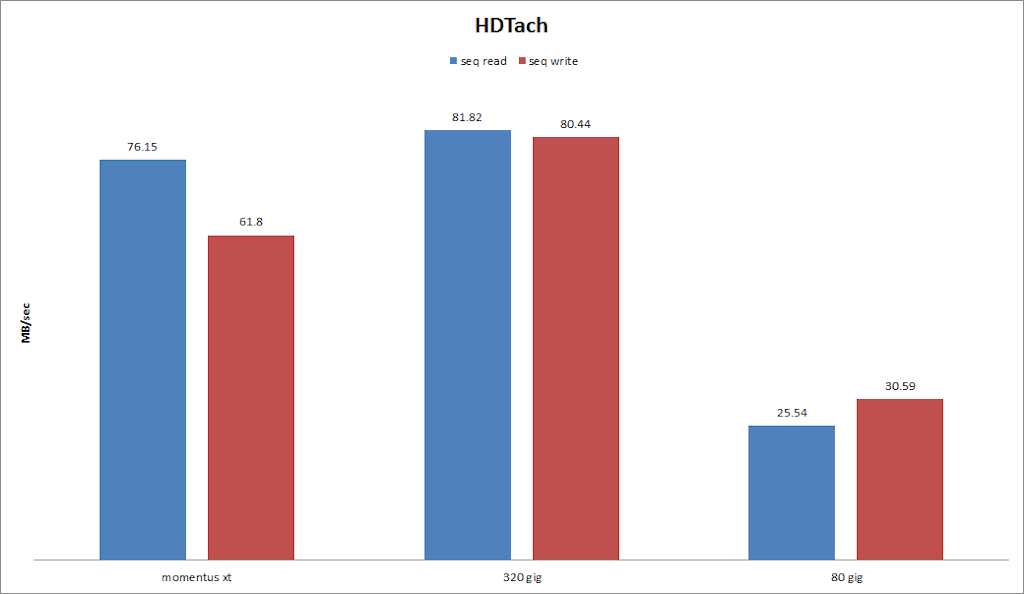
Lets start with HDtach 3.0.1.0
The read speed is slightly slower than the 320gig and the write speed is slower. I am assuming that this does not take into account the cache, its expected. Lets try another one, hdtune pro 4.6 trial.
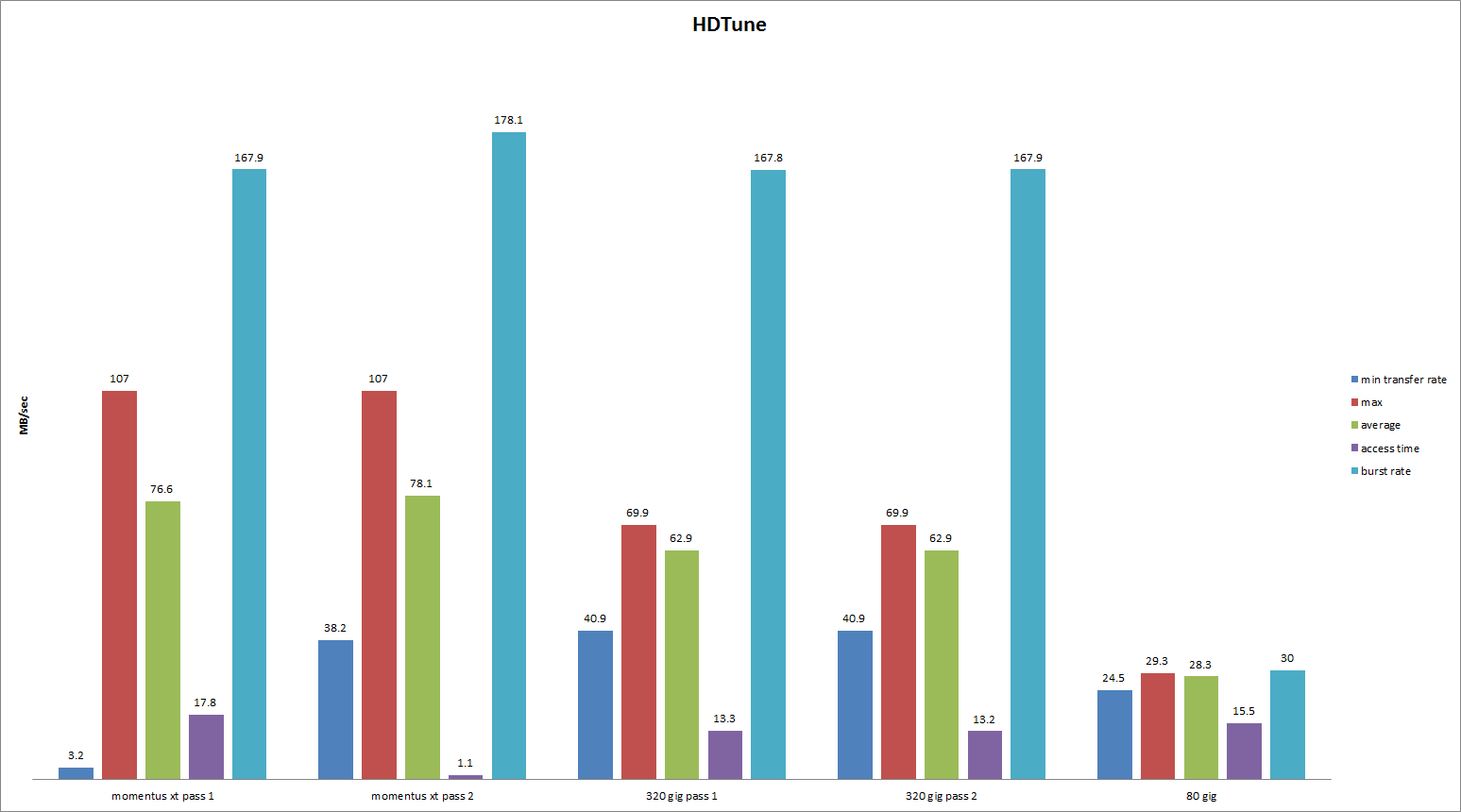
Here you can see the maximum and average transfer rates are actually faster than the 320 gig. Burst speeds are close. Its interesting that the access time dropped to very impressive levels at the second pass. This is the cache at work.
III. REAL WORLD BENCHMARKS
First impressions. The write speed is slow. I didnt use a stopwatch but installing programs to the momentus XT either from another hard drive or from DVD seemed slower. Also if the momentus was busy either reading or writing a large file/s the PC became slow and unresponsive. Like if you scroll down or type a letter maybe half of the time there's a 1-2 second delay. With the other 2 hard drives busy, I did not notice any slowdowns. This would be an acceptable trade off since you rarely install or copy large files.
With the drives idle, sometimes there are also pauses and slowdowns, however this only seems to happen with firefox, not notepad, internet explorer or other programs. So it looks to be unrelated.
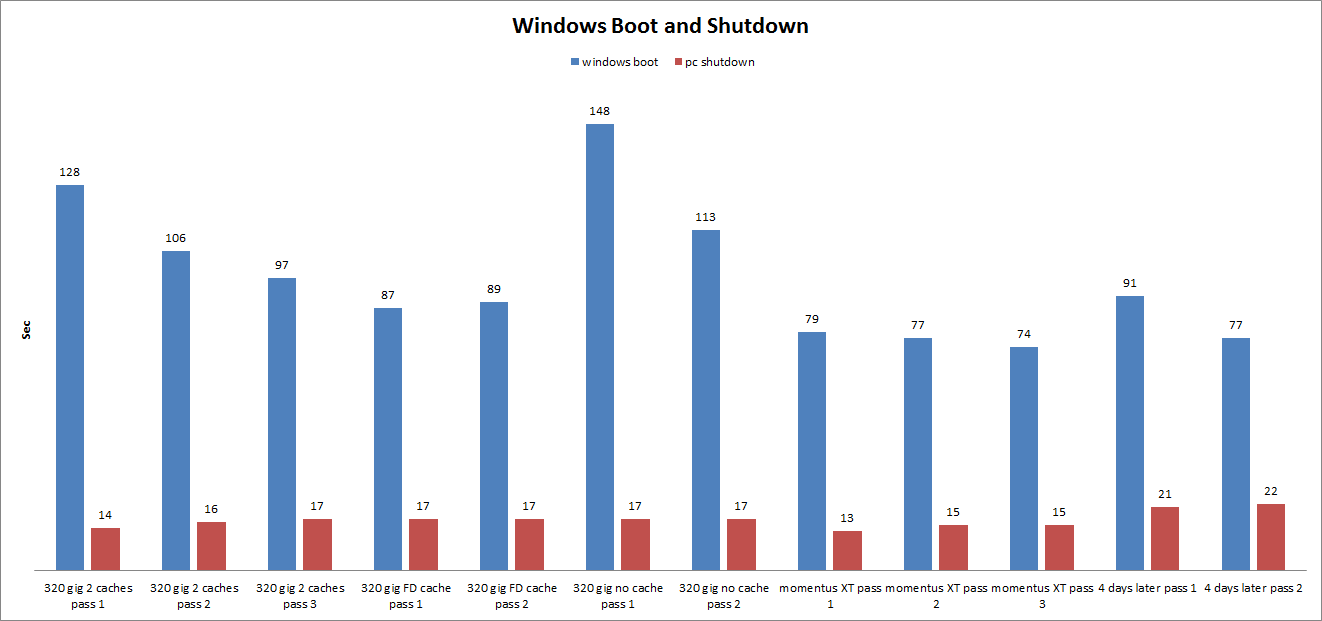
OK, with the conflicting results of synthetic benchmarks, lets do real world benchmarks. For the first one its windows boot and shutdown. Internet was off for the tests. I use a boot manager called soluto. I use it to remove or delay unnecessary startup programs. In this case, no programs were delayed, all delayed programs were reinstated. Tests were done with windows on the 320 gig drive and with windows re-installed on the momentus XT. Although soluto can measure the boot time, it is not 100% accurate, probably because the POST is not included. So values were measured with a stopwatch from pressing the power button on the case to when the hard drive light dies. I tried to re-create the old installation as much as possible but since cloning my OS was not successful, there are differences. So consider these results with a grain of salt. I re-did the tests 4 days later after installing more programs.
With the 320 gig HD I used the trial version of the cache program Eboostr. For the first set of data labeled "2 caches", I used 4 gig caches on a flash drive and on the 80 gig hard drive. The next set of data called "FD cache" uses eboostr and a 4 gig flash drive. Last was with eboostr loaded but no cache drives. All results with the momentus XT use no eboostr or readyboost caches.
Results for booting are consistent. From pass 1 to later passes, most values go down. This is due to the action of the various caches (eboostr, superfetch, and the momentusXT's own cache). Using the 80 gig as an ebooster cache has a detrimental effect compared to using only the flash drive but it still better than using no cache. This is expected as my 80 gig hard drive is slow. The momentus XT was slightly faster in booting, even 4 days later, once the cache kicks in.
For shutdown, values are very close. The momentus is slightly faster at first but 4 days later, it lags. not sure why, maybe some programs I have installed.
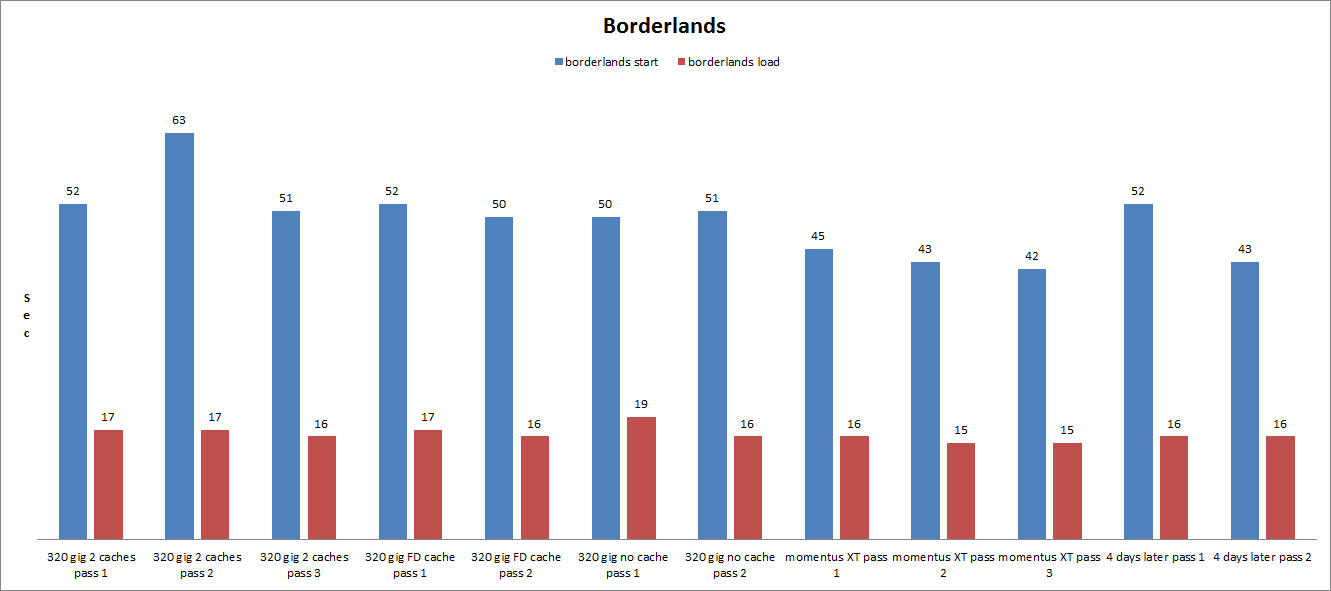
Next lets try borderlands. Again, I had to re-install my OS in between the tests on the 320 gig and the moementus XT. Internet was off. Steam was on in offline mode and borderlands had the intro videos disabled. I measured the time from clicking on the desktop icon to the (press enter) on the main menu and the time from the main menu to loading a checkpoint. The checkpoint is the very first checkpoint for a new game, the one where you meet the robot claptrap for the first time. I rebooted after each pass. Again, I re did the tests 4 days later.
For the 320gig, the start borderlands times are very similar with and without the caches. An aberration is an abnormally long second pass with 2 caches. With the momentus XT, its consistently slightly faster once the cache kicks in. The load checkpoint times for both drives are very close.
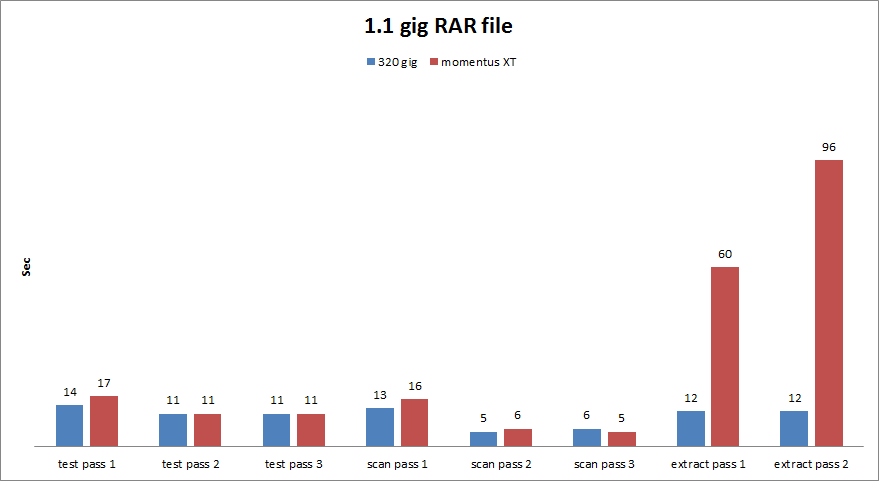
Next lets try winrar. This includes write tests, unlike boot and borderlands which are primarily read tests. I used an identical 1.1 gig RAR file on both the momentus and the 320 gig. "Test" means opening the file in winrar and using winrar's test function. "Scan" means scanning the file from the right click menu using Avast virus scan free. Extract means extracting the file to the same directory. This last test is more of a write test This time I did not reboot between passes to give the cache a chance to work.
With both drives, the read tests become faster after the first pass. This probably represents a cache at work. Probably a windows cache since I have a lot of ram. For pass 1, the momentus is slightly slower but at pass 2 or 3, both drives are neck and neck. The last test, the write test, shows the momentus significantly slower since the momentus's cache is for read.
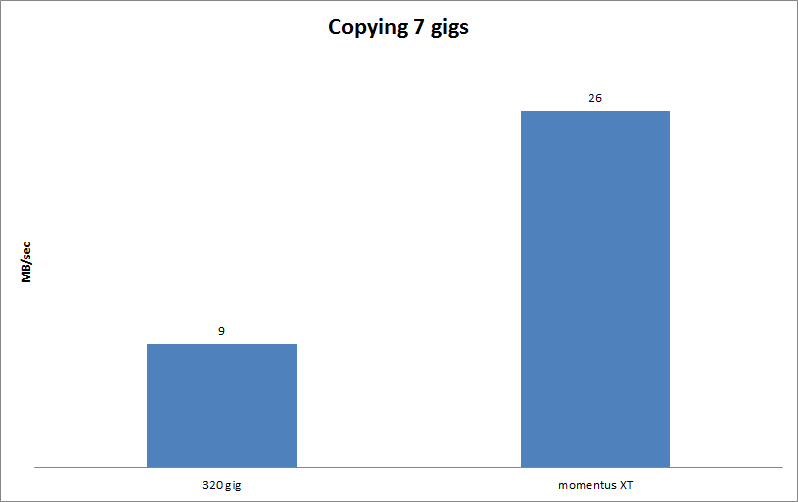
Lets try something BIG. Copy 7 gigs (mostly a few multi gig files) from the 80 gig to both drives. I rebooted in between each test. Only 1 pass since the 7 gigs is significantly larger than either the momentus's cache or my ram. This way we see raw uncached write performance. I use the program teracopy. It has a log that shows the time used and the average MB/sec speed.
Significantly slower. Expected since its a 2.5 inch drive and the cache is a read cache which does not come into play so writing will be slower.
IV. CONCLUSIONS
This is tedious and boring work. Fortunately I can do something else while waiting. I watch TV or use my laptop.
Read performance is slightly faster than my old hard drive if you let the cache do its work.Emphasis on "slightly". I was not expecting significant gains since this is not a SSD. I give it a 4/5 stars. But write performance is bad. I give it 2/5 stars. On average that's 3/5 stars.
So was it worth it? Thats a hard call to make since there is a small benefit.. Right now I cannot recommend this product unless maybe for a laptop that has an existing SATA drive that is much slower than my 320 gig. The slow write performance causes a lot of pauses during normal operation. I could try more tweaks like moving the swap file or the windows TEMP directory to the 320 gig. Anyway I took the risk and I'll have to live with it. Maybe when I get a new laptop I'll use it there.If you have the money and dont need disk space, a SSD is the way to go if you want significant speed increases.
the end
The seagate momentus XT is a hybrid hard drive. I needed more disk space and I was torn between buying a SSD or a hybrid. A 80 gig SSD costs around PHP 9000+ in the philippines and this 500 gig momentus XT only costs PHP 6150 - PHP 6500. I bought it for PHP 6150 at the store in gilmore called PC-Options.
Since an SSD is pricey and I needed the space, I opted for the hybrid hard drive. Right then I knew this was a gamble since I'm betting on the cache making a big difference. And I know that the 2.5 inch form factor, even at 7200rpm, might make uncached reads and writes slower.
PC-options is a no frills store with a reputation for long lines, low prices, a top secret price list, and a large and up to date selection of items. By up to date I mean if something new is released, you can find it there sooner than some stores. I'm a frequent shopper there. By top secret I mean top secret. They dont give away copies and you are prohibited from taking a picture of the list with a cellphone camera. Its printed on paper taped to the counter right in front of the employees. You could use a spycam though.
The momentusXT that I bought happened to be the only one thay had. It was on display. Living up to its low cost and no frills reputation, the drive came in a sealed antistatic bag which they opened in front of me to put the warranty sticker. They then wrapped it in bubble wrap and placed it in a plastic food box. Hey, helps keep costs down and it works, so I have no problem. The food box looks like this.
I asked them if they would order any replacement inventory and they couldnt say. Oh well.
Okay, physically its just a normal 2.5 inch SATA drive. In SATA, 2.5 and 3.5 inch formats use the same power and data cables so I can use it in my desktop. BTW, my desktop is a core 2 duo with 4 gigs of ddr2 ram. It has 2 seagate drives, a 320 gig seagate sata ST332062AS primary hard drive and a 80 gig ide drive, ST380011A, attached via an ide to sata converter.I'm using windows 7 64 bit.
Before plugging in the momentusXT, I ran a few real world tests on my PC. Several passes of booting and shutting down and loading times for the game Borderlands, steam version. I then installed the hard drive. You'll see the results later.
Using seagate discwizard, I was able to format and allocate a partition. Unfortunately something went wrong when attempting to clone the 320 gig drive. I set it up, discwizard prepares the drive and says I have to reboot. After the reboot, nothing happens. Tried it again, nothing. Ok, I downloaded a few freeware disc cloners. I tried one (I have since deleted it and I forgot the name). Step one was to copy all the files from the 320 gig to the momentus. OK. I screwed up step 2, which was to make the momentus bootable by copying something, MBR or boot sector or whatever. When the program wanted to reboot, I rebooted and set the BIOS to boot from the momentus, I get a NTLDR missing or something like that error after the POST, press CTRL + ALT + DEL to continue. Set bios to boot from the 320 gig, same thing. Ohhhhkayyy. This is going to be harder and the comparison will be less valid. I eventually ended up re-installling my OS. To make sure I get it right, both the 320 and 80 gig were unplugged until the windows OS was installed. Fortunately, no files were lost on either drive, and I got backups anyway.
This makes the comparison less valid because
- The configuration of the old and new OS will not be exactly the same
- The swap files and temp files would now be on the momentus XT
- I did not defragment so fragmentation might affect the results
Once I more or less got the OS and programs installed, I then proceeded to do more real world and synthetic tests. So all other tests were done with the OS installed on the momentus XT
II. SYNTHETIC TESTS
NOTE: all graphs have the exact values shown.
Lets start with HDtach 3.0.1.0
The read speed is slightly slower than the 320gig and the write speed is slower. I am assuming that this does not take into account the cache, its expected. Lets try another one, hdtune pro 4.6 trial.
Here you can see the maximum and average transfer rates are actually faster than the 320 gig. Burst speeds are close. Its interesting that the access time dropped to very impressive levels at the second pass. This is the cache at work.
III. REAL WORLD BENCHMARKS
First impressions. The write speed is slow. I didnt use a stopwatch but installing programs to the momentus XT either from another hard drive or from DVD seemed slower. Also if the momentus was busy either reading or writing a large file/s the PC became slow and unresponsive. Like if you scroll down or type a letter maybe half of the time there's a 1-2 second delay. With the other 2 hard drives busy, I did not notice any slowdowns. This would be an acceptable trade off since you rarely install or copy large files.
With the drives idle, sometimes there are also pauses and slowdowns, however this only seems to happen with firefox, not notepad, internet explorer or other programs. So it looks to be unrelated.
OK, with the conflicting results of synthetic benchmarks, lets do real world benchmarks. For the first one its windows boot and shutdown. Internet was off for the tests. I use a boot manager called soluto. I use it to remove or delay unnecessary startup programs. In this case, no programs were delayed, all delayed programs were reinstated. Tests were done with windows on the 320 gig drive and with windows re-installed on the momentus XT. Although soluto can measure the boot time, it is not 100% accurate, probably because the POST is not included. So values were measured with a stopwatch from pressing the power button on the case to when the hard drive light dies. I tried to re-create the old installation as much as possible but since cloning my OS was not successful, there are differences. So consider these results with a grain of salt. I re-did the tests 4 days later after installing more programs.
With the 320 gig HD I used the trial version of the cache program Eboostr. For the first set of data labeled "2 caches", I used 4 gig caches on a flash drive and on the 80 gig hard drive. The next set of data called "FD cache" uses eboostr and a 4 gig flash drive. Last was with eboostr loaded but no cache drives. All results with the momentus XT use no eboostr or readyboost caches.
Results for booting are consistent. From pass 1 to later passes, most values go down. This is due to the action of the various caches (eboostr, superfetch, and the momentusXT's own cache). Using the 80 gig as an ebooster cache has a detrimental effect compared to using only the flash drive but it still better than using no cache. This is expected as my 80 gig hard drive is slow. The momentus XT was slightly faster in booting, even 4 days later, once the cache kicks in.
For shutdown, values are very close. The momentus is slightly faster at first but 4 days later, it lags. not sure why, maybe some programs I have installed.
Next lets try borderlands. Again, I had to re-install my OS in between the tests on the 320 gig and the moementus XT. Internet was off. Steam was on in offline mode and borderlands had the intro videos disabled. I measured the time from clicking on the desktop icon to the (press enter) on the main menu and the time from the main menu to loading a checkpoint. The checkpoint is the very first checkpoint for a new game, the one where you meet the robot claptrap for the first time. I rebooted after each pass. Again, I re did the tests 4 days later.
For the 320gig, the start borderlands times are very similar with and without the caches. An aberration is an abnormally long second pass with 2 caches. With the momentus XT, its consistently slightly faster once the cache kicks in. The load checkpoint times for both drives are very close.
Next lets try winrar. This includes write tests, unlike boot and borderlands which are primarily read tests. I used an identical 1.1 gig RAR file on both the momentus and the 320 gig. "Test" means opening the file in winrar and using winrar's test function. "Scan" means scanning the file from the right click menu using Avast virus scan free. Extract means extracting the file to the same directory. This last test is more of a write test This time I did not reboot between passes to give the cache a chance to work.
With both drives, the read tests become faster after the first pass. This probably represents a cache at work. Probably a windows cache since I have a lot of ram. For pass 1, the momentus is slightly slower but at pass 2 or 3, both drives are neck and neck. The last test, the write test, shows the momentus significantly slower since the momentus's cache is for read.
Lets try something BIG. Copy 7 gigs (mostly a few multi gig files) from the 80 gig to both drives. I rebooted in between each test. Only 1 pass since the 7 gigs is significantly larger than either the momentus's cache or my ram. This way we see raw uncached write performance. I use the program teracopy. It has a log that shows the time used and the average MB/sec speed.
Significantly slower. Expected since its a 2.5 inch drive and the cache is a read cache which does not come into play so writing will be slower.
IV. CONCLUSIONS
This is tedious and boring work. Fortunately I can do something else while waiting. I watch TV or use my laptop.
Read performance is slightly faster than my old hard drive if you let the cache do its work.Emphasis on "slightly". I was not expecting significant gains since this is not a SSD. I give it a 4/5 stars. But write performance is bad. I give it 2/5 stars. On average that's 3/5 stars.
So was it worth it? Thats a hard call to make since there is a small benefit.. Right now I cannot recommend this product unless maybe for a laptop that has an existing SATA drive that is much slower than my 320 gig. The slow write performance causes a lot of pauses during normal operation. I could try more tweaks like moving the swap file or the windows TEMP directory to the 320 gig. Anyway I took the risk and I'll have to live with it. Maybe when I get a new laptop I'll use it there.If you have the money and dont need disk space, a SSD is the way to go if you want significant speed increases.
the end
Subscribe to:
Posts (Atom)