Saturday, November 12, 2011

lenovo ideapad z470 review - part 1

Hi. This is going to be a rather quick informal review of my new Lenovo z470 laptop. I'll divide it into at least 2 parts since it might be a long document. Again, this is informal so dont expect too detailed discussions as I will tend to concentrate on points that I deem important.

Part 1.a : Introduction and Outside appearance

Ok I bought this in the lenovo store in SM city, san Fernando Pampanga. I have a 7 year old IBM laptop and the backlight is starting to fail. I already had it fixed once but it cuts out from time to time so I guess its time to replace it. Cash, it cost me Php 32,500 pesos.

Freebies are a keyboard protector, a shoulder bag, windows home premium, Open office 3, 4 gig ram and a package. The package either consists of a rather low quality wired mouse and headset (intex brand) or a 4 gig flash drive/sd card. Various brands of flash drives are available but the SD card (micro sd plus adaptor) is transcend brand. Unfortunately its only SDHC class 2. But I aded 200 pesos to upgrade the 4 gig sd card into an 8 gig one. You can also pay more to get other versions of win7 OS.

Specs are quite OK.
  • Intel core i3 2330M @ 2.2 ghz
  • 4 gigs PC3-10700 DDR3 ram. Curiously, the first stick is Transcend brand and the second is Nanya brand. Oh well, as long as it works and it does run in dual channel mode
  • 2 gig geforce 540m + built in Intel graphics, switchable, using optimus technology.
  • 750 gig western digital SATA hard drive
  • dual layer DVD reader/writer
  • 14 inch screen 1366 x 768. Actual size 31 cm width, 27.7cm height, 35.7cm diagonal
  • multitouch (I think) touch pad
  • 4-in-one card reader
  • bluetooth
  • wifi-N
You can get the official PDF flyer here.

My personal requirements for a laptop were not high. Pretty much for surfing and office work and maybe for downloading overnight. Any decent CPU and GPU would do. However I insisted on a large HD, a large screen and 4 gigs ram for snappy performance. But since on this laptopo, the CPU is pretty OK and it has CUDA as well as Intel Quick Sync, I might use it for video transcoding. For games, I have an old desktop with a core 2 duo and a geforce 560ti.

I chose lenovo because it has a good reputation and I used to have an IBM. Plus, they opened a store in my local SM which gave good prices and freebees.

As for initial impressions, I'm pleased. The back of the lid is glossy but that makes it into a fingerprint magnet. Screen is clear and nice. No dead pixels.

IMG_0082

IMG_0086


IMG_0106

Keyboard has some space in between the keys. Typing is more better comfortable than some netbooks I tried since the keys have some space. Being Lenovo I would expect no less since they have a rep for good laptop keyboards. Sorry but I cant be more specific than that. It just feels OK typing and thats. My previous laptop was an old IBM thinkpad R51E.

Caps lock tends to get hit accidentally because of the tight spacing between it and the A key but I just set windows to beep whenever I press it. The home and pgup keys are close to the backspace and enter keys respectively so they sometimes get hit.

UPDATE: Another problem is that the DEL key is very small plus the DEL and BACKSPACE and HOME keys are very very close to one another. The problem with this is you might hit the HOME key by mistake and if you did not notice, you would start typing with the cursor moved to the start of the line.

IMG_0108

I never liked touchpads and this touchpad is no different. The pencil eraser like TrackPoint on my old IBM is much better. But I have to make do. I eventually turned off the function that interprets a tap on the touchpad as a left mouse click to reduce errors.  I havent fully explored the multitouch but so far, 2 fingertips going closer or farther from each other seems to just increase or decrease font size in firefox. I just re-use my old beat up logitech mouse. Its much more responsive than the trackpad.

The increase from 2 to 4 USB ports is welcome. Although they are only usb 2.0, thats an acceptable trade off for the price. The right rear usb port does sometimes interfere with the power cord.

IMG_0111

And while on the subject of the power cord, I have found out that the position of the power outlet plus the L-shape of the power  cord's end makes the cord more prone to fouling when picking up the laptop and repositioning it. My old laptop had a straight plug and the power port was on the back, out of the way.

Haven't tested the optical drive yet for burning but the ergonomics of the eject button is bad. Its hidden from view if you are above the laptop and it barely sticks out so it is difficult to feel with your fingers. To top it off, its a bit difficult to push. I can imagine sticking a piece of rubber on the button in the future.

IMG_0115

The exhaust is on the left side. A quick test shows that the exhaust can get a bit uncomfortable specially if the laptop is working. Heat will eventually conduct through the plastic bottom and sometimes it might be too hot for your lap. However as long as you keep the intake ports clear and you do not load the laptop like running a CPU or GPU intensive app, the temp at the bottom of the laptop is acceptable.

Using the software PCwizard and Coretemp, and GPU-z, I measured the temps. Energy management mode was set to "balanced" and thermal management was set to "efficient thermal dissipation". All temps in degrees C. The laptop is placed on my table to ensure more or less OK airflow under the laptop
  • Room temp = 28
  • idle = CPU 51, GPU 43
  • Load using MSI Kombustor GPU burn in = CPU 73, GPU 77
  • Transcoding a DVD (files on the HD) to ipod, using Badaboom TRIAL v2.0.0.128 = CPU = 71, GPU = 67 (only around 60-70% load)

The bezel surrounding the screen sticks out a fraction of a millimeter on the right side of the screen so you can use your fingernail to raise it a bit. But this is only a small problem. This is the only thing I can see that reflects bad build quality, aside from the fingerprint magnet. No obvious scratches or poor workmanship. Then again, I'm no expert with regards to build quality, so don't take my word for it.

Part 1.b. Accompanying software, drivers and related features

Lenovo has several drivers and software that make things easier. I'll go through some of them

Battery life is claimed to be 2-3 hours but I havent tried it yet. An interesting note is that the battery software can be told to optimize the charging profile for either battery life or battery health. If you choose battery life, then the battery will charge up to ~100%. If you choose health, the batt will only charge up to ~50%. This will decrease battery life to 1 hour using balanced or 1.5 hours using the power saver setting but since the battery is not stressed out, it will last longer before needing replacement. This setting is recommended if you mostly use the laptop while plugged in.

I did use the built in software to recalibrate the battery lifespan value, but I did not do any battery life benchmarks, so the above values are approximate.

On the left right front is a selector switch. Basically wifi on or off, although I'm not sure if bluetooth is included. On the right left front is the Optimus on/off switch.


Optimus technology essentially means that the laptop has a power thrifty Intel video card and another discrete Nvidia video card. If optimus is off, only the intel video card is active. If optimus is on, the laptop by default uses the intel vid card but switches to the nvidia when CUDA is needed or you run gpu accelerated stuff like games. I'll try this out in part 2 with benchmarks.

Microsoft security essentials antivirus is included.

CPU temp at idle is a little high at ~ 65 deg C at idle while GPU temp is ok at 55 deg C. At load using MSI Kombustor 2.0.0, I get CPU and GPU temps of 70+ deg C.

Lenovo has something called onekey theatre. A button on the upper right controls it. Basically the settings are always off, always on and automatic or intelligent. Intelligent means the software decides when to turn it on or off. While off, the colors look a bit muted and light. while on the color and detail pops out.

I'm not gonna review the speakers. They are loud enough and quality is OK. I'm not that picky.

So to end part 1, I can say that the quality and value for money is quite good. I say 4/5 stars. But again, this is not a formal review and my requirements are not that high.

A future blog post will be part 2 of this review, benchmarks. So stay tuned!

update: Part 2 is online!

The end.

    Wednesday, November 9, 2011

    Renewed smart money card and Paypal


    My smart money card will expire at the end of the month, but I put in for a replacement. Actually, All I did was fall in line at the local Smart office and apply for a new one, only to discover that you can't do that unless the card is already expired. Since the expiration date is 11/11, it will still be valid until 12/11 or December 1, 2011

    But later on I did receive a text message from Smart money saying that I will receive a replacement. I have no idea if this is automatic or it was triggered by my trying to have it replaced. If it is automatic, then kudos to smart for making things easy for the customer.

    Today, its only November 9 but a 2Go letter arrived with my replacement card. Since this is a renewal of an expired card, I get the same card number. The only thing that changed is the expiration date and the CSC. The card came with a sticker that says call 15177 on your smart cellphone to activate. OK, I called and got it activated. Actually it was already active since its just a renewal. They then texted me the instructions.
    To nominate your primary card: Just type ENROLL CARD   and send to 343.

    OK I did that. Next I went to paypal to link my card. This procedure is much faster than with a new card.
    • unlock card for internet transactions
    • login to paypal
    • you will be at the my account tab
    • click update my credit card info
    • click edit
    • change the expiry date to the new one and change the CSC
    After that you will recieve a text: Approval of Php 43.54 purchase at PAYPAL Merchant from card . Avail Bal: Php XXXX Ref: XXXXXX


    And thats it. 

    The end

    Friday, October 28, 2011

    Hamstersoft ebook converter full


    Hamstersoft is a software company that makes several free softwares. I like their hamstersoft ebook converter. Its free and easy to use. You can download the software on their website.


    However, their style is that when you download the software, you cannot download the full software, you only download a small downloader software which in turn downloads the full software and installs it. This is OK for first world users with lots of fast internet but its not OK for third world users with intermittent or slow internet. I prefer to have a backup of all my software accessible off the net so I can install it in say a reformatted PC without a net connection, and it does save on bandwidth. I cant do that if the installation program is in itself a downloader. I contacted hamstersoft and they more or less said that they wont do it. However I was able to get my hands on the full version installer.

    Download the full installer here.

    The end.

    Monday, October 10, 2011

    LED emitter ranking

    A list of LED emitters arranged by light output.

    Here's the List of LEDs by order of lumen output.

    Luxeon Rebel 040-bin (84+ lm @ 1A)
    Luxeon Rebel 050-bin (105+ lm @ 1A)
    Luxeon Rebel 060-bin (126+ lm @ 1A)
    SSC P4 S1-bin (127-141 lm @ 1A)
    SSC P4 S2-bin (141-165 lm @ 1A)
    Luxeon Rebel 070-bin (147+ lm @ 1A)
    SSC P4 T1-bin (165-188 lm @ 1A)
    Luxeon Rebel 080-bin (168+ lm @ 1A)
    Cree XRE/XPE P4-bin (177-192 lm @ 1A)
    Luxeon Rebel 090-bin (189+ lm @ 1A)
    Cree XRE/XPE Q2-bin (192-207 lm @ 1A)
    SSC P4 T2-bin (188-214 lm @ 1A)
    Cree XRE/XPE Q3-bin (207-220 lm @ 1A)
    Luxeon Rebel 100-bin (210+ lm @ 1A)
    Cree XRE/XPE Q4-bin (220-233 lm @ 1A)
    SSC P4 U1-bin (214-235 lm @ 1A)
    Luxeon Rebel ES (225+ lm @ 1A)
    Luxeon Rebel 110-bin (231+ lm @ 1A)
    Cree XRE/XPE Q5-bin (233-251 lm @ 1A)
    SSC P4 U2-bin (235-256 lm @ 1A)
    Cree XRE/XPE R2-bin (251-268 lm @ 1A)
    SSC P4 U3-bin (256-280 lm @ 1A)*
    Cree XRE/XPE R3-bin (268-286 lm @ 1A)
    Cree XRE/XPE R4-bin (286-306 lm @ 1A)
    Cree XPG R2-bin (380-406 lm @ 1.5A)
    Cree XPG R3-bin (406-433 lm @ 1.5A)
    Cree XPG R4-bin (433-463 lm @ 1.5A)
    Cree XPG R5-bin (463-493 lm @ 1.5A)
    Cree XPG S2-bin (493-520 lm @ 1.5A)
    Cree MCE H-bin (490-560 lm @ 2.8A)
    SSC P7 A-bin (440-570 lm @ 2.8A)
    Cree MCE J-bin (560-648 lm @ 2.8A)
    SSC P7 B-bin (570-700 lm @ 2.8A)
    Cree MCE K-bin (648-753 lm @ 2.8A)
    SSC P7 C-bin (700-800 lm @ 2.8A)
    Luminus SST-50 F-bin (635-823 lm @ 5A)
    Cree MCE M-bin (753-858 lm @ 2.8A)
    SSC P7 D-bin (800-900 lm @ 2.8A)
    Cree MCE N-bin (858-980 lm @ 2.8A)
    Luminus SST-50 G-bin (823-999 lm @ 5A)
    SSC P7 E-bin (900-1100 lm @ 2.8A)
    Luminus SST-50 H-bin (999-1175 lm @ 5A)
    Luminus SST-50 J-bin (1175-1410 lm @ 5A)
    Luminus SST-50 K-bin (1410-1645 lm @ 5A)
    Luminus SST-90 K-bin (1410-1645 lm @ 9A)
    Luminus SST-90 L-bin (1645-1998 lm @ 9A)
    Luminus SST-90 M-bin (1998-2350 lm @ 9A)
    Luminus SST-90 N-bin (2350-2820lm@9A)
    Luminus SST-90 P-bin (2820-3408lm@9A)

    Newer Leds

    XML T5 (504-543 lm @ 1.5A)
    XML T6 (543-582 lm @ 1.5A)
    XML U2 (582-621 lm @ 1.5A)
    XML U3 (621-660 lm @ 1.5A)

    XML T5 (845-910 lm @ 3.0A)
    XML T6 (910-975 lm @ 3.0A)
    XML U2 (975-1040 lm @ 3.0A)
    XML U3 (1040-1105 lm @ 3.0A)

    The list is unverified so take it with a grain of salt.

    List courtesy of tipidpc user ian2381
    source


    the end

    Sunday, October 9, 2011

    cherry picking batteries

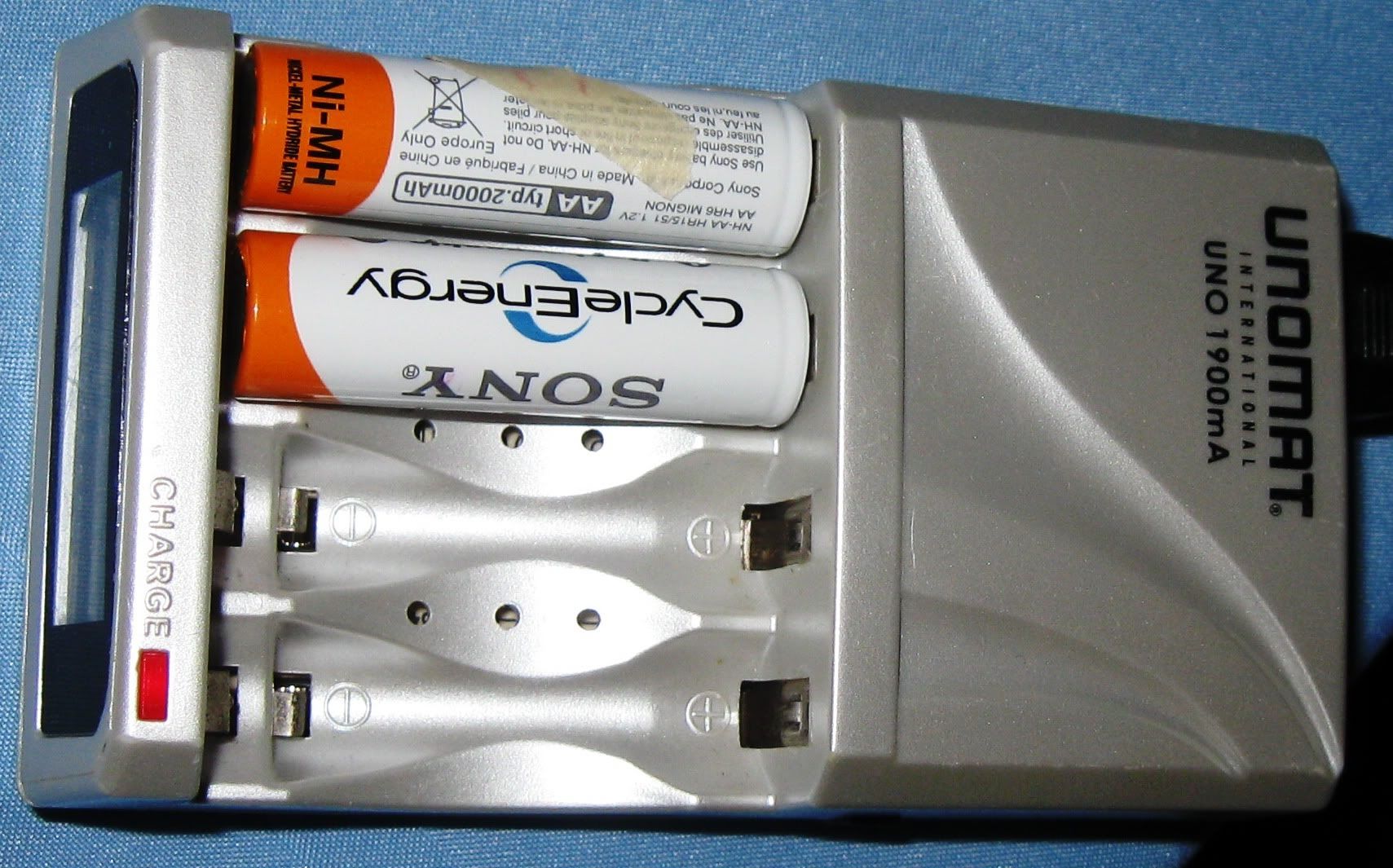
    I use 4 AA sony cycle energy LSD NIMH batteries for my digicam. Almost a year old by now. Here's a pic with my unomat charger


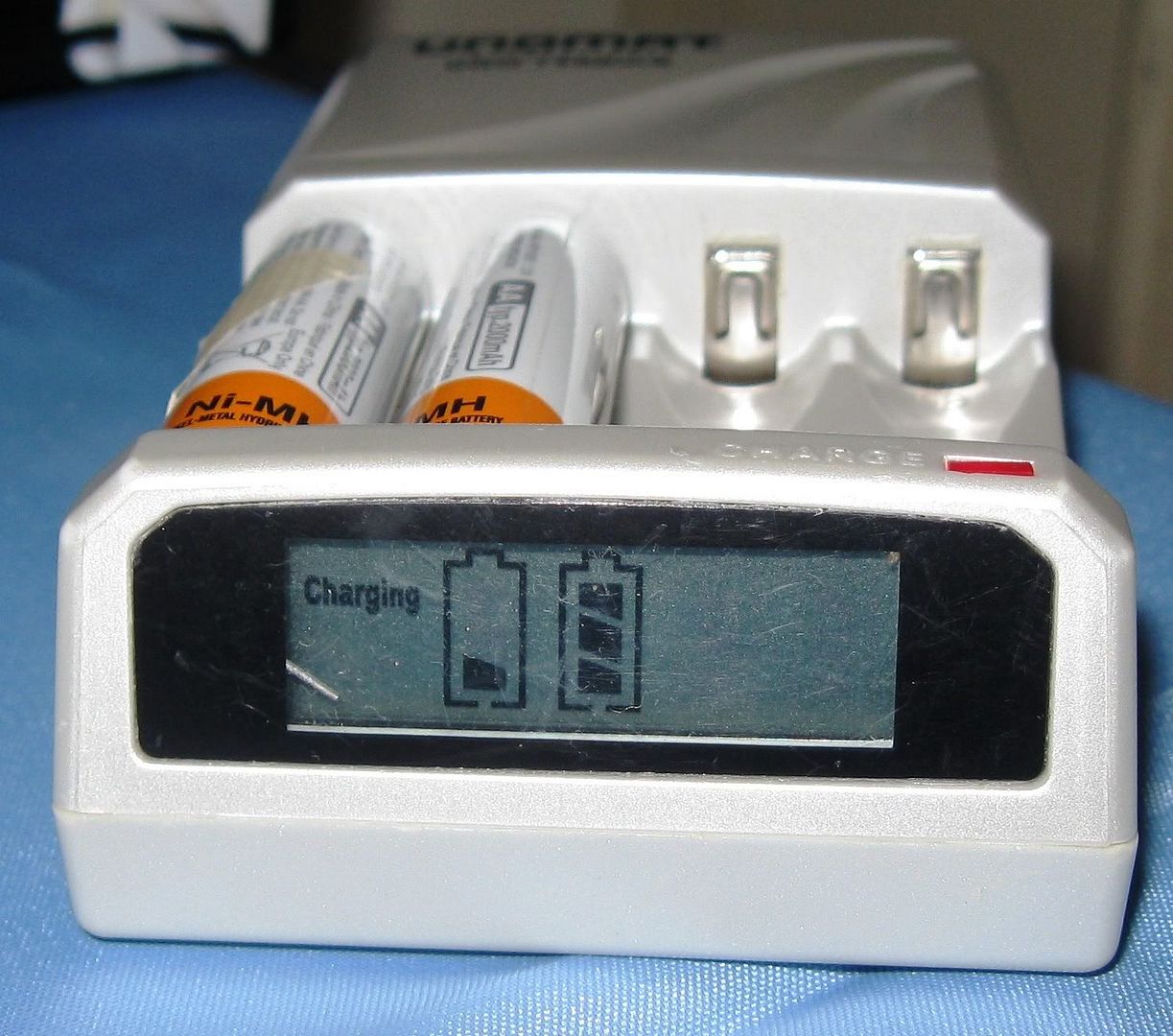
    I've noticed that sometimes my camera shows a low batt warning well before the expected time. I dont have exact figures, sorry. But today I noticed something. I was charging and one batt is more empty than the other.


    The #1 batt on the left has 1 of 3 bars blinking on the LCD display and the #2 on the right has 2 solid bars and the last bar is blinking. It only looks full because the camera caught it at the wrong time.I mentioned that I have 4 batts, and the other pair also has a weak one.

    I've always followed the dictum that for multiple cell devices, i.e. devices that use 2 or more batteries, always use the same batteries together. I do this by labeling the batteries. This is to avoid polarity reversal which is a situation where one battery is weaker and runs out before the others and the others attempt to charge the weak battery. And this damages the weak battery.

    What could have happened? My smart charger has individual charging channels so each battery is guaranteed to be fully charged. Its possible that over time, polarity reversal did happen. Or maybe, the weak cells were like that from the start and I just didnt notice or they got worse due to polarity reversal.

    Well, whatever, I relabeled the batts and now I'll test the weak and the strong batts separately. My digicam uses 2 AA batteries so I'll pair up the weak and the strong ones and see what happens.

    I also would like to note that I would never have known this if I used a lesser charger which did not have a LCD display.

    The end

    Thursday, October 6, 2011

    Steve Jobs should have seen a doctor earlier


    Steve Jobs should have seen a doctor earlier.


    smaller version


    In mid-2004, Jobs announced to his employees that he had been diagnosed with a cancerous tumor in his pancreas.[111] The prognosis for pancreatic cancer is usually very poor; Jobs, however, stated that he had a rare, far less aggressive type known as islet cell neuroendocrine tumor.[111] After initially resisting the idea of conventional medical intervention and embarking on a special diet to thwart the disease, Jobs underwent a pancreaticoduodenectomy (or "Whipple procedure") in July 2004
    - wikipedia


    This is a quick and dirty educational poster I made. The positioning of the text and the wording and translation was rushed but I think it gets the message across: Do not delay by trying out non proven treatments first, see your doctor early before the disease gets worse. The department of Health should use something like this in an educational campaign.


    All images copyright Apple inc.

    BTW: I am a surgeon in addition to being a tech geek and a blogger.


    the end

    Tuesday, September 27, 2011

    maryfi - turn your wifi equipped laptop into a hotspot

    Maryfi or mary-fi is a freeware app that turns your wifi equipped laptop into a wifi hotspot. Win 7 only AFAIK.


    I've tested it using a usb 3g modem (sun bro). Works great and not that difficult to configure. The program has a small PDF file with step by step instructions. It also supposedly works if your laptop's internet is coming in via LAN cable.

    But an interesting claim is that even if your laptop's source of internet is wifi, you can in turn re-broadcast the internet, turning your laptop into a repeater. So if laptop A is in range of the wifi router but another laptop B is out of range, but in range of laptop A, with mary-fi laptop A can repeat the wifi signal to laptop B. Pretty cool trick. Unfortunately I haven't tried it yet so I cant confirm because I need to borrow another laptop to do that.

    As of now, the website of mary fi is down. This is what I can see

    Forbidden

    You don't have permission to access / on this server.
    Additionally, a 403 Forbidden error was encountered while trying to use an ErrorDocument to handle the request.


    Fortunately, I have mirror links to the file, that is an alternate download link.Filename is  Maryfi-EN.exe (2.07 MB)

    LINK


    the end

    projectwonderful adszz

    Nuffnag Adzz

    Slashdot It

    Followers