Sunday, September 25, 2011

Sawoid - free game

Game Giveaway of the Day 

Sawoid is a breakout clone style game. Its free for today

Update: there seems to be a problem with the HTML code I got from the site. You just see a blank. But you can still click on it.

the end

Tuesday, August 23, 2011

second generation LED maglite repair

If you read my older posts here, you know that my family has a few second generation led maglite 2AA flashlights. My mom uses hers practically every day. Lots of scratches and its fallen from the table a few times. But this time, the light died.

I was dismayed. I though maglites were indestructible! I initially despaired of being able to fix it and bought a cheap cdrking LED flashlight as a temporary replacement. A few days later, my mom asked about the flashlight and she suggested that I disassemble it and try to repair it.

So now, I'm at my desk, poking and prodding at the flashlight. It was empty, i.e. no batteries. I removed the end cap and was poking the emitter head back and forth when this fell out. By the way, its normal for the emitter head to move like that.


Its a plastic holder with the positive electrode for the batteries on the posterior end and a circuit board inside. There are 2 electrical slots on the inside posterior end of the plastic holder which should match with the 2 contacts on one end of the board.

UPDATE: the circuit board can be inserted onto the  black plastic holder in 2 directions. Since the holder is pretty symmetrical, its difficult to know which direction is correct. So you can try using trial and error.

Photobucket

Photobucket

This gave me hope. I thought that if I could get at the emitter head, I might have a chance of ficing this. I thought about asking in a flashlight message board that I'm a member of. But before asking, I decide to search for "maglite dissasemble" in the forums. I found this.

I used two screwdrivers and just pushed the LED module out the other end. Now for reassembling...

OK so this gave me hope. I opted to use a  small hammer and a chopstick to remove the emitter head.

Photobucket

I placed the tip of the chopstick on the metal beside the actual LED and VERY GENTLY began tapping with a hammer. Eventually, the metal emitter head fell down through the back end of the flashlight body. A black plastic ring remained which fell out the forward end of the flashlight body. The ring serves to lock the head in place

UPDATE: you can use your fingers to press the metal emitter head down instead of using a hammer.

Photobucket

I just re-assembled the emitter head, the board and the black holder. The emitter head has 3 electrical slots on its back so the end of the circuit board with 3 electrical contacts goes there. But I noticed that there are no positive and negative signs and the board can go in 2 ways. I thought, OK go for broke, 50/50 chance. I'm just hoping that what maglite says about the electronics being vulnerable to reverse current flow isnt true.

UPDATE: The metal emitter head has writing on one side and the other side as seen in the picture above has no writing. For standardization purposes,  the side of the circuit board with the cylindrical black plastic cylinder with wire coiled around it and a "100" printed on top faces the side of the metal emitter head which has writing on it. And getting it backwards doesn't seem to fry the electronics if you don't try it for too long.

I placed the emitter in the back end of the flashlight body and placed 2 AA batteries after the emitter. I then pushed the batteries upwards with my finger. The emitter head is now in the proper place. I got the black ring and pushed it through the front end of the body and with a gentle push, locked the head in place. I then tried the flashlight, IT WORKS!!!!

the end

Monday, August 22, 2011

fixated on kilometers per liter?

Times are hard so we have to save money. If you have a car, one of the ways you save money is calculating your km/l performance, i.e. mileage, every time you fill up and find ways to increase it. Yes it helps a lot, but is it the be all and end all? Maybe there is a measurement thats slightly more accurate.

I though that well, since a lot of people are paid in monthly wages, maybe you should be looking at your transport related expenses also in a per month manner. You could measure liters per month or even better money spent on gas per month.

The old km/l is pretty good as it is but there are a times where it can be inaccurate. What if instead of your inner city commute with the traffic jams, you took a long cut that happens to bypass traffic because it uses a long stretch of highway? What if your usual routine involves a route that gets stuck in traffic (to work) and a less than 1km commute with no traffic (maybe to a mall or something) and you decide to walk that < 1 km? Both would negatively affect your km/l values but would decrease the money per month value.

Think about it.


the end

Sunday, August 21, 2011

case fan filter enlarger

If you use 3m dust filters on your PC case's intake fan and you room is very dusty like mine, you'll know that as a consequence of the efficiency of 3m Filtrete air filter's efficiency, they do clog up quickly. Now one way of increasing the time in between filter changes is to simply increase the surface area of the filter. This also has the advantage of slightly decreasing airflow resistance.

You can do it in 3 ways. The usual way is corrugations which as a bonus, do not increase by much the volume of the entire filter apparatus, i.e. it doesnt become bulkier. Example


The second way is to change the filter from a flat surface to something 3D like a hemisphere, a cuboid or a pyramid. However, I haven't been successful at figuring out a way to do the first 2, I'm forced to do the third method.

The third method keeps the filter flat but simply increases the X and Y dimensions. As a disadvantage, you will increase the volume of the filter apparatus i.e. make it bulkier and you will need an adaptor which in this case is also an enlarger.

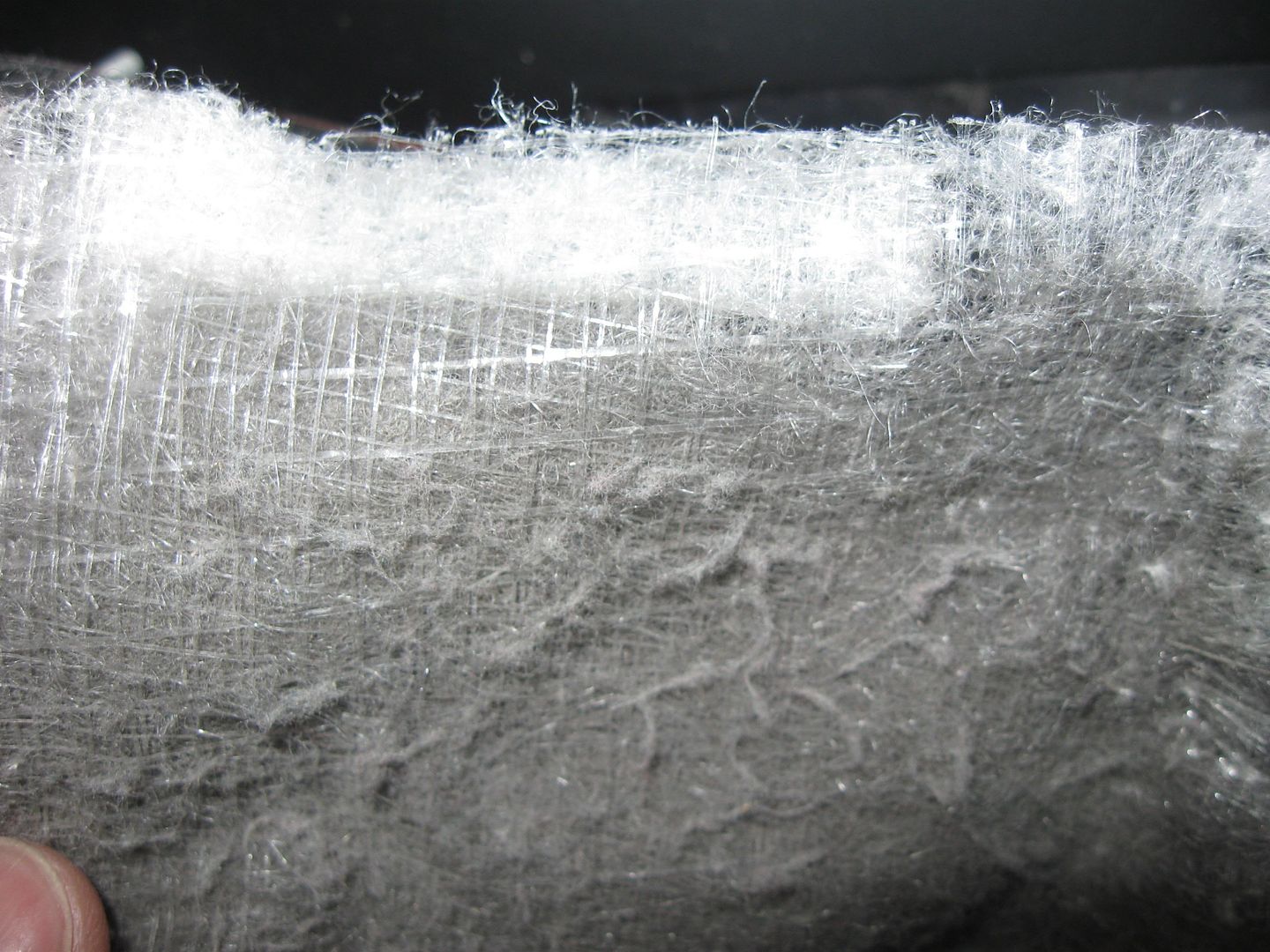
The 2 pics below are my filter on a 120mm intake fan after around 3 weeks. Pretty dirty.


OK so we need an adaptor/enlarger. I am going to make one from a box, or anything vaguely rectangular. I was thinking about the old mythbusters adage, if its worth doing its worth overdoing.


And that is why I got a rather large box. Its plastic so its light and cheap and not too hard to cut. Since only the X and Y dimensions need to be big, I can skimp on the Z dimension, i.e. its tall and wide but not deep. I present to you, an A4 document case. Hey, the larger filter surface area does mean it will take a longer time to clog up. Bulkiness and looks are of secondary importance to me so I will put up with this.

Photobucket

First on one side I mark the outline of the fan and the 4 holes for the screws.

Next I flip to the other side and drill a hole then move the drill bit sideways to create an opening for the tip of the tin snips to get something to hold on to.

Photobucket

While cutting with my not too sharp tin snips, The material started to crack so I placed masking tape around the perimiter to reinforce it. You may tidy up the cut edges with sandpaper, a file or a sharp knife.

Photobucket

Now flip to the fan side and repeat. The holes for the screws are already drilled and they are under the masking tape.

Photobucket

Photobucket

Photobucket

Now I think I made the hole a bit too small and the dull tin snips were hard to use so I just decided to make a few cuts and bend the edges to enlarge the hole size. Looks untidy but my hands were tired from using the tin snips

Photobucket

I next added self adhesive velcro strips, the hook side. I had to throw away the loop side.

Photobucket

I then re screwed it back on the side plate of the PC case. The Orange plastic thing is a previously existing. 120mm to 90mm fan adaptor. I didnt feel like cutting up my case that day.

Photobucket

Cut the 3m Filtrete filter to size and apply. The hooks of the velcro will catch the filter. Optionally you could tape the edges.

Photobucket

I also taped the seam of the document holder to make it more or less air tight.

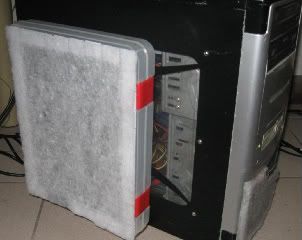
And its done!

Photobucket


Link to a smaller version of the above picture.


The end

room fan air filter

If you read my previous posts, you know that my room is very dusty and it affects my PC. One way to reduce the dust is to put an air filter in my room. Its not gonna be near 100% like placing filters on my windows and sealing the door and cracks, but its easier to do and its better than doing nothing. BTW, here's a discussion of my PC's positive pressure ventilation fan setup.


I decided that since I already have an electric stand fan in my room, I'm gonna place the filter there. Of course, placing a filter on a fan will reduce the airflow so to compromise:
  1. Don't cover 100% of the fan
  2. Make sure the fan is more than powerful enough to provide cooling. The weather is autumn-ish in the philippines with noontime temps maybe 32 degrees Celsius max so I swapped out my 125 watt stand fan with a 75 watt one. It is more than enough to provide cooling for the current weather. Next year when summer comes around and temps climb to 38 and more, I'll bring back the bigger fan.
Clarification: by "more than powerful enough", I mean that the fan is powerful enough that even if the airflow is reduced by the filter, it would still be enough to cool you.
    Making the filter is dead simple. I started out with rectangle of foam type air filter and just cut 2 slots on one side for the fan's motor. Fold the cut portion up and place it behind the fan. Thats it. Friction and the fan suction will hold it on. You could add a few large binder clips if you want.

    Photobucket

    I estimate maybe 2/3 of the surface area of the fan is covered.


    This closeup shows the filter after around 3 weeks. Notice the color contrast.

    Photobucket

    the end

    Saturday, July 16, 2011

    channel surfing benchmark for televisions


    I have used CRT TV's all my life. Even now my TV is an old Sony CRT probably >10 years old. Since we got  cable television around 10 years ago, I have rejoiced in the freedom of many channels and have adopted a channel surfer's lifestyle. By channel surfing I mean I frequently just sit at the TV, pressing the next channel button on the remote control until I find a nice tv show. Although recently with the advent of the internet I could just look at the online TV schedule.

    As an impatient channel surfer, I press the next channel button all the time. With my sony CRT tv, it takes a split second to change from one channel to another. Some of my relatives bought a cheaper model sharp 32 inch LCD tv. When I tried it I was disappointed because the time it takes for me to change the channel is appreciably longer than on my old CRT TV. I thought it was because this was a lesser known brand and/or a cheaper model. Unfortunately, I did not take any measurements. This can get annoying.

    But then I was able to use a samsung 5 series 37 inch LCD TV in a 5 star hotel. It also has a delay when changing channels. With an unscientific test, 10 channel changes took 14-15 seconds. I'm no expert but samsung doesn't seem to be a lesser brand and a hotel wouldn't use cheap stuff.

    This got me thinking. Is this delay an unintended consequence of LCD technology? Maybe it can be fixed if the TV manufacturers really wanted to. Maybe some people will get used to it. I don't know. But if you are a channel surfer and buying your first LCD tv, this benchmark might be nice to know. But as of now (I google around a bit), AFAIK, no one is talking about this problem so benchmarks like these might not exist.

    Note: if you have a cable TV set top box, this issue is moot since the channel change speed is dependent on the set top box.

    Wednesday, July 13, 2011

    Mass effect 2 PC review, the flaws


    Hi. This is my review of mass effect 2 for the PC. First of all, I want to say that this is quite a good game. However its not perfect. There are traces of consolitis (it has a console heritage), a few bugs and other design choices that did not sit well with me. So I'll concentrate on the flaws mostly. Lots of other reviews have praised this game (which it deserves) so to be different and avoid repetition, lets concentrate on the flaws.
    Update: I should have also mentioned that I'm concentrating on  the technical side so I wont cover the story, character development, etc.

    I bought mass effect 2 (digital deluxe edition) from gamersgate at a good discount. I downloaded this game in bits and pieces over several months. A lot of the gamefiles are RAR files. This is actually a good choice since I can easily manipulate and peek into the install files. When I tried to install the game, the installation proceeded then unexpectedly stopped. I googled the error and found no help except to redownload the install files. I tried again and this time I watched the installer. There is a small status bar which shows which file is being processed. I found the file where it stopped. It was one of the RAR files. A big one, 2 gigs. I opened it in winrar and tested it and found an error. OK, no choice I need to re-download. Most likely before when I was downloading, the PC either hung, the net connection dropped or the power went out or something.

    OK, I deleted the file and started the gamersgate download. I was dismayed when the progress bar of the download went all the way back to 20%. Thats ludicrous. The 2 gig file only comprises around 16% of the 12 gig download size. It should only go back to 84%. In the first case, it looks like gamersgate's download manager has no option to verify or test file integrity like most torrent clients and Steam and does not have the capability to download only one file. If one file is missing, a group of files are downloaded. OK, I re downloaded. Again there was a problem. This time I tested all the RAR files and found 2 files with errors, both greater than 1 gig, which failed testing. This time I did something different. I observed the subdirectory where the files are being downloaded and I noticed that the file I deleted first becomes a zero sized file then becomes larger and larger as the download progresses. After it is finished, the download manager then deletes another file and repeats the process. I now had a plan.

    OK, this is how I avoided a lengthy re-download. First, I deleted the 2 files with errors then I copied the rest of the perfectly good files. I then started the download. The progress bar goes back to 20% and I wait till the 2 files are finished downloading. After the 2 files are finished, the download manager then deletes a third perfectly good file and starts downloading. I stop the download at this time. I copy over the backup of the third file. OK, now I have all the necessary files. I start the install process and it works.

    Whew, thats a lot of work. OK to the game itself. Let me list down some of the flaws.   alot of them are related to consolitis.

    If you import an old mass effect 1 save, the choices you made carry over. If you do not have an old ME1 save, the game makes some default choices for you which is a bit annoying for me since the default choice is not a 100% paragon choice and I prefer paragon.  But its an understandable compromise. There is a DLC, mass effect 2 genesis which allows you to make these choices, but its not free.

    The intro movies cannot be skipped. This also applies to some FMV cutscenes specially the ones at the start of the game. The movies are BIK or Bink movies so you can get a BIK movie viewer and watch them and decide which you dont want then rename the files. Or you can google "mass effect 2 no intro" and download a mod which does it automatically

    Loading takes too many steps. First you have to double click on the icon on the desktop, which brings up the menu.
    Then after the intro movies, you get a "press any key to continue page". At least it isnt "press start" to continue which would have been insulting to PC users.

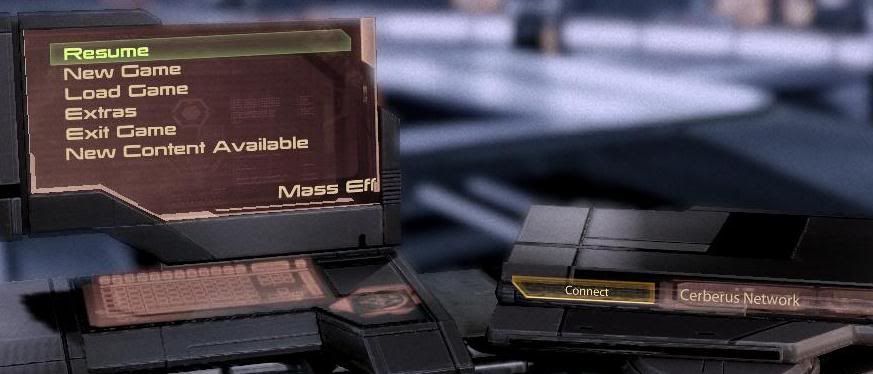
     Next yo get to the main menu. But there's a little annoyance. Look at the pic below.


    Initially the screen on the Left is blank, then 1-2 seconds later, the menu items Resume, new game, load game, extras and exit game appear. But if you try to click on them nothing happens. A few seconds later the new content available menu option appears and a few secodns later on the DVD like device on the right, a connect to cerebrus network button appears. Its kinda annoying that you have to wait for all of these to finish before any of the menu options work.


    In the graphical options, the choices are pretty limited, also the fault of consolitis.

    Saving a game is pretty fast but level loads and loading a game are slow. This is most pronouced when riding the elevator on the normandy. Fortunately, the normandy elevator bug is mostly fixed with the 1.02 patch but loads still take a fair amount of time.

    A really big bug is that the spoken dialog and sound is sometimes delayed in some cutscenes. I've googled about this bug and it seems there is no fix out yet. I did try updating my pc's audio drivers but it did nothing.

    Finally, I have an issue with the heavy weapons.  Most other weapons come in different versions which are well balanced and different advantages and disadvantages like balancing rate of fire with accuracy and damage per shot. But for heavy weapons, the mechanics of some of the weapons suck. Firing should be simple, click left button and boom. With some of them, click the left button and nothing happens. You got to HOLD the left button, wait for it to charge up and then release. Good luck if you get hit by enemy fire while waiting for the weapon to charge up.

    Ammo for heavy weapons is also scarce. This can translate to only 1 or 2 shots for the nuke.

    Level design is slightly linear for missions. Although outside of missions you can go pretty much anywhere.

    The run and take cover button is the same, the space bar. Guess what happens if you are standing with cover in fornt of you and an enemy firing at your back. You press space bar and try to run but instead you crouch in front of the barrier, still taking fire.

    Ok thats it. Let me repeat, this is a great game but it isnt perfect. I'm just focusing on the flaws.

    The end


    update: OK a couple of people in the comments were asking (not politely) why I needed to describe my troubles downloading the game. Well, the problems showed up a flaw in gamersgate's download manager, the inability to download only one file. I'm sure I won't be the only person in the world who would experience problems like this. I'm merely sharing my workaround which avoided wasting bandwidth re downloading several gigs worth of perfectly good files. Don't you think thats knowledge worth sharing? Not everybody has a fast net connection and some people have download caps.

    update: some people have suggested that this is not a review. That suggestion has merit. Maybe I should call it a "list of bugs" or something. Anyway, in the end, its possible that someone may learn from the mistakes and bugs I've pointed out here.

    projectwonderful adszz

    Nuffnag Adzz

    Slashdot It

    Followers