I covered this topic before. But if it doesnt work, there's another workaround. I got the idea from here. So thank you. I'm reposting what I did to fix it here.
Okay first some background. Your problem is that Office 2010/2013 apps dont print but other programs like notepad, browsers, etc can print. You already tried re installing office, changing to or from 64/32 bit office, and re installing the printer driver. You even tried the tip in my other post. If those dont work do this.
I'm doing it in win 8 64 bit but it should work the same for win 7.
* Go to control panel.
* Go to Devices and Printers.
* Click on "Add a printer". I chose at random the LPT1 and the HP deskjet 4320.
* Do not make it the default printer.
Thats it. MS office should print OK from now on.
Showing posts with label printing. Show all posts
Showing posts with label printing. Show all posts
Tuesday, January 22, 2013


Wednesday, January 9, 2013
Ms Office 2010 does not print
Have you ever installed MS Office and it doesnt print however other programs like browsers, notepad, etc do print?
The first thing you should do is check your printer drivers.
If that doesnt work a workaround is to install a PDF converter, preferably freeware like Cute PDF. Set cute PDF as the printer, print and save as a PDF file. Then open the PDF and print.
But a workaround is not satisfying. Here's the real fix.
For MS publisher, go to the FILE tab then click options. Click Advanced then scroll down to Print. There's only one option : Use XPS enhanced print path when available. Un check this.
For MS word, go to the FILE tab then click options. Click Advanced then scroll down to Print. There are several options. Try unchecking Print in background.
A reboot might be necessary.
the end
The first thing you should do is check your printer drivers.
If that doesnt work a workaround is to install a PDF converter, preferably freeware like Cute PDF. Set cute PDF as the printer, print and save as a PDF file. Then open the PDF and print.
But a workaround is not satisfying. Here's the real fix.
For MS publisher, go to the FILE tab then click options. Click Advanced then scroll down to Print. There's only one option : Use XPS enhanced print path when available. Un check this.
For MS word, go to the FILE tab then click options. Click Advanced then scroll down to Print. There are several options. Try unchecking Print in background.
A reboot might be necessary.
the end
Wednesday, May 18, 2011
replacable ink nozzles are better than fixed ink nozzles
Inkjet printers work by firing ink through very small holes or nozzles. A small hole is easy to clog.
There are 2 things that can clog a nozzle: lumps and hardened ink. Lumps can be either ink ingredients that did not dissolve properly in the manufacturing process or foreign contaminants.
Hardened ink is usually caused by ink that stays in the nozzles when the printer is left unused for too long. How long? Its hard to say. I usually like to print something at least once a week, or at least power cycle the printer once a week. A printer when turned on usually squirts a small amount of ink into the waste pad to clean out the stale ink. That might be enough. The ink nozzles are covered by a cap whenever the printer is properly powered off to minimize exposure to the air which causes the solvent to evaporate and the ink to harden but it still happens. <source>
The frequency of lumps and foreign contaminants is determined by the quality of the manufacturing process both for original inks and for refills. Almost all original inks are of high quality while for refill inks, the quality is more variable. Also, for refills, there is a theoretical chance of foreign contaminants like dust entering the system unless you use a refill system that is not exposed to air.
If you do get a clogged nozzle, you can use your printer's cleaning utility. If that doesnt work you can get more aggressive like emptying the cartridge of ink, flushing it with cleaning fluid and filling it with cleaning fluid and running a clean cycle on the printer. If the nozzles are replacable you can try soaking the nozzles in cleaning fluid. There are several commercial cleaning fluids available but distilled water sometimes works.
If however, cleaning doesnt work, then you have no choice. You have to replace the nozzles. If you have a fixed nozzle then you have to replace the printer. If you have replacable (also known as disposable) nozzles, then you can merely buy a new cartridge. This is the big advantage of replacable nozzles.
wiki article on nozzles
So yes, its possible that by chance, your nozzles wont clog. However ...

If it doesnt, then you're ok. But if you are not lucky, then having replacable nozzles is an insurance policy. So the bottom line is :
note: that to be fair, I did not mention any printer brand. My own personal printer is one of those major brands which favors replacable ink heads.
the end
There are 2 things that can clog a nozzle: lumps and hardened ink. Lumps can be either ink ingredients that did not dissolve properly in the manufacturing process or foreign contaminants.
Hardened ink is usually caused by ink that stays in the nozzles when the printer is left unused for too long. How long? Its hard to say. I usually like to print something at least once a week, or at least power cycle the printer once a week. A printer when turned on usually squirts a small amount of ink into the waste pad to clean out the stale ink. That might be enough. The ink nozzles are covered by a cap whenever the printer is properly powered off to minimize exposure to the air which causes the solvent to evaporate and the ink to harden but it still happens. <source>
The frequency of lumps and foreign contaminants is determined by the quality of the manufacturing process both for original inks and for refills. Almost all original inks are of high quality while for refill inks, the quality is more variable. Also, for refills, there is a theoretical chance of foreign contaminants like dust entering the system unless you use a refill system that is not exposed to air.
If you do get a clogged nozzle, you can use your printer's cleaning utility. If that doesnt work you can get more aggressive like emptying the cartridge of ink, flushing it with cleaning fluid and filling it with cleaning fluid and running a clean cycle on the printer. If the nozzles are replacable you can try soaking the nozzles in cleaning fluid. There are several commercial cleaning fluids available but distilled water sometimes works.
If however, cleaning doesnt work, then you have no choice. You have to replace the nozzles. If you have a fixed nozzle then you have to replace the printer. If you have replacable (also known as disposable) nozzles, then you can merely buy a new cartridge. This is the big advantage of replacable nozzles.
wiki article on nozzles
So yes, its possible that by chance, your nozzles wont clog. However ...

If it doesnt, then you're ok. But if you are not lucky, then having replacable nozzles is an insurance policy. So the bottom line is :
All nozzles will probably eventually clog so the best policy is to have replaceable nozzles.
note: that to be fair, I did not mention any printer brand. My own personal printer is one of those major brands which favors replacable ink heads.
the end
Monday, September 20, 2010
cheap 5x8 paper
SM supermarket sells cheap 4x8 paper. No lines (unruled). Bound with padding glue.
PhP 36 for ~ 500 sheets.
This may be of use if you want to print stuff this size like reciepts, prescription pads, etc but dont want to pay for professional printers. With refilled inkjet printers, it might be much cheaper specially if the print run is small.
PhP 36 for ~ 500 sheets.
This may be of use if you want to print stuff this size like reciepts, prescription pads, etc but dont want to pay for professional printers. With refilled inkjet printers, it might be much cheaper specially if the print run is small.
Sunday, February 14, 2010
inkless printer

A Japanese company called Sanwa Newtec has developed a printer that works without toners, ink or (copy) paper. ThePrePeat RP-3100 is rather based on a line thermal head and special paper that’s made of PET plastic and can be reused over and over again.
In other words, if you have a sheet that you don’t need any longer you can insert it back into the printer (where it gets “cleaned”) and immediately print out a new document in one go. Each of those special sheets can be used 1,000 times, saving not only the costs for 1,000 sheets of copy paper but also 5.7kg of CO2 for the environment.
The printer prints in black and white only, but at least you need neither toners nor ink (look here for a detailed price comparison with conventional printers).
One sheet costs $3.35, while the PrePeat itself is priced at $5,600. It’s already available in Japan (people living outside Japan can make an inquiry here). Obviously, Sanwa Newtec is justifying this price with the low running costs and the eco-friendliness of the device.
in reference to: Toner-, ink- and paperless printer (video) (view on Google Sidewiki)
Monday, November 30, 2009
HP original cartridge - cheap at PC express
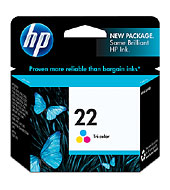
Yesterday I went to Octagon in a small Robinsons mall in manila. I was trying to buy HP 22 ink cartridges for my HP D2460 printer. The old one was refilled once and is now not working well. I was expecting a price of PHP700 or so, but the price was 800+. Just now, PC corner's website lists the price as PhP 898.
Well, today I went to PC Express, Pampanga. The price of the HP 22 was 590. HP 21 black is 700, the combo 21/22 pack is 1000+ php. Hey thats cheap, 590 pesos. I was a little worried because the ink did not come in a box, instead it came in the foil pack which usually is inside the box. Must be OEM or something
I havent installed it yet. I'll blog back to report later.
BTW, my hp 21 cartridge has been refilled 2x and is still OK.
UPDATE: Yep it fits. Here is the picture.
2 thumbs up to Pc express

Subscribe to:
Posts (Atom)
projectwonderful adszz
