Friday, March 4, 2011

crysis2 demo benchmarks


Here are some crysis2 demo benchmarks. Note that this is only DX9. When you use DX 11 expect your framerates to be 20%-40% slower.

source

update: the specs of the pc used was
CPU ProcessorIntel Core i5 760@2.8GHz
Motherboard MotherboardAsus P55
RAM MemoryChaintech DDR3-2000 4GB (2GB × 2)
Hard drive HDDSeagate Barracuda (Seagate Barracuda) 7200.12 1TB
source

the end

Friday, February 25, 2011

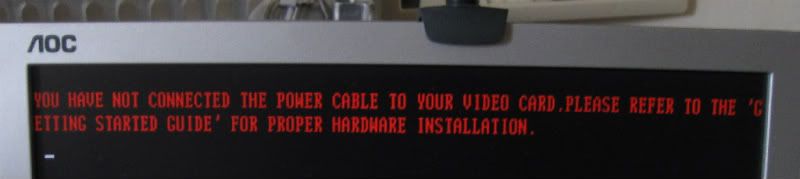
The power cable is not connected to the video card

I have a june 2008 vintage PC. A core 2 duo e8200 and a MSI radeon 4850. The power supply or PSU is a dec 2009 vintage OCZ mod X stream pro 600w.


Recently I've been getting this error message. It pops up in red letters during POST, along with a beep - pause - beep  sound. 

"The power cable is not connected to the video card. Please refer to the Getting Started guide for information on proper hardware installation"


This happens if I turn on my PC within say 30 minutes or so of turning it off or if I reboot or if I go to the BIOS setup end exit. Otherwise the PC works normally. Games work.


Using a little common sense (confirmed by googling), I theorized some possible diagnoses. 

  • video card
  • PSU
  • 6 pin cable
  • video card's sensor or power chip
My PSU is modular so I tried changing the 6 pin cable with the spare one in the PSU's box. Didnt work. There are 2 free slots on the modular PSU where I could plug the 6 pin pci-e cable and both did not work. A visual inspection of the video card, motherboard and PSU (it was still in warranty so I did not open it and I just looked inside the grilles).

I dont have a spare PSU or video card available so for a week or so I ended up keeping the PC on all the time (except when I went to work or slept for the night) since it does work as long as I let it rest 30 min or so after turning it off.

Eventually I bought a 2 x molex to 6pin pcie cable. It solved the problem.


I have to assume that the problem lies within the PSU.  I am theorizing that the molexes and the 6 pin power cable are separate, maybe connected to separate rails or something and the rail that powers the 6 pin cable is faulty while the rail that powers the molexes still works. 

the end


Update: after a few days, I'm again getting the red flashing letters if I don't rest the PC for maybe a half hour. I contacted OCZ and they said that the RMA center for OCZ is in taiwan. Its not worth it to mail the PSU to taiwan so I bought a HEC cougar 550w  for php 2700 at PCHub. Unfortunately, this new PSU does not fix the problem. I have to assume that it is the video card. The video card is probably sending a signal to the PC that it lacks power.


Bummer. I'm thinking of buying a radeon 6870 or a geforce 560ti. The geforce has slightly higher power consumption and benchmarks. Both cost 11,000+ pesos. Both can be run by a 550w PSU.

Update: The problem is fixed. It really was the video card. I'll blog about it later


the end

Friday, February 4, 2011

DUMeter name your price


DUMeter is a nifty little program. Its a network monitoring tool. Primarily what it does is show a graph in a small window. The graph shows the data coming in and out of your PC via the network. So when you download a file off the net or open a webpage you see the graph showing activity.

It has other nifty features like an "alert" whenever more/less than X megabytes of data was uploaded/downloaded/both in Y minutes. The alert consists of a couple of options. I usually use the "shut down computer" if less than X megs were downloaded in Y minutes option. I use this as a safeguard against wasting energy. Imagine if you left your PC on overnight downloading then the internet went down, your PC would still be on, but it would be doing nothing.

Another feature is it can say how much data you have up/downloaded. There are reports that can be customized to hourly, daily, weekly, monthly. You can even export to a spreadsheet.

But this is not freeware. It costs $29.99. I have not seen any freeware with this many features. However, dumeter's publishers allow you to haggle. This is a link where you can make a single offer and if the offer is accepted, you can buy dumeter at the lower price that you specified.

Try it

UPDATE: this offer may not be available in all countries

Monday, January 24, 2011

The disadvantages of the steam client

STEAMWORKS is a digital distribution game service. This is their website. To download and run a steam game, you have to run the steam client or software. Everytime you run it it accesses the internet to validate your login and password. It can store your login and password for convenience. If it detects that there is no internet connection, it will offer to run in offline mode.

Steam has its own disadvantages. the steam client and some steam games can take many seconds to connect to the steam servers if something is wrong with your internet connection or router. Again it depends on your ISP if it is reliable or not. Sometimes I sometimes "hack" games to bypass the steam verification to be able to load up faster. Morally I believe that its OK since I paid for the game and I do not give or sell the game to other people, only I play it. Although the steam client has an offline mode, there is no way to force it to go to offline mode every time. The closest is to run it in offline mode then exit. The next time you run it it will ask you if you want offline or online mode. The steam client takes many seconds to shut down, and if its active when you shut down windows, it will add those many seconds to your windows shutdown time.

Special danger. In some cases, a combination of internet and/or router problems can fool steam into thinking that 1. there is an internet connection, therefore there is no reason to suggest going into offline mode and 2. steam cannot connect. I have not been able to replicate the conditions reliably but it has happened to me several times. If that happens, steam will delete the current password stored (even if you set steam to remember your password), assume that the current password is wrong  and pop up an error message, asking you to input a new password and it will refuse to go into offline mode.  Lets say your internet had say scheduled maintenance for say 1 week and it cut off in the middle of steam's logon sequence. If the timing is right, steam will, as explained above, delete your password and ask for a correct password. When that happens, since your net is down, you can't logon for 1 week. If you can't log on, you can't play your games until you log on. Workaround is a secondary internet connection like a 3g usb stick or a "hack", as mentioned above.

Saturday, January 15, 2011

Philippine Blog directory

Someone is starting a directory for Filipino Blogs.

You can see it here. Currently its pretty empty but hey, lets see if it can grow.

PH Blogs

Friday, January 7, 2011

local shortage of wifi routers

Last november I was in the market for a new wifi router so I went around my local SM mall in San Fernando Pampanga and wrote down the available model numbers and prices so I could make a better decision as to what to buy.

2 days ago, I was in one shop and I noticed that only one model of router was available. Last november there were at least 4 brands available. Intrigued, I went to a total of 5 PC stores in my local SM mall. All of them have severe shortages of wifi routers compared to what I saw before. I talked to the employees in 3 stores and they said that they were all sold out. New stocks should arrive in a week or so.

Well its expected since its after the christmas season and a lot of people must have bought them as gifts. I did not really check on other items but the stores seemed a little roomier than before. So early january is not a good time to buy a wifi router because there is a shortage. Wait for new stocks and new models to arrive.

Tuesday, December 21, 2010

2010 Steam Christmas sale

The 2010 christmas Steam sale is on! Every day there are specials

Check out the STEAM website

projectwonderful adszz

Nuffnag Adzz

Slashdot It

Followers