Showing posts with label video card. Show all posts

Friday, March 4, 2011

crysis2 demo benchmarks


Here are some crysis2 demo benchmarks. Note that this is only DX9. When you use DX 11 expect your framerates to be 20%-40% slower.

source

update: the specs of the pc used was
CPU ProcessorIntel Core i5 760@2.8GHz
Motherboard MotherboardAsus P55
RAM MemoryChaintech DDR3-2000 4GB (2GB × 2)
Hard drive HDDSeagate Barracuda (Seagate Barracuda) 7200.12 1TB
source

the end

Friday, February 25, 2011

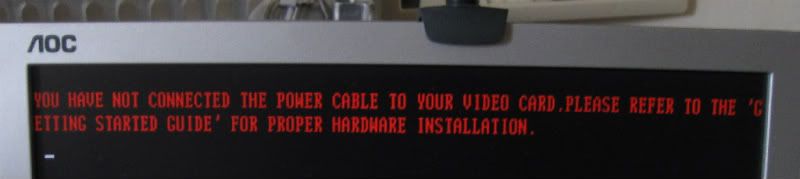
The power cable is not connected to the video card

I have a june 2008 vintage PC. A core 2 duo e8200 and a MSI radeon 4850. The power supply or PSU is a dec 2009 vintage OCZ mod X stream pro 600w.


Recently I've been getting this error message. It pops up in red letters during POST, along with a beep - pause - beep  sound. 

"The power cable is not connected to the video card. Please refer to the Getting Started guide for information on proper hardware installation"


This happens if I turn on my PC within say 30 minutes or so of turning it off or if I reboot or if I go to the BIOS setup end exit. Otherwise the PC works normally. Games work.


Using a little common sense (confirmed by googling), I theorized some possible diagnoses. 

  • video card
  • PSU
  • 6 pin cable
  • video card's sensor or power chip
My PSU is modular so I tried changing the 6 pin cable with the spare one in the PSU's box. Didnt work. There are 2 free slots on the modular PSU where I could plug the 6 pin pci-e cable and both did not work. A visual inspection of the video card, motherboard and PSU (it was still in warranty so I did not open it and I just looked inside the grilles).

I dont have a spare PSU or video card available so for a week or so I ended up keeping the PC on all the time (except when I went to work or slept for the night) since it does work as long as I let it rest 30 min or so after turning it off.

Eventually I bought a 2 x molex to 6pin pcie cable. It solved the problem.


I have to assume that the problem lies within the PSU.  I am theorizing that the molexes and the 6 pin power cable are separate, maybe connected to separate rails or something and the rail that powers the 6 pin cable is faulty while the rail that powers the molexes still works. 

the end


Update: after a few days, I'm again getting the red flashing letters if I don't rest the PC for maybe a half hour. I contacted OCZ and they said that the RMA center for OCZ is in taiwan. Its not worth it to mail the PSU to taiwan so I bought a HEC cougar 550w  for php 2700 at PCHub. Unfortunately, this new PSU does not fix the problem. I have to assume that it is the video card. The video card is probably sending a signal to the PC that it lacks power.


Bummer. I'm thinking of buying a radeon 6870 or a geforce 560ti. The geforce has slightly higher power consumption and benchmarks. Both cost 11,000+ pesos. Both can be run by a 550w PSU.

Update: The problem is fixed. It really was the video card. I'll blog about it later


the end

Friday, September 17, 2010

AMD catalyst drivers on steam


AMD catalyst drivers are now on steam

Just install/run the steam client and click on the menu
STEAM > update amd video drivers

Thursday, July 8, 2010

Nvidia caught hobbling PhysX!!


 Okay,  we all know what physX does. It adds more special effects to games and makes them even prettier and more realistic. But if you run physX on your CPU only, its very slow. If you have an  Nvidia video card, the physX runs on the video card and its much faster. If you have an ATI video card and you want physX, it has to run on the CPU, and did I mention that its very slow?

Now evidence has surfaced that physX is intentionally hobbled by Nvidia. First, it only runs in one thread. Right there we have a big issue, but it gets better. The link below claims that in essence the physX code is written old style, designed for processors like the pentium 2 and below. Now if it were re-written correctly, designed to take advantage of modern processors, we should expect a 1.5-2x speed improvement. Now if you add to that support for more cores, I think you would be able to run physX comfortably on a modern CPU.


Link

Monday, June 7, 2010

fastest integrated video card

Most integrated video cards tend to be anemic like low end intel video cards. But not this one.


LINK


The motherboard is an X58 mainboard which is compatible with a Core i7 processor. The integrated video is a  "full-fledged ATI Radeon HD 5770". Wait, there's more, there's also an integrated Lucid Hydra chip fused onto the PCB and 2 pci-e slots. If you dont know what the licud hydra chip does, it means you can slap 2 nvidia cards, 2 ati cards or 1 of each brand into the pci-e slots and all 3 can sli/xfire with each other. See this link for the wikipedia entry on lucid hydra.

There are some unanswered questions.
* How about the cooling?
* Will this 5770 have its own ram or will it share ram with the motherboard? With shared ram I predict this will be severely bottlenecked, probably  more than 50% slower than a normal 5770.
* If it has its own ram, how does it compare to a normal 5770?
* Is this a new version of the hydra  because older versions have a few bugs and buggy drivers

Since its not out yet, we dont know about the price.

Wednesday, February 3, 2010

Radeon HD 5870 PCI-Express Scaling


A lot of people have old pci-e 1.1 motherboards and they always wonder if this will bottleneck their ultrafast vid card. So it looks like previous guesses were right. The bottleneck is small

BTW, pci-e 2.0 8x is equivalent in speed to pci-e 1.1 16x
in reference to: techPowerUp :: AMD Radeon HD 5870 PCI-Express Scaling Review :: Page 25 / 26 (view on Google Sidewiki)

projectwonderful adszz

Nuffnag Adzz

Slashdot It

Followers