Showing posts with label utilities. Show all posts

Friday, September 17, 2010

AMD catalyst drivers on steam


AMD catalyst drivers are now on steam

Just install/run the steam client and click on the menu
STEAM > update amd video drivers

Friday, June 18, 2010

Soluto Boot optimizer


This is a nifty freeware application. It does several things
  • It analyzes your PC as it boots and lists down all the programs that load on startup
  • It tells you how many seconds each program adds to your boot time
  • It gives you an estimate of how long it will take your PC to boot
  • You can disable a program from loading on startup or delay it from loading until your PC is idle
  • It uses a wiki style database to categorize each program into "optional", must load during boot and "you can disable this if you know what you're doing"
  • It also uses the database to tell you what will happen if you do disable that program
  • You can add comments to the database. This helps the website recognize more programs
  • The program monitors all programs you install on your PC and it even graphs the boot time so you can see how installing the program affects your boot time.


Soluto - How to use Soluto Beta from Soluto on Vimeo.

Link to website.

the end

UPDATE: the new soluto has 2 new features
1. remove unnecessary addons from your browser. I've tested it on firefox so far
2. a still buggy function that detects and attempts to help you if a program crashed

a utility for keeping a window on top

Have you ever wanted to do two things at once with your PC? Like maybe watch a youtube video while typing in Office? Well this program does just that.

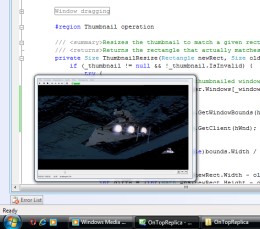
Run it and you the program runs in a small resizable semi transparent window that always stays visible. You can select which window or even which part of a window you want to see there. You can even scale it up or down.

This is a pretty useful utility for multitaskers. And its freeware! Here's a sample screenshot.


Website link

Saturday, January 2, 2010

readyboost in windows XP

I've been using this for some time. It really does give a small boost specially on my 2006 vintage laptop with only 1 gig ram. The new versions also work in vista.


"Give Your Windows PC a Boost! eBoostr™, working as an alternative solution to ReadyBoost and SuperFetch technologies, implements a different advanced approach to use flash memory to speed up your computer It speeds up your PC and improves application responsiveness by using flash memory and free RAM as an extra layer of performance-boosting cache for your PC. Use up to four inexpensive flash devices to speed up your system. Add more speed to your PC without any hardware upgrade!"
- Boost your Windows PC performance » eBoostr.com (view on Google Sidewiki)

projectwonderful adszz

Nuffnag Adzz

Slashdot It

Followers