Showing posts with label bug. Show all posts

Monday, April 18, 2011

smart money - paypal error

To properly document the procedure for adding then verifying a smart money card with paypal, I removed my smart money card from paypal and tried to add it again. Unfortunately I'm getting an error. I'm recieving a text message right after trying to add the card.
 
and paypal is showing this error
This credit card has been denied by the bank that issued your credit card. For details on why your card was denied, please contact your credit card issuer's customer service department. Or, you may want to try adding a different credit card.
You should not have any Php 43.88 charge to your smart money card. You should have a 100 peso charge but only upon verifiying the card. And I haven't reached verification stage yet. That comes after adding the card.

I have tried two times several days apart. Since I was able to add and verify  my smart card last month, I have to assume there is a problem in the system, probably with Smart.

Friday, February 25, 2011

The power cable is not connected to the video card

I have a june 2008 vintage PC. A core 2 duo e8200 and a MSI radeon 4850. The power supply or PSU is a dec 2009 vintage OCZ mod X stream pro 600w.


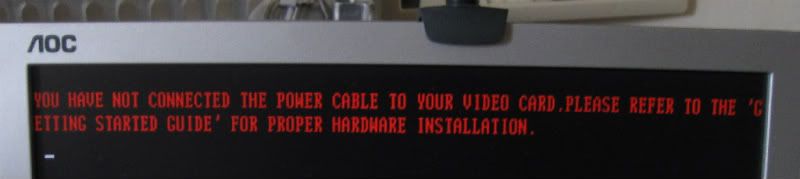
Recently I've been getting this error message. It pops up in red letters during POST, along with a beep - pause - beep  sound. 

"The power cable is not connected to the video card. Please refer to the Getting Started guide for information on proper hardware installation"


This happens if I turn on my PC within say 30 minutes or so of turning it off or if I reboot or if I go to the BIOS setup end exit. Otherwise the PC works normally. Games work.


Using a little common sense (confirmed by googling), I theorized some possible diagnoses. 

  • video card
  • PSU
  • 6 pin cable
  • video card's sensor or power chip
My PSU is modular so I tried changing the 6 pin cable with the spare one in the PSU's box. Didnt work. There are 2 free slots on the modular PSU where I could plug the 6 pin pci-e cable and both did not work. A visual inspection of the video card, motherboard and PSU (it was still in warranty so I did not open it and I just looked inside the grilles).

I dont have a spare PSU or video card available so for a week or so I ended up keeping the PC on all the time (except when I went to work or slept for the night) since it does work as long as I let it rest 30 min or so after turning it off.

Eventually I bought a 2 x molex to 6pin pcie cable. It solved the problem.


I have to assume that the problem lies within the PSU.  I am theorizing that the molexes and the 6 pin power cable are separate, maybe connected to separate rails or something and the rail that powers the 6 pin cable is faulty while the rail that powers the molexes still works. 

the end


Update: after a few days, I'm again getting the red flashing letters if I don't rest the PC for maybe a half hour. I contacted OCZ and they said that the RMA center for OCZ is in taiwan. Its not worth it to mail the PSU to taiwan so I bought a HEC cougar 550w  for php 2700 at PCHub. Unfortunately, this new PSU does not fix the problem. I have to assume that it is the video card. The video card is probably sending a signal to the PC that it lacks power.


Bummer. I'm thinking of buying a radeon 6870 or a geforce 560ti. The geforce has slightly higher power consumption and benchmarks. Both cost 11,000+ pesos. Both can be run by a 550w PSU.

Update: The problem is fixed. It really was the video card. I'll blog about it later


the end

Monday, January 24, 2011

The disadvantages of the steam client

STEAMWORKS is a digital distribution game service. This is their website. To download and run a steam game, you have to run the steam client or software. Everytime you run it it accesses the internet to validate your login and password. It can store your login and password for convenience. If it detects that there is no internet connection, it will offer to run in offline mode.

Steam has its own disadvantages. the steam client and some steam games can take many seconds to connect to the steam servers if something is wrong with your internet connection or router. Again it depends on your ISP if it is reliable or not. Sometimes I sometimes "hack" games to bypass the steam verification to be able to load up faster. Morally I believe that its OK since I paid for the game and I do not give or sell the game to other people, only I play it. Although the steam client has an offline mode, there is no way to force it to go to offline mode every time. The closest is to run it in offline mode then exit. The next time you run it it will ask you if you want offline or online mode. The steam client takes many seconds to shut down, and if its active when you shut down windows, it will add those many seconds to your windows shutdown time.

Special danger. In some cases, a combination of internet and/or router problems can fool steam into thinking that 1. there is an internet connection, therefore there is no reason to suggest going into offline mode and 2. steam cannot connect. I have not been able to replicate the conditions reliably but it has happened to me several times. If that happens, steam will delete the current password stored (even if you set steam to remember your password), assume that the current password is wrong  and pop up an error message, asking you to input a new password and it will refuse to go into offline mode.  Lets say your internet had say scheduled maintenance for say 1 week and it cut off in the middle of steam's logon sequence. If the timing is right, steam will, as explained above, delete your password and ask for a correct password. When that happens, since your net is down, you can't logon for 1 week. If you can't log on, you can't play your games until you log on. Workaround is a secondary internet connection like a 3g usb stick or a "hack", as mentioned above.

Friday, July 2, 2010

Leaked: apple's response to the iphone 4 antenna bug


If you  call Apple to complain about the iphone 4 antenna bug, this is how Apple tells its call center agents to respond.

1. Keep all of the positioning statements in the BN handy – your tone when delivering this information is important.
a. The iPhone 4’s wireless performance is the best we have ever shipped. Our testing shows that iPhone 4’s overall antenna performance is better than iPhone 3GS.
b. Gripping almost any mobile phone in certain places will reduce its reception. This is true of the iPhone 4, the iPhone 3GS, and many other phones we have tested. It is a fact of life in the wireless world.
c. If you are experiencing this on your iPhone 3GS, avoid covering the bottom-right side with your hand.
d. If you are experiencing this on your iPhone 4, avoid covering the black strip in the lower-left corner of the metal band.
e. The use of a case or Bumper that is made out of rubber or plastic may improve wireless performance by keeping your hand from directly covering these areas.
2. Do not perform warranty service. Use the positioning above for any customer questions or concerns.
3. Don’t forget YOU STILL NEED to probe and troubleshoot. If a customer calls about their reception while the phone is sitting on a table (not being held) it is not the metal band.
4. ONLY escalate if the issue exists when the phone is not held AND you cannot resolve it.
5. We ARE NOT appeasing customers with free bumpers – DON’T promise a free bumper to customers.


LINK

Friday, March 12, 2010

How to Handle Sudden Unintended Acceleration: Video


DO
• Brake. Brake once, don't pump or ride the brakes. This will only heat up the brake pads, potentially overheating them and making them fail. It will take more force than you're used to to make the vehicle stop. Use both feet if you need to.
• Shift. Move the gearshift into neutral. If the throttle is truly stuck, the engine will redline and make a lot of noise, but it won't be damaged. The injection computer will keep it from over-revving. Leaving it running will keep the power brakes an power steering working normally. Obviously, if your car has a manual transmission, simply stepping on the clutch pedal will slow the car.
• Steer. Steer your car to a safe place off the road and away from traffic.

DON'T
• Pump the brakes.
• Shift into park. (Which won't engage at speed anyway.)
• Drag the brakes.
• Shut off the engine. (Well, shut off the engine as a last resort, but it may affect the brakes and steering, which will become heavier, although they'll remain operational.)
in reference to: Video on How to Stop Sudden Unintended Acceleration - Toyota Recall - Popular Mechanics (view on Google Sidewiki)

Wednesday, February 24, 2010

~ 20 year old bug found in photoshop


Look at this picture of the dalai lama. Now scale it down to 50% size using any image manipulation software. If you see an all grey square like below, your photo manipulation program has the bug. So far I tested microsoft office picture manager and it has the bug.


There is an important error in most photography scaling algorithms. All software tested have the problem: The Gimp, Adobe Photoshop, CinePaint, Nip2, ImageMagick, GQview, Eye of Gnome, Paint and Krita. Also three different operating systems were used: Linux, Mac OS X and Windows. These exceptions have subsequently been reported: the Netpbm toolkit for graphic manipulations, the developping GEGL toolkit, 32 bit encoded images in Photoshop CS3, the latest version of Image Analyzer, the image exporters in Aperture 1.5.6, the latest version of Rendera, Adobe Lightroom 1.4.1, Pixelmator for Mac OS X, Paint Shop Pro X2 and the Preview app in Mac OS X starting from version 10.6.
in reference to: Gamma error in picture scaling (view on Google Sidewiki)

Friday, February 12, 2010

firefox 3.6 tab bug/annoyance

I often browse with many many tabs open in firefox. I am use to the fact that the tab works this way.  When you right click on a link and choose "open in new tab", the new tab opens to the right of the rightmost tab.

So if we have TAB1, TAB2 and TAB3, and I open a fourth tab, the result used to be

TAB1, TAB2, TAB3, TAB4.

However starting with firefox 3.6 (confirmed with 2 pc's, one with a fresh install of firefox 3.6), the new tab goes to the right of the tab where the link is located, as seen here
 
TAB1, TAB2, TAB3

then if we open a new tab from tab 1, this is the result

TAB1, TAB4, TAB2, TAB3


I find this annoying because I got used to the old system.

Solution


New tabs do not appear to the right of the last

In Firefox 3.6, new tabs created from opening links are positioned next to the current tab. This behavior makes it easier than before to keep similar tabs close together.
If you would like to use the old behavior from Firefox 3.5 and earlier, in which new tabs open at the end of the tab strip, you can set configure this through the advanced configuration.
  1. In the Location bar, type about:config and press Enter.
    • The about:config "This might void your warranty!" warning page may appear. Click I'll be careful, I promise!, to continue to the about:config page.
  2. Search for the preference browser.tabs.insertRelatedAfterCurrent.
  3. Double-click on browser.tabs.insertRelatedAfterCurrent, which should set the value to false.
If you ever want to change it back, repeat the steps above, which will toggle the value back to true.
For more information about tabbed browsing, see Tabbed browsing.

link

projectwonderful adszz

Nuffnag Adzz

Slashdot It

Followers